Proxies for Spotify: How to Choose One and Set It Up

Spotify's desktop app has its own proxy section: you pick a protocol, type the host, port and credentials, restart the client, and from then on its traffic leaves through that server. Phones have no such field, so on mobile the proxy is set for the whole Wi-Fi connection or handled by a separate client. That covers the mechanics. What usually confuses people is the other half: a new IP address does not change which songs, podcasts or prices you get, because Spotify ties those to the country stored in your account.
This guide is written for people with ordinary reasons to route the app through a proxy: an office network that only lets traffic out through a gateway, a campus or hotel Wi-Fi that drops streaming connections, a wish to keep the home address private, or a marketing team watching how campaigns run in the market it pays for. You will find how account country and IP interact, which proxy types behave well with a long audio stream, the desktop setup step by step, the mobile options, a quick check and the errors people hit most often. Tricks for unlocking another region's catalogue or cheaper subscription are left out on purpose: Spotify's terms forbid getting around territorial restrictions, and accounts that try it can lose access.
Static proxies for streaming apps
Stable residential and ISP IPs with SOCKS5 and password access for desktop clients
When a Proxy Is Worth It for Spotify
Most listeners never need one. Still, there are a handful of situations where routing the client through an intermediary solves a real problem:
- Corporate or school networks. Many offices allow outbound traffic only through an internal proxy. Spotify will not discover that gateway by itself unless you choose automatic detection or type the address in.
- Unstable or filtered connections. Public Wi-Fi in airports, dorms and coworking spaces sometimes cuts long-lived connections or blocks the ports a client prefers. A proxy with a clean route can keep playback steady.
- Privacy. A proxy keeps your home IP out of the logs of the services you connect to. It does not hide the account: Spotify still knows exactly who is listening.
- Advertising and label work. People who buy audio ads or promote releases sometimes review public pages, ads and playlists from an address inside the target market. The legitimate version of this uses an account registered in that market and an IP that matches it.
Account Country Decides the Catalogue
Spotify records a country or region on every account. According to its support pages, that value comes from where you were when you signed up, and it drives the catalogue, the podcast selection, the subscription price and the payment methods on offer. The IP address is a secondary signal used to spot travel.
Here is how the rules look in Spotify's own help articles at the time of writing:
| Situation | What Spotify says happens |
|---|---|
| Free account used abroad | Works for up to 14 days, then playback stops until the account country is updated |
| Premium account used abroad | Keeps working while you travel |
| You move to another country | Update the account country and use a payment method valid there |
| Country with no Spotify service | Cannot be selected as the account country |
The practical takeaway: an IP address from another nation leaves your account country untouched and does not turn on content licensed only there. Trying to combine a foreign address with a mismatched account or payment details is exactly what the terms prohibit. Anyone who has truly relocated should edit the country field of the account rather than tunnel past the check. The same logic applies to markets Spotify has left, such as Russia, where the service shut down in 2022: a proxy does not make an account there legitimate.
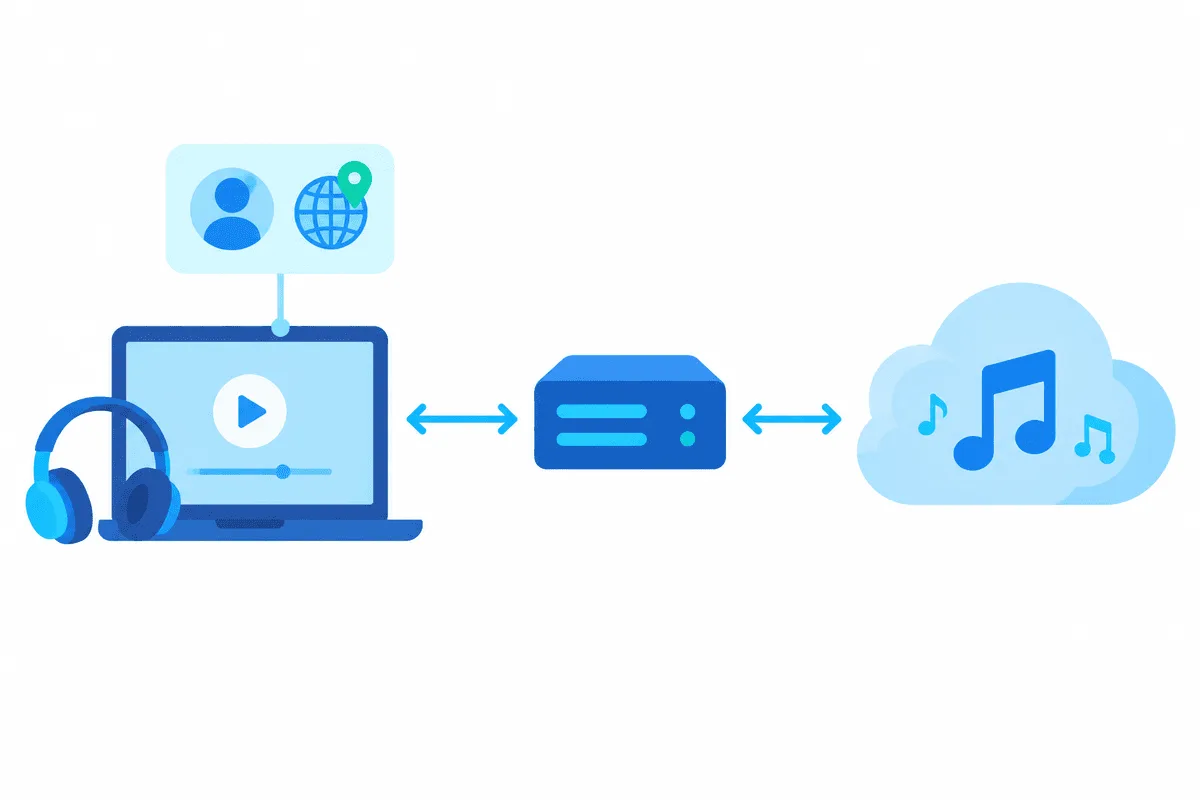
Which Proxy Type to Choose
An audio stream is a long session with frequent small requests for the next chunk of a track, plus a login token that should not hop between countries. That rules out some options straight away.
| Proxy type | Fit for Spotify | Why |
|---|---|---|
| Static residential or ISP | Best | One address for weeks, looks like a regular household line, stable for long sessions |
| Residential with sticky sessions | Good | Holds the same IP for a set time; choose a long session length |
| Rotating per request | Poor | Address changes mid-stream, which can trigger reconnects and security checks |
| Datacenter | Works on some networks | Fast, but server ranges are flagged more often by streaming services |
| Free public lists | Avoid | Unknown operators can read unencrypted metadata and slow everything down |
Pick the location to match where you actually are and where the account is registered. A German resident travelling in Spain gains nothing from a US exit; a static IP in their own region simply keeps the connection looking consistent. For protocol, SOCKS5 is the usual choice for desktop clients, while HTTP works as well when the network only offers that. The practical differences between them are covered in our SOCKS5 vs HTTP comparison.
Setting Up a Proxy in the Spotify Desktop App
What follows applies to the Windows and Mac clients. Spotify moves things around on its preferences page every so often, so expect the wording in your build to drift a little from ours.
Step 1. Gather the connection details
Your provider hands out four values: the server address (numeric or a domain name), its port number, plus a login pair. Everything shown here is fictional, e.g. server 203.0.113.58, port 40120, login user-7f3k.
Step 2. Open the proxy section
Hit the round avatar near the window's upper edge, pick Settings, and keep scrolling past audio quality, library and display options; the Proxy settings group sits near the very end. When a locked-down network stops you before sign-in, look for the small settings link on the login window itself: it opens the identical form
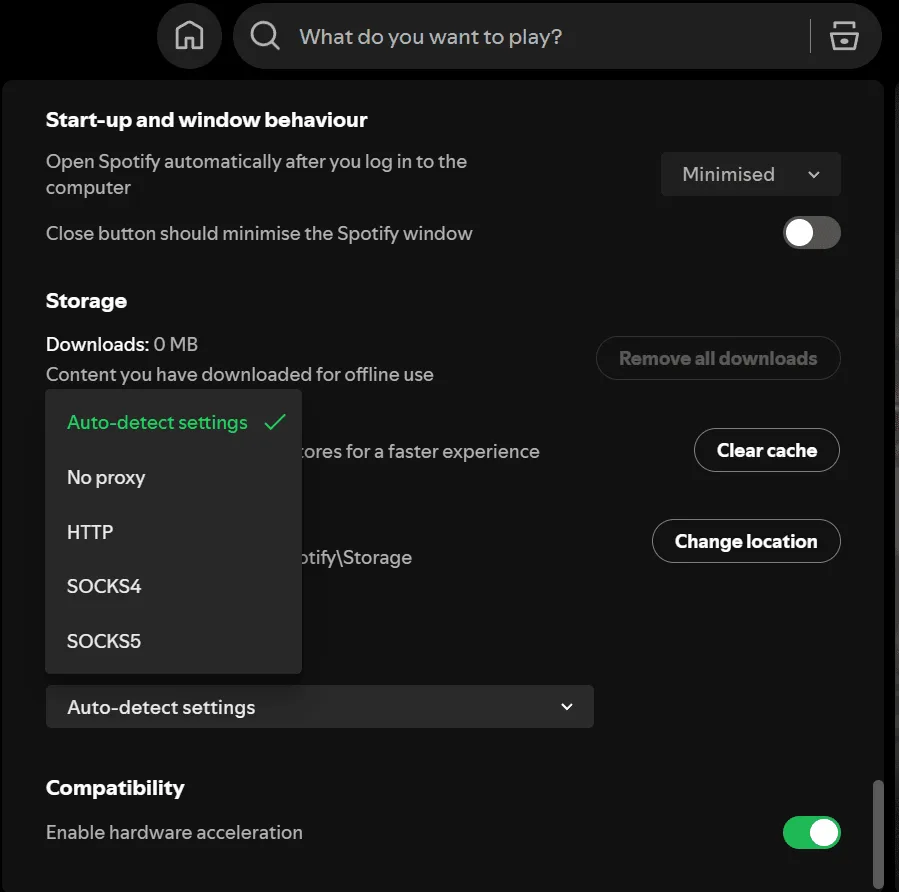
Step 3. Choose the type and fill in the fields
The Proxy type list typically holds No proxy, Autodetect settings, HTTP, SOCKS4 and SOCKS5. Match it to whatever your port actually runs, then type the server, port and both halves of the credentials. Autodetect tells the player to borrow whatever proxy Windows or macOS already uses, a sensible pick on laptops administered by an IT department. The SOCKS4 protocol carries no login at all, so it only fits accounts that the provider authorises by a whitelisted source IP.
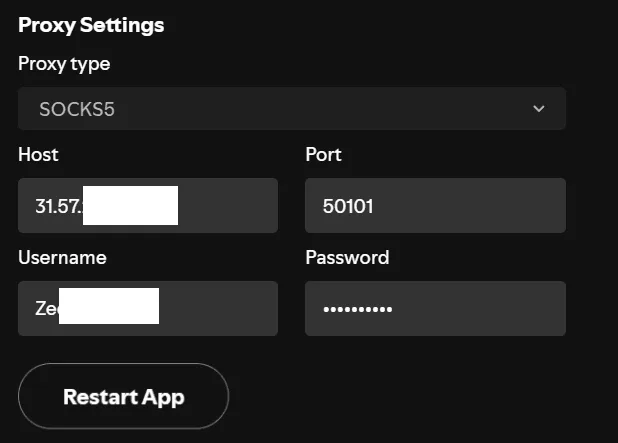
Step 4. Restart the app
Hit Restart app under the form, or exit Spotify fully and launch it once more. Fresh proxy values take effect only after a complete relaunch; on Windows, sending the window to the tray leaves the old process running.
Rolling back is the same trip in reverse: open that group again and flip the type to No proxy.
Phones, Tablets and the Web Player
Neither the Android nor the iOS edition of the player exposes any proxy option, which leaves three workarounds:
- A Wi-Fi proxy. On both systems you can open the details of the current Wi-Fi network and set a manual HTTP proxy with host and port. It applies to every app on that network, not only to Spotify, and a mobile data connection ignores it.
- A proxy client app. Clients that create a local VPN profile can send traffic through a SOCKS5 server with a login and password, and some can limit that to selected apps. Our guides to proxies on Android and on iPhone walk through the options.
- The web player. Inside a browser the player simply inherits the browser's own route, so a dedicated profile or a switcher extension can send that single tab elsewhere.
Check That the Proxy Is in Use
Once the client is back up, play a track and watch whether it starts promptly. Then confirm the route:
- Open an IP-check page in a browser that uses the same proxy and compare the location with what you expected; our article on checking proxy geolocation explains why databases sometimes disagree.
- On desktop, temporarily set a wrong port. If Spotify loses the connection, the app really goes through the proxy rather than straight out.
- If the network blocks direct traffic, a working sign-in is itself proof that the proxy carries the session.
Common Errors and Fixes
| Symptom | Likely cause | What to try |
|---|---|---|
| Message that a firewall may be blocking Spotify, often with error code 30 | Wrong type, host or port, or the proxy is down | Recheck each value, test the proxy in a browser, try the other protocol |
| Endless loading after restart | Credentials rejected | Retype the username and password, or whitelist your IP with the provider |
| Playback stutters or skips | Distant or overloaded exit | Choose a server closer to you, avoid rotating addresses |
| App signs you out repeatedly | IP changes during the session | Switch to a static or long sticky session |
| Content greyed out abroad | Account country rules, not the proxy | See the travel rules above; a proxy will not change them |
Also check that the operating system's firewall or antivirus is not blocking Spotify itself. Proxy errors and a blocked executable produce nearly identical messages.
Choosing a Provider for Long Listening Sessions
For music, stability matters more than pool size. A small set of residential proxies in your own country, held in sticky mode, is usually enough for one listener or a small team. Look for SOCKS5 support with password authentication, the option to pin a city, and clear rules about acceptable use. Teams that monitor ads in several markets can read our overview of proxies for streaming services to plan addresses per region.
Spotify Proxy FAQ
Does Spotify allow the use of a proxy?
Its computer client includes a proxy form out of the box, so sending the stream through a gateway is an ordinary option. The prohibited part is using tools to dodge territorial limits, which is why account country, billing details and your physical whereabouts should line up.
Will a proxy unlock songs that are unavailable in my country?
No. Availability follows the country stored in your account and the licences for that market. Changing the IP does not change it, and attempts to fake the country can lead to account restrictions.
Can I set a proxy in the Spotify mobile app?
Not inside the app itself. On a phone, either enter a manual proxy in the Wi-Fi network details or install a client that creates a local VPN profile and forwards traffic to your server.
Which proxy type works best with Spotify?
A static residential or ISP address over SOCKS5 with a username and password. It holds one IP for long sessions, which avoids reconnects and repeated sign-in checks.
Why does Spotify show error code 30 after I add a proxy?
The app cannot reach its servers through the values you entered. Check the protocol, host, port and credentials, make sure the proxy is online, and confirm your firewall is not blocking the Spotify program.
How do I turn the proxy off in Spotify?
Reopen the preferences page, find the proxy group near the end, choose No proxy as the type and relaunch the player.