WebRTC IP Leaks: Why Turning WebRTC Off Backfires

In multi-accounting, few things cause as much panic as a sudden leak of the real IP. No matter how it slipped out, profiles, accounts and money are at stake.
When a group of accounts gets restricted out of the blue, the settings of your own software are the last thing people suspect. Proxy providers, anti-detect browser developers and staff get the blame first. That reaction is understandable, but let's stand up for the middlemen and look at the most common technical cause of real IP leaks: WebRTC.
The problem is easiest to explain with an example. You send an email from your company address, but your personal phone number was left in the signature by mistake. The sender looks corporate, yet an attentive reader still sees who you are. WebRTC works the same way: requests go through a proxy, but the platform's protection system still learns your real IP address.
For anyone running several profiles this is especially risky: anti-fraud systems can link separate sessions by a shared digital trace and restrict every profile at once.
Residential proxies
Stable residential IPs with the location you need
How WebRTC Works
WebRTC (Web Real-Time Communication) is a standard built into the browser engine. It lets the browser exchange data with another device directly, peer to peer, without a relay server in the middle. WebRTC powers Discord voice channels, Google Meet calls, web versions of messengers, screen sharing and in-tab file transfer. Users install nothing: it works out of the box.
Compare two ways of sending data:
- Regular browsing through a proxy. The browser reaches a site over HTTP or HTTPS on top of TCP. With a correctly configured proxy, all of that traffic goes through the rented server.
- A WebRTC peer session. For live audio and video, extra hops hurt: every packet delay turns into freezes, lag and desync. So the browser looks for the shortest direct route to the other side and uses the UDP protocol.
The Quick Fix That Backfires
The old way to deal with WebRTC problems was to switch the feature off completely. The logic is simple: no protocol, no leak. People changed hidden browser flags or installed blocking extensions.
That works if you need to hide your real IP at any cost and do not care how protection systems react. In professional multi-accounting it only makes things worse.
Regular users have WebRTC turned on in more than 99% of cases. The browser uses it not only for calls but also for background network checks. A profile with WebRTC fully disabled stands out: it happens, but it looks suspicious.
Disabling it means removing or forcibly blocking the RTCPeerConnection interface. An ordinary person never opens chrome://flags to turn off basic multimedia modules for the sake of privacy, and most do not even know such settings exist. For anti-fraud systems this is atypical behavior.
The better approach is to keep the module and change its logic. WebRTC keeps working normally, but its answers to STUN requests show the proxy's data rather than your home provider's.
How STUN and ICE Get Around the Proxy
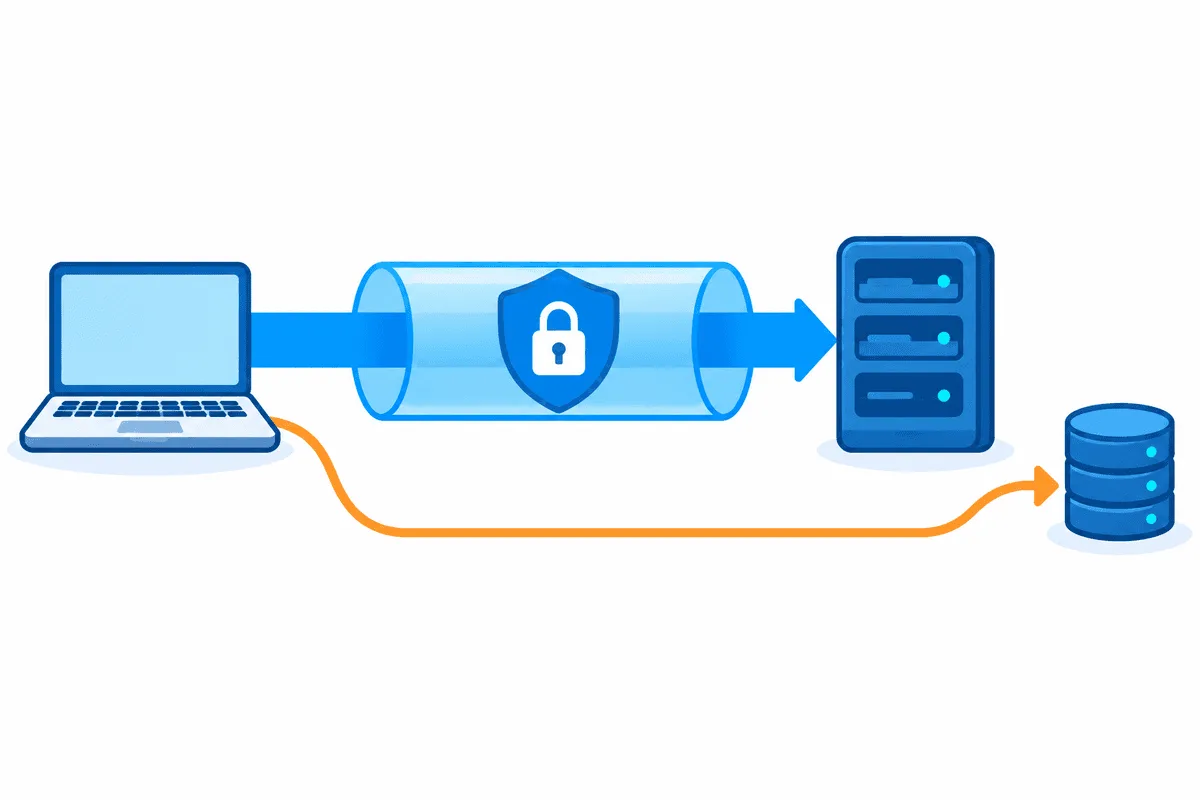
The leak comes from the fact that different parts of the network stack use different protocols.
How a STUN Request Works
To find a short path to the other participant, the browser sends a small UDP packet to a public STUN server (Session Traversal Utilities for NAT). From the packet header the server learns the public IP and port the request came from and sends them back to the browser as an ICE candidate (Interactive Connectivity Establishment).
In the session description (the SDP offer) these routes are marked with attributes:
- host — the internal address of the network card on the local network;
- srflx (Server Reflexive) — the public address as the STUN server saw it.
There is no spying built into this mechanism: it is a standard way of getting through NAT.
Why a Regular Proxy Does Not Help
Most datacenter and mobile proxies run over TCP. They carry HTTP and HTTPS requests but do not pass UDP datagrams.
When the browser starts a WebRTC session, it builds exactly such a UDP packet for the STUN server. A TCP proxy cannot carry it, so the operating system sends the packet along the normal route, through your provider's gateway and around the proxy. The STUN server sees the home address and reports it back as the srflx candidate.
To carry UDP through an intermediary you need a SOCKS5 proxy that supports the UDP ASSOCIATE command. Node Proxy rotating residential proxies support UDP: just turn on the switch in your dashboard when you set up the proxy. In every other case, which covers most work with regular TCP proxies, the network answers have to be replaced inside the browser engine itself.
Other Ways Network Data Leaks
Besides the external address, WebRTC can reveal two more kinds of data.
Your Internal Network Layout
Every device also has a local IP address assigned by the router or network adapter, and it can leak too.
A private subnet address on its own identifies no one. But if several anti-detect browser profiles run on one computer, each with its own proxy, and all of them report the same local IP, that is a reason to link the profiles together.
Browsers have a safeguard: the internal address is replaced with a random mDNS name ending in .local that tells an outside site nothing. The protection stops working when a site asks for camera or microphone access (a getUserMedia call). Once the user allows access in the system prompt, the site is treated as trusted and sees the real internal IP instead of the placeholder.
Leaks Through IPv6
The internet currently runs on two generations of the protocol at once:
- IPv4 — the familiar address format;
- IPv6 — the newer, much larger address pool.
Many home providers and mobile carriers give a device both addresses, while most commercial proxies only handle IPv4. The difference is covered in more detail in IPv4 vs IPv6.
This creates an imbalance:
- the IPv4 proxy only carries its own share of the traffic;
- the IPv6 channel on the network adapter is not controlled by anyone;
- WebRTC checks every network interface: over IPv4 it sees the proxy's address, while over IPv6 it goes out directly through the provider and adds your home IPv6 to the candidate list.
How Anti-Fraud Systems Spot Plugins and Blockers
These are the signs protection systems use to detect tampering with the environment:
- The API is gone. If the protocol is disabled with a flag (for example, media.peerconnection.enabled = false), calling RTCPeerConnection fails or returns undefined. For anti-fraud systems this is a sign of a non-standard environment.
- Methods replaced via JavaScript. Blockers swap native methods for their own functions. A check script calls
Function.prototype.toString.call(window.RTCPeerConnection): the native object returnsfunction RTCPeerConnection() { [native code] }, while extension code gives away a modified profile. - Forgotten workers. Many extensions change the environment only in the main window and leave separate Web Worker and Service Worker contexts alone. Inside a worker, RTCPeerConnection keeps working as usual and reveals your real IP.
Comparison of protection methods:
| Protection method | Hides the real IP | Anti-fraud trust | API in workers | Works with TCP proxies | Risk of blocks and CAPTCHA |
|---|---|---|---|---|---|
| Disabling via flags | Yes | Minimal, an obvious anomaly | Broken | Yes | Maximum |
| JS plugins | Unreliable | Low, changes are visible | Broken | Yes | High |
| UDP tunnel (SOCKS5 with UDP) | Yes | High | Intact | No, needs UDP support | Low |
| Browser engine patch | Yes | High | Intact | Yes | Minimal |
How to Check a Profile's Network Settings
You can check a profile with freely available tools:
- Network test. Open the profile and visit a checker such as BrowserLeaks or Pixelscan. In the WebRTC section, make sure that:
- the IP shown matches the proxy address;
- the candidate list contains no home IPv6 and no local network addresses;
- the srflx attribute and port match the proxy's network environment.
- API and worker integrity. Run the profile through CreepJS: the report should show no signs of prototype tampering, methods should return native code, and worker checks should pass without errors or delays.
- Console check. Open DevTools inside the profile and run this script:
// 1. Are the constructor and key method native?
console.log('Constructor:', Function.prototype.toString.call(window.RTCPeerConnection));
console.log('createOffer:', Function.prototype.toString.call(RTCPeerConnection.prototype.createOffer));

// 2. Gather ICE candidates through a public STUN server
const pc = new RTCPeerConnection({ iceServers: [{ urls: 'stun:stun.l.google.com:19302' }] });
pc.createDataChannel('leak_test');
pc.onicecandidate = (e) => { if (e.candidate) console.log('Candidate:', e.candidate.candidate); };
pc.onicegatheringstatechange = () => console.log('Gathering:', pc.iceGatheringState);
pc.createOffer().then((offer) => pc.setLocalDescription(offer));
In a correctly configured environment, the output looks roughly like this (example addresses):
Gathering: gathering
Candidate: candidate:1982170229 1 udp 2113937151 20ad41a3-a899-4802-9f77-6dfc171a9518.local 59452 typ host generation 0
Candidate: candidate:2202552712 1 udp 1677729535 203.0.113.90 7172 typ srflx raddr 0.0.0.0 rport 0 generation 0
Gathering: complete
Local addresses are hidden behind .local names, and the srflx candidate shows the proxy's address. Unexpected stack trace lines, errors or signs of a JavaScript Proxy wrapper reveal that the environment was tampered with.
Conclusion
The "turn off everything that might give you away" strategy stopped working long ago. Blockers and stripped-out browser modules only make behavioral anti-fraud systems flag the profile as abnormal.
A more reliable setup is one where the environment looks like an ordinary user's and parameters are replaced inside the browser engine itself. That is how the Aurorium anti-detect browser works. Stable residential proxies with the right location complete the setup.
Keep WebRTC switched on, but keep its parameters under control.
WebRTC Leak FAQ
What is a WebRTC IP leak?
A site uses WebRTC to see the real IP address while the browser itself works through a proxy. The usual cause is a UDP request to a STUN server that never enters the proxy tunnel.
Is it worth turning WebRTC off entirely?
Not for multi-accounting. Almost every user has WebRTC on, so a profile with it disabled looks abnormal and draws the attention of anti-fraud systems.
Why doesn't a regular proxy hide my IP in WebRTC?
Most proxies work over TCP, while WebRTC sends STUN requests over UDP. If the proxy does not pass UDP, the packet goes out directly through your provider.
Can IPv6 leak if the proxy works over IPv4?
Yes. If your provider gave the device an IPv6 address and the proxy handles only IPv4, WebRTC can find a route over IPv6 and reveal your home address.
How do I check for a WebRTC leak?
Open the profile on BrowserLeaks or Pixelscan and compare the IP in the WebRTC section with the proxy address. The candidate list should contain no home IPv6 and no local addresses.