How to Test Geo-Targeted Landing Pages and Traffic Filters with Residential Proxies

If you run campaigns in several countries, one question comes up again and again: what does a visitor from the target country actually see? Your landing page may switch language, currency, or content by location. Your traffic filter may route visitors based on country, device, and connection type. Checking all this from your own office IP tells you almost nothing, because you are not the audience.
This guide walks through a practical way to test geo-targeted pages and traffic filtering from the visitor's side, using residential proxies. You will learn which proxy type fits which check, how to run a repeatable test, and how to read the results without drawing the wrong conclusions.
Residential proxies
Check your pages from 234 countries and territories
Why Testing From Your Own IP Is Not Enough
A website decides what to show a visitor using several signals at once. The most common are:
- IP location. Country, and sometimes city.
- Connection type. Home connection, mobile network, or data center.
- Browser language and timezone. These should agree with the IP location.
- Device, OS, and browser. Used for mobile and desktop versions.
- Referrer. Where the visitor came from.
When you test from your own IP, you see only one combination of these signals. If your office is in Warsaw and your campaign targets Brazil, you will never see the Brazilian version of the page, the local currency, or the way your traffic filter treats a Brazilian visitor.
Proxies solve this by sending your request through an IP in another country, so the website sees that country's address and responds as it would to a local user. The same approach is used for ad verification across regions.
Step 1: Choose the Right Proxy Type for the Check
Not every proxy fits every test. Here is a quick way to choose, based on how each type behaves.
| Check | Suitable proxy type | Why |
|---|---|---|
| Local version of a page, language, currency | Residential | Home connection IPs with country and city targeting |
| How a traffic filter treats a regular visitor | Residential | A home connection is the closest match to a real user |
| Long session, such as a full checkout test | Residential with a sticky session | The IP stays the same for the whole test |
| Repeated daily checks from one address | Static IPv4 or ISP | One IP for the whole rental period |
| Speed and high traffic volume | Static IPv4 | Unlimited traffic, fixed price per IP |
A practical detail: if your filter or page treats data-center connections differently from home connections, a data-center IP will show you a different result than your real audience sees. For tests that simulate a real visitor, residential IPs are the safer choice. The difference between a fixed address and a changing one is covered in sticky vs rotating proxies.
Node Proxy offers both options, which is convenient for this kind of work. Residential proxies cover 234 countries and territories with country, city, and provider targeting, and let you choose between a new IP on every request or a sticky session of up to 24 hours. Static IPv4 and ISP proxies are available in 39 countries. Both support HTTP(S) and SOCKS5. Residential traffic is billed per GB, so a test that loads a few pages uses very little of it.
Step 2: Connect the Proxy to Your Browser
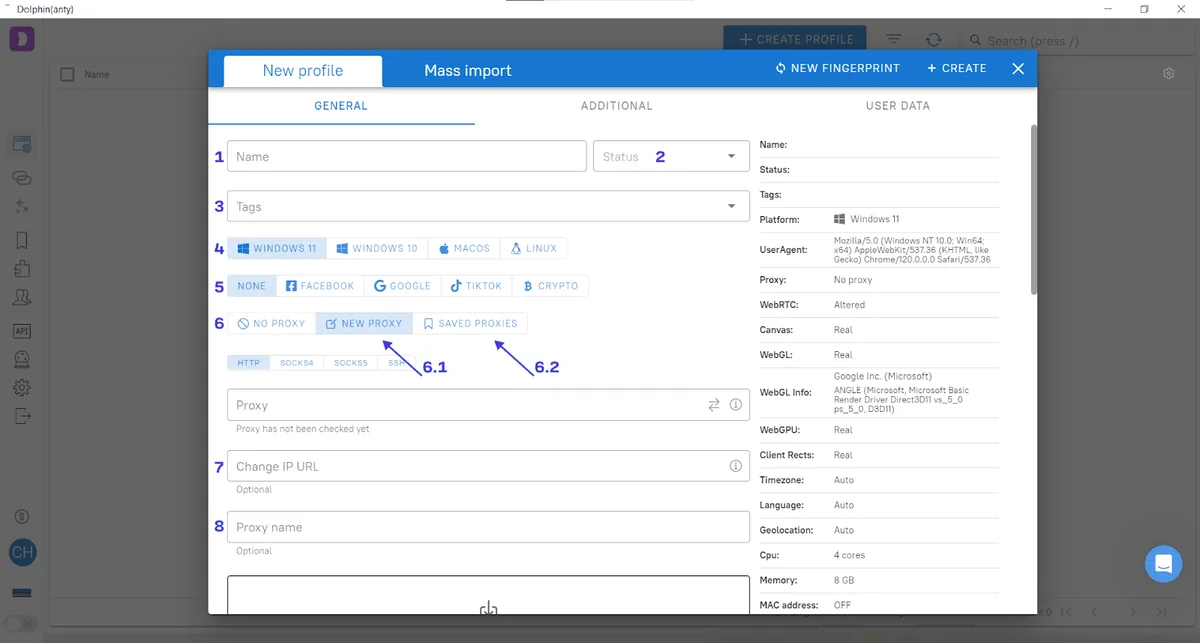
Every provider gives you the same four details: host, port, username, and password. You can enter them in the system settings, in a browser extension, or in a separate browser profile.
A clean setup for testing looks like this:
- Create a separate browser profile used only for tests, for example in an anti-detect browser. This keeps cookies and saved logins from your daily work out of the results.
- Add the proxy with the host, port, and credentials from the dashboard.
- Check the connection before testing anything else. A proxy checker shows the exit IP, country, and city. Node Proxy has an online proxy checker for this.
- Make sure the browser language and timezone match the proxy country. A browser set to one language with an IP from another country can trigger different behavior and distort your test.
Step 3: Build a Test Matrix
A repeatable test is better than a random click. Decide in advance which combinations you will check, and record the result of each one.
| Test | Country | Device | Language | Expected result |
|---|---|---|---|---|
| 1 | Target country | Mobile | Local language | Main offer page |
| 2 | Target country | Desktop | Local language | Main offer page |
| 3 | Other country | Mobile | English | Neutral page |
| 4 | Target country | Mobile | Different language | Depends on your rules |
| 5 | Data-center IP, target country | Desktop | Local language | Usually the neutral page |
Run each row, take a screenshot, and note which page you actually received. If a result differs from what you expected, you have found a rule that needs attention.
Step 4: Check Traffic Filtering Rules
This is where proxies are most useful. A traffic filtering service decides which page a visitor receives based on signals such as country, device, connection type, and referrer. More on how such services work is in our article on cloaking in affiliate marketing. To verify the setup, look at the decision from the outside (what the visitor sees) and from the inside (what the service logged).
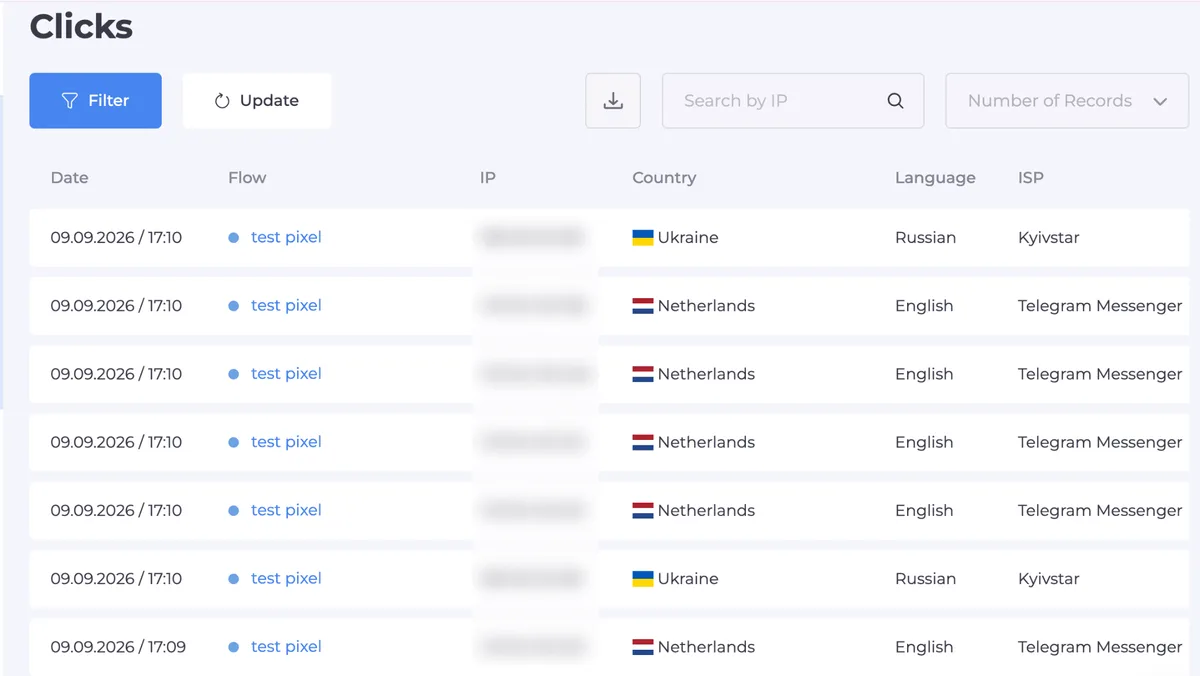
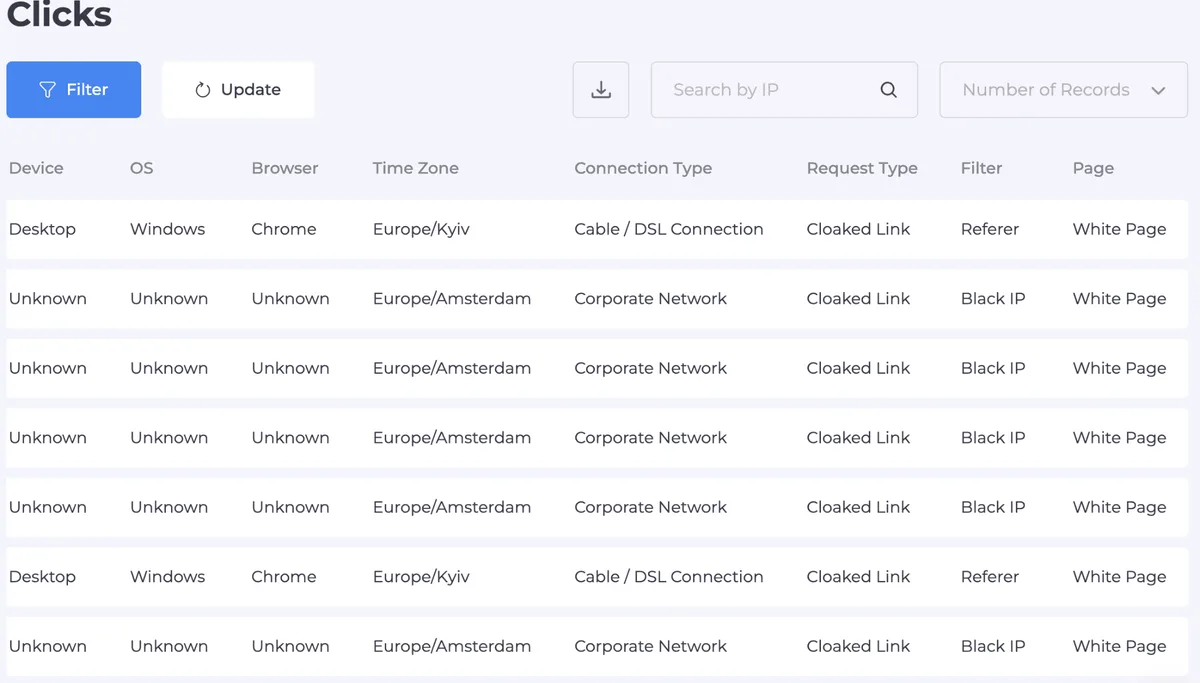
A service like Cloaking.House works this way: you create a flow with two destinations, set filters (country, device, OS, browser, language, VPN or proxy detection, referrer, click limit), and every visit is recorded in a click log with the result and the filter that triggered it. That log is what makes testing precise, because it tells you why a visitor was routed the way they were.
A reliable testing routine:
- Add your own IP to the whitelist to confirm that the main page opens correctly for you.
- Remove it from the whitelist, connect through a residential proxy from the target country, and open the link.
- Open the click log and check three fields: the result, the triggered filter, and the IP and country it recorded.
- Repeat from another country and with a different device to confirm that visitors from outside the target audience receive the neutral page.
Step 5: Read the Results Correctly
Testing produces confusing results if you do not know what to expect. Keep these points in mind.
- An unexpected result is not always a bug. Many filters treat VPN and data-center IPs as a separate category. If your test came from such an IP, the filter may be working exactly as configured.
- Proxy quality matters. A residential IP that was recently used heavily may behave differently from a clean one. If a result looks strange, rotate the IP and run the test again before changing any rule.
- Check the whole chain. Country, language, and timezone should agree. A visitor with a Brazilian IP and a browser set to another language may be handled differently from one with consistent signals.
- Change one setting at a time. If you adjust several filters at once, you will not know which change made the difference.
If real-looking visits from your target country keep landing on the wrong page, open the log, find the triggered filter, and loosen that specific rule. The page those visitors should see also has to meet each network's rules, which are compared in White Page requirements.
Common Mistakes
- Testing from a data-center IP and assuming it represents your audience. Use a residential IP for tests that simulate a regular visitor.
- Reusing the same browser profile for work and testing. Saved cookies change what you see.
- Ignoring language and timezone. Mismatched signals create results your audience will never produce.
- Testing once. Rules change, so repeat the matrix after every significant edit.
- Changing many rules at once. You lose the link between cause and effect.
Quick Checklist
- Separate browser profile used only for testing.
- Proxy connected and verified with a checker: country and city match.
- Browser language and timezone consistent with the proxy country.
- Test matrix prepared: countries, devices, languages.
- Own IP whitelisted for the main-page check, then removed.
- Click log reviewed: result, triggered filter, country.
- Each rule change followed by a new test.
Wrapping Up
Testing geo-targeted pages and filters from the visitor's side is a habit, not a one-time task. A residential proxy gives you the local viewpoint, a clear test matrix keeps the process repeatable, and a click log shows the reason behind every routing decision. With these three in place, you can change rules with confidence and see what your audience sees.
If you want to try this routine, Cloaking.House offers a 7-day free trial with no feature limits, enough to build a flow and run your first test matrix.
Geo Landing Page Testing FAQ
Why can't I test a geo-targeted page from my own IP?
The site decides what to show by your location, connection type, language and device. From your own IP you see only your own country's version, not what the target audience gets.
Which proxy type is best for testing landing pages?
Residential proxies, because a home connection is closest to a real visitor. Static IPv4 or ISP proxies suit repeated daily checks from one address.
Why does a test visit land on the neutral page?
Often because the filter treats data-center or VPN IPs separately, or because the browser language and timezone do not match the IP country. Check the triggered filter in the click log.
Do I need a separate browser profile for testing?
Yes. Saved cookies and logins from daily work change what the page and filter show, so tests should run in a clean profile.
How often should I repeat the tests?
After every significant change to the page or filter rules, and regularly while the campaign is running.