ixBrowser Proxy Setup and Review: Profiles, Bulk Import and Checks

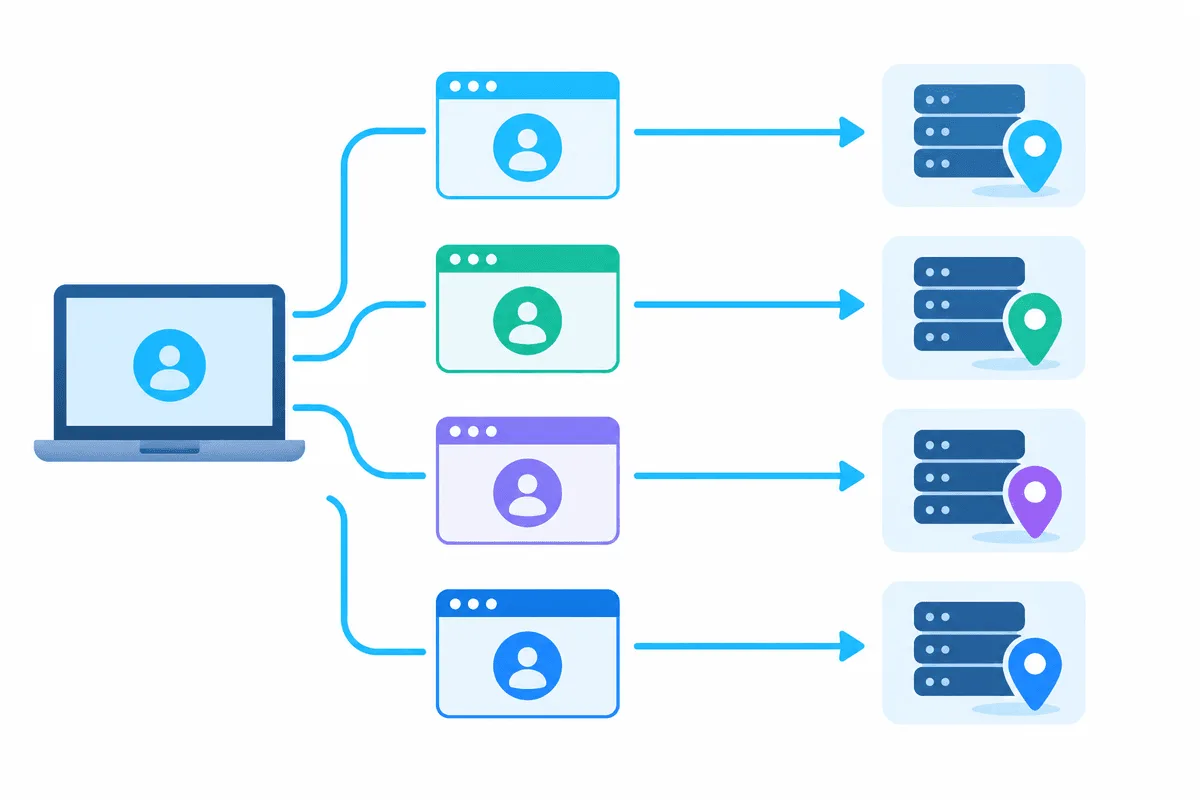
ixBrowser is an antidetect browser built on Chromium that walls off each account in a profile of its own. Proxies are wired in during profile creation: switch the connection mode to Custom, select the protocol, type the server address with its credentials, hit Proxy Detection and save. For larger setups, addresses can sit in a central proxy library and get distributed among dozens of profiles in one go.
First comes a short verdict on the browser itself: the limits of the no-cost tier, the extras for teams and developers, and the rough edges. After that we move to practice: binding a proxy to one profile, loading a whole list of addresses at once, and verifying that every profile leaves the computer through the exit you are actually paying for.
Proxies for ixBrowser profiles
Residential proxies with HTTP and SOCKS5 to give every ixBrowser profile its own IP
ixBrowser in Brief
The tool is aimed at sellers, media buyers and SMM managers who juggle many shops, ad cabinets or brand pages and want each of them to resemble a distinct device. Technically, a profile is a sandboxed Chromium instance carrying private cookies, cache, extensions and a configurable fingerprint: user agent, time zone, interface language, screen size, plus noise for Canvas, WebGL and audio.
Highlights compared with rival products:
- A no-cost tier that never expires. The vendor's site states that stored profiles are unlimited, while daily activity is capped at roughly 10 newly created profiles and 100 launches, with two sub-accounts included.
- Inexpensive subscriptions (Professional, Business, Enterprise) that raise those daily ceilings and open up file import and the automation interface for developers.
- Collaboration. Members receive roles with granular rights; profiles and proxies can be shared with or handed over to colleagues, and actions end up in a log.
- Cloud storage of profile data, cookie import and export, and installation of extensions from the Chrome Web Store.
Drawbacks to keep in mind: some interface strings read like a rough translation, the help center is less detailed than at long-established rivals, and programmatic control is locked behind a subscription. Quotas and tier names get revised periodically, so glance at the current pricing before onboarding a whole team.
What to Prepare
Collect the following before starting:
- Connection data: scheme, server, port, username, secret. Storing each proxy as a single colon-separated line saves time later, e.g.
203.0.113.24:10425:user-7f3k:Pa55word. - A mapping between accounts and addresses. The sensible baseline is one exit per profile; putting several accounts behind one shared IP undoes the isolation you installed the browser for.
- An address category that suits the target platform. Marketplaces and social apps tend to be more forgiving toward home broadband and cellular ranges than toward hosting ranges. Long-lived accounts usually run on residential proxies in sticky mode, which keeps one exit for hours.
How to Add a Proxy to a Single Profile
Labels quoted here come from the English UI of recent releases; an update may rename an item slightly.
Step 1. Start a New Profile
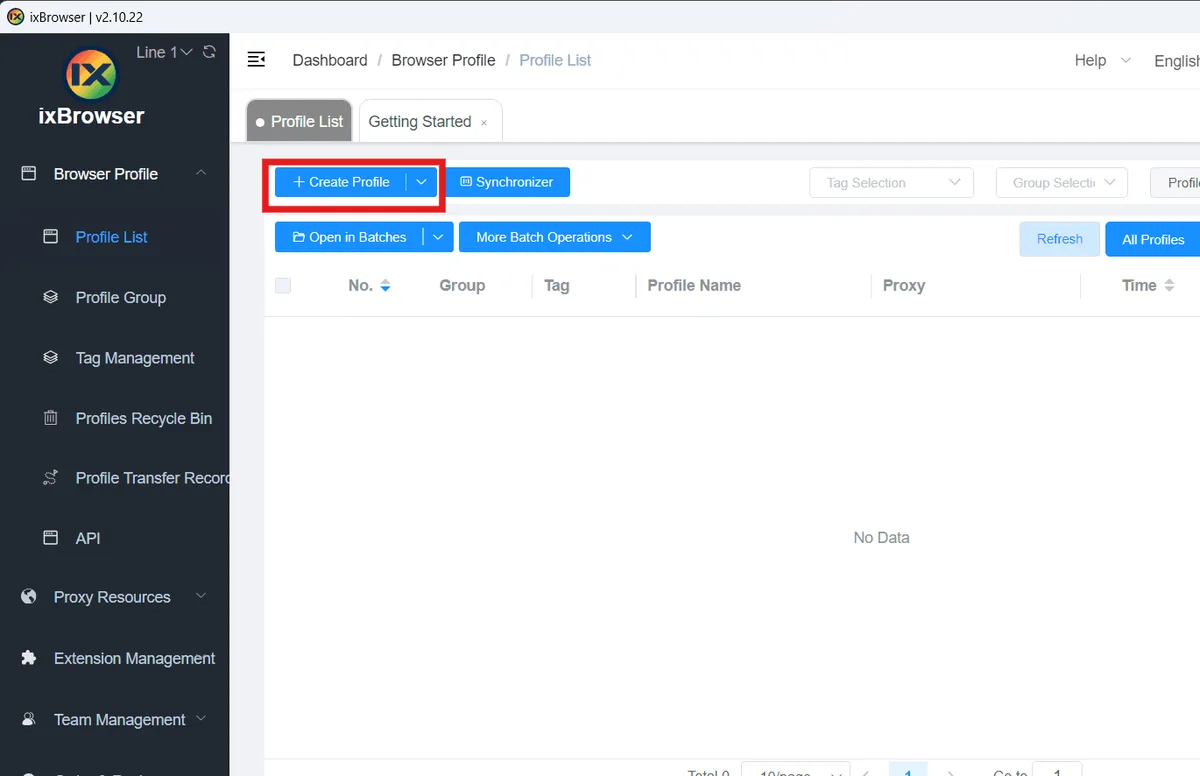
In Profile List, hit Create Profile. Should a notice say your proxy library is still empty, simply proceed: the server data will be typed manually two steps later.
Step 2. Choose the Platform
The Platform Account Configuration tab asks which website the profile is for; you may also leave a blank start page. Name the profile meaningfully, drop it into a group for quick filtering and continue with Next Step.
Step 3. Fill In the Proxy Configuration
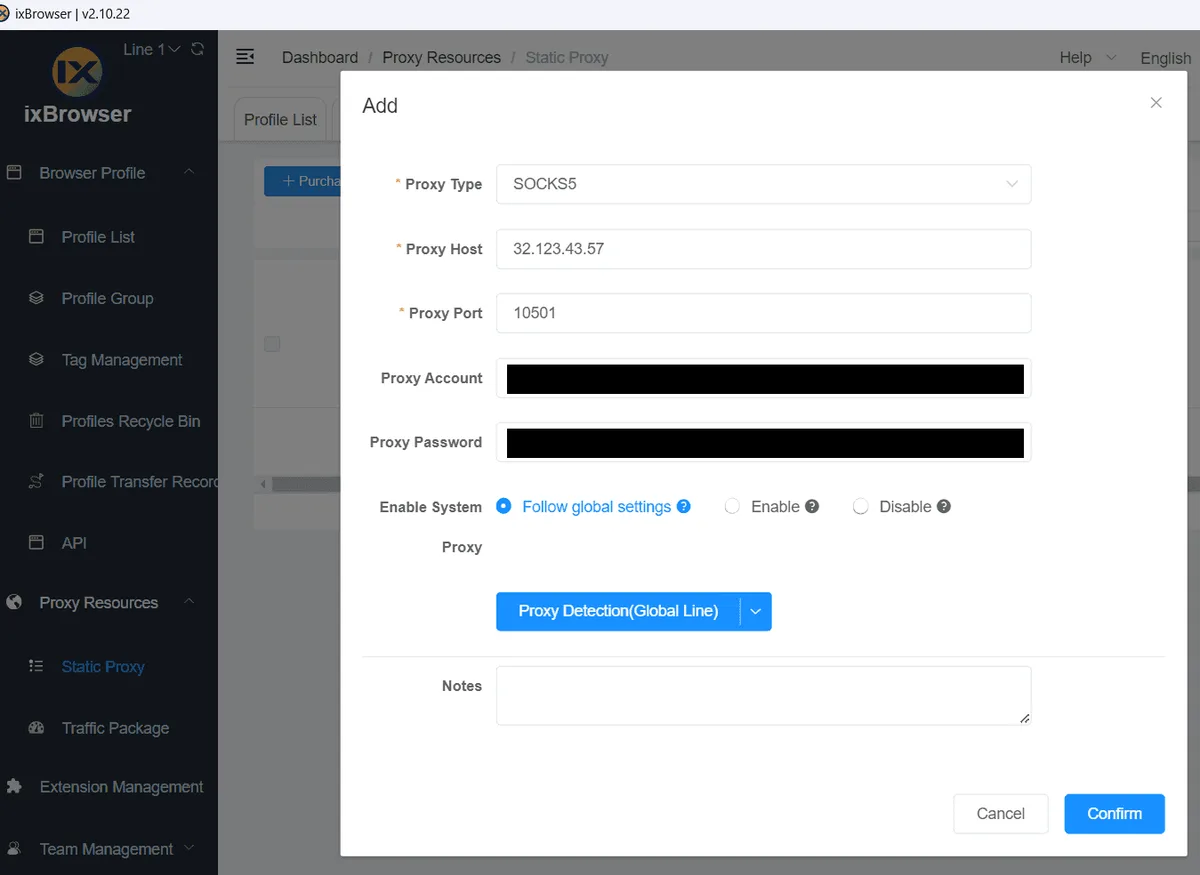
Inside Proxy Configuration, set the mode to Custom and complete these fields:
- Proxy type: HTTP, HTTPS or SOCKS5. Copy the choice from the vendor's panel rather than guessing.
- Host together with its port.
- Account plus password, if the proxy uses credential-based access.
Some vendor tutorials mention that dropping a full host:port:user:pass line into the host box makes ixBrowser distribute the parts into the right fields by itself. When your release ignores that trick, fill the boxes individually.
Step 4. Run Proxy Detection
Press Proxy Detection. On success, the exit address and its geolocation appear right beneath the button. A failed test is a signal to correct the entry immediately, before the profile has accumulated history on real websites.
Step 5. Align the Fingerprint and Save
Move to Fingerprint Configuration and confirm that time zone, language and geo position are derived from the proxy address instead of your local machine. Finish with Confirm (some versions say Create). The new entry shows up in the list, already tied to its proxy.
Adding Many Proxies at Once
Filling in fifty profiles by hand quickly becomes a chore, which is why ixBrowser offers a standalone address library in its Proxy section.
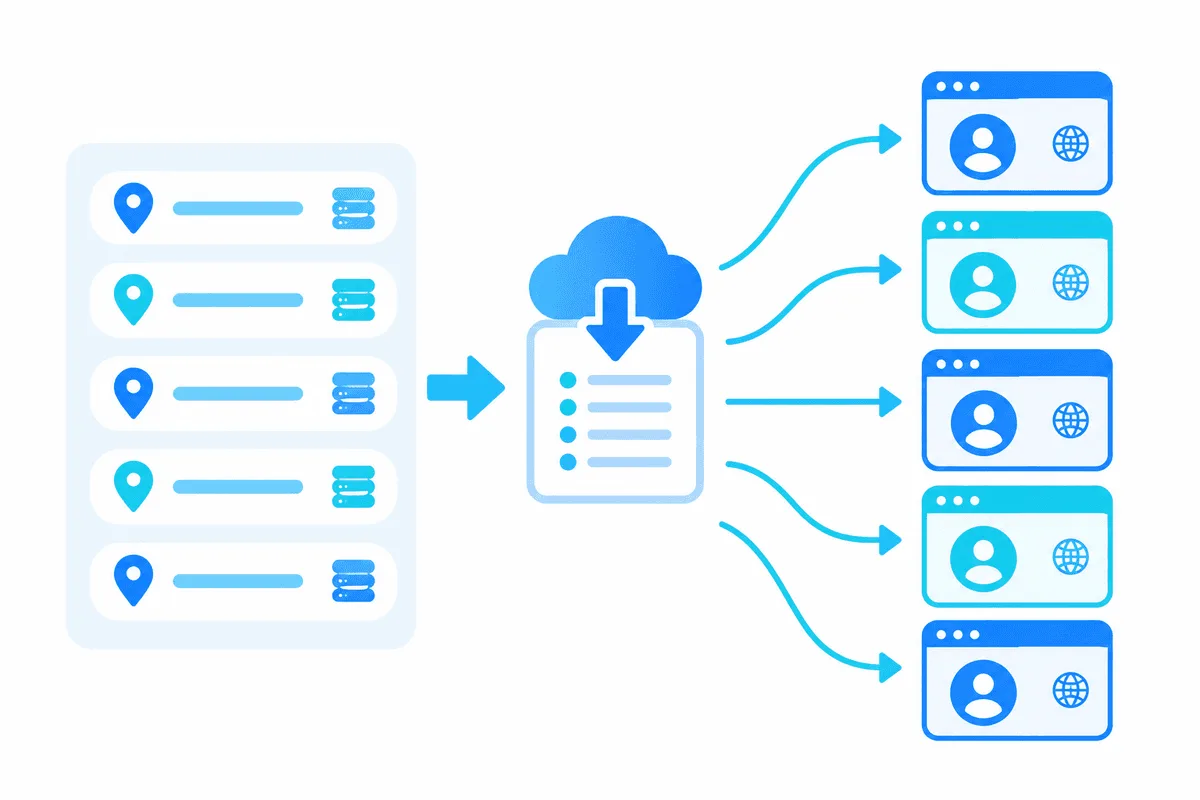
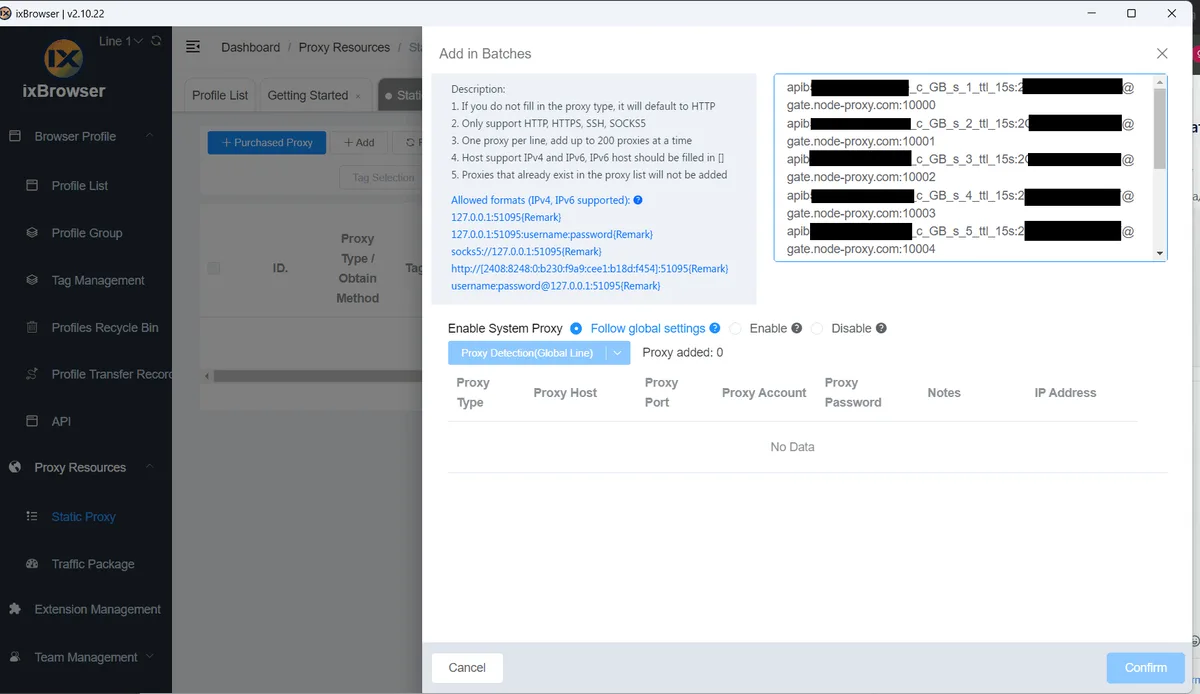
- On the static proxy tab, + Add creates one record, while Batch Operations opens bulk adding for a whole list.
- Insert the addresses line by line using a uniform pattern such as
host:port:user:pass. According to tutorials from proxy vendors, SOCKS5 entries should start with a scheme likesocks5://, otherwise ixBrowser may treat them as HTTP. - Test the imported batch and delete any entries that do not respond.
- Attach addresses to profiles, either one by one or by ticking several profiles and spreading the proxies among them through bulk editing.
The neighbouring Residential Proxy tab only lists traffic purchased through ixBrowser's own shop. Addresses you bring from an outside vendor belong on the static tab, even if they come from a residential pool.
Subscribers can additionally create profiles from a spreadsheet in which proxy columns are prefilled. Take the template from the import window itself; column order invented from memory tends to break the import.
Checking That the Profile Uses the Right IP
Open the profile: its start page already displays the connection details ixBrowser picked up. Next, visit any what-is-my-IP service from inside that window and match four values against the order: address, country, city, time zone. Platforms are quick to notice when the IP points to one region and the browser clock to another; the guide on browser fingerprinting lists the remaining attributes they cross-check.
Our free proxy checker works outside the browser and tells you whether the server answers at all, so you can quickly decide whether the fault lies with the address or with the profile.
Common Errors and Fixes
| Symptom | Likely cause | Fix |
|---|---|---|
| Detection fails instantly | Port or scheme mismatch | Recheck the scheme in the vendor panel; a port meant for HTTP never replies to SOCKS5 |
| Credentials rejected | Stray space or letter case in username or secret | Type both values again, watch for blanks at the end |
| Test passes, sites stay blank | Vendor IP allow list or exhausted traffic | Review the allow list and the remaining balance in the vendor account |
| Websites still see your home country | Profile left without a proxy, or WebRTC exposing the real address | Edit the profile and switch WebRTC to a mode based on the proxy |
| Bulk adding drops some lines | Several patterns mixed in one paste | Stick to one pattern and prefix SOCKS5 lines with the scheme |
Usually the trouble stems from workflow habits, not from ixBrowser. Shared IPs across profiles, mismatched regions and free proxy lists are the classic culprits, all covered in our piece on mistakes when using proxies with antidetect browsers.
Which Proxies Suit ixBrowser
- Residential in sticky mode fits marketplaces, ad cabinets and social accounts meant to live for months.
- Cellular addresses help on platforms that scrutinize fresh sign-ups; mobile proxies (coming soon at Node Proxy) are shared by crowds of genuine subscribers behind carrier NAT, so platforms rarely ban such an IP outright.
- Datacenter exits cover QA work and jobs where raw speed outweighs address reputation.
Whichever category you choose, follow each website's rules: isolated profiles exist to keep legitimate work for different brands or clients apart, not to sidestep a platform's policies. Instructions for other programs are gathered in our collection of antidetect browser proxy guides.
ixBrowser FAQ
Is ixBrowser free?
A free tier exists and has no expiry date. It restricts how many profiles may be created and launched daily, and features like spreadsheet import and programmatic control require a subscription.
Which proxy types does ixBrowser support?
When creating a profile you can pick HTTP, HTTPS or SOCKS5. Use whichever scheme the vendor assigns to that port, or the connection test will fail.
Can I use one proxy for several ixBrowser profiles?
You can, but platforms will then see those profiles as linked through the shared address. Accounts meant to stay independent each need a dedicated exit.
Why does Proxy Detection show a different city?
Geolocation databases often disagree, so one service may place the address in a neighbouring city. Focus on the country and on a time zone that matches the exit.
How do I change the proxy of an existing profile?
Open that profile's settings from the list, replace the server data in the proxy block and repeat the detection test. When dozens of profiles need new exits, bulk editing is faster than going through them one at a time.