Janitor AI Proxy: What It Is and How to Set It Up

Whatever the label suggests, the proxy option in Janitor AI has nothing to do with routing internet traffic. It is simply a web address of a language model service that understands the OpenAI chat format, for instance OpenRouter or a model vendor's own API, which Janitor contacts in place of its in-house JanitorLLM. You type that address, a model identifier and your personal key into the API Settings of a chat; from that point the chosen model writes the character's lines and your provider account pays for them.
Pages ranking for this query mostly describe the platform itself. We focus on the plumbing instead: what happens to a message after you press send, how to fill in each field of the current form, what the typical error codes mean and, the part most tutorials skip, how to protect both your key and your conversations.
Stable proxies for AI tools
Static and residential proxies for a steady connection to AI services from work or while travelling
Two Meanings of Proxy Around Janitor AI
The term covers two unrelated things, and confusing them causes most failed setups.
| Janitor API proxy | Network proxy | |
|---|---|---|
| Nature | Address of a model service speaking the OpenAI chat dialect | Relay server for your internet connection |
| Configured in | API Settings inside a Janitor chat | Browser, operating system or app network options |
| Effect | Swaps the model that generates replies | Swaps the IP address that websites observe |
| Inputs | Endpoint, model identifier, secret key | Host, port, username, password |
On top of that, community relays are often called reverse proxies. Somebody else runs such a server: it receives your request, passes it to a model vendor and hands the answer back. Janitor cannot tell the difference, but whoever operates the relay can read every line that travels through it, which is why the safety section below matters.
How the Janitor AI Proxy Works
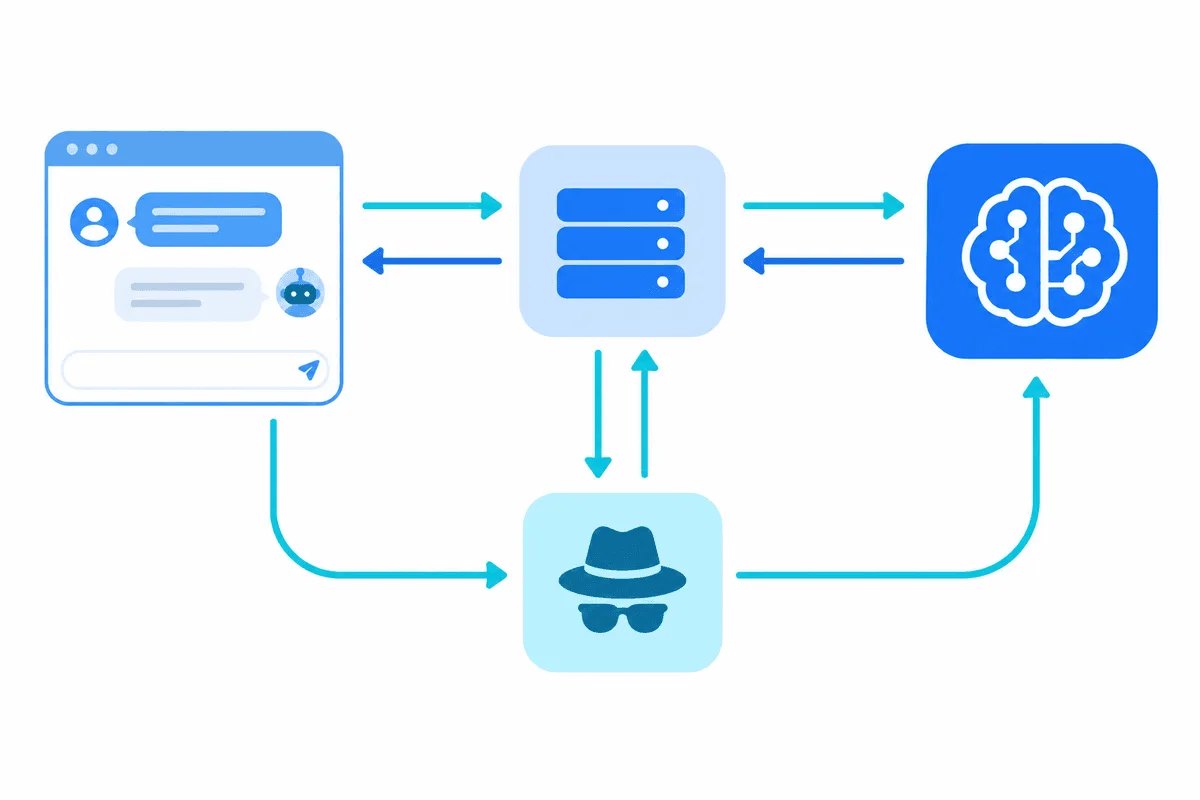
Out of the box Janitor answers with JanitorLLM (JLLM), its own model that costs nothing. Once a custom configuration is stored, each turn of the conversation gets bundled, together with the character card and earlier messages, into a chat completions request aimed at your address. The service replies with generated text, and Janitor displays it as the character speaking.
Since that request format is an informal industry standard, the same field happily accepts OpenRouter, the DeepSeek platform, other compatible vendors or a self-hosted model that exposes a matching route. Under the hood the call resembles this:
curl https://openrouter.ai/api/v1/chat/completions \
  -H "Authorization: Bearer $MY_ROUTER_KEY" \
  -H "Content-Type: application/json" \
  -d '{"model": "vendor/model-id", "messages": [{"role": "user", "content": "Hello there"}]}'
Janitor assembles all of it automatically. The snippet only illustrates the three ingredients that have to be correct: an address that ends with /chat/completions, a model identifier spelled precisely and a live key.
Preparation Checklist
- A provider account. OpenRouter is the popular pick, since a single key unlocks hundreds of models, several of them free.
- A secret key. OpenRouter generates it on the Keys page reachable from the profile menu. Save it at once, because the full string is displayed a single time.
- The precise model identifier from the provider's catalogue page, shaped like
vendor/model-name. Free OpenRouter variants end with:free. - Balance or free allowance. At the time of writing, OpenRouter caps how many free-model calls you get per day and lifts that cap after a one-off credit purchase. Paid models deduct from your balance.
Setting Up a Proxy in Janitor AI
Step 1. Open a chat
Sign in and enter any conversation with a character. The model options are reachable from inside a chat, not from the profile page.
Step 2. Open API Settings
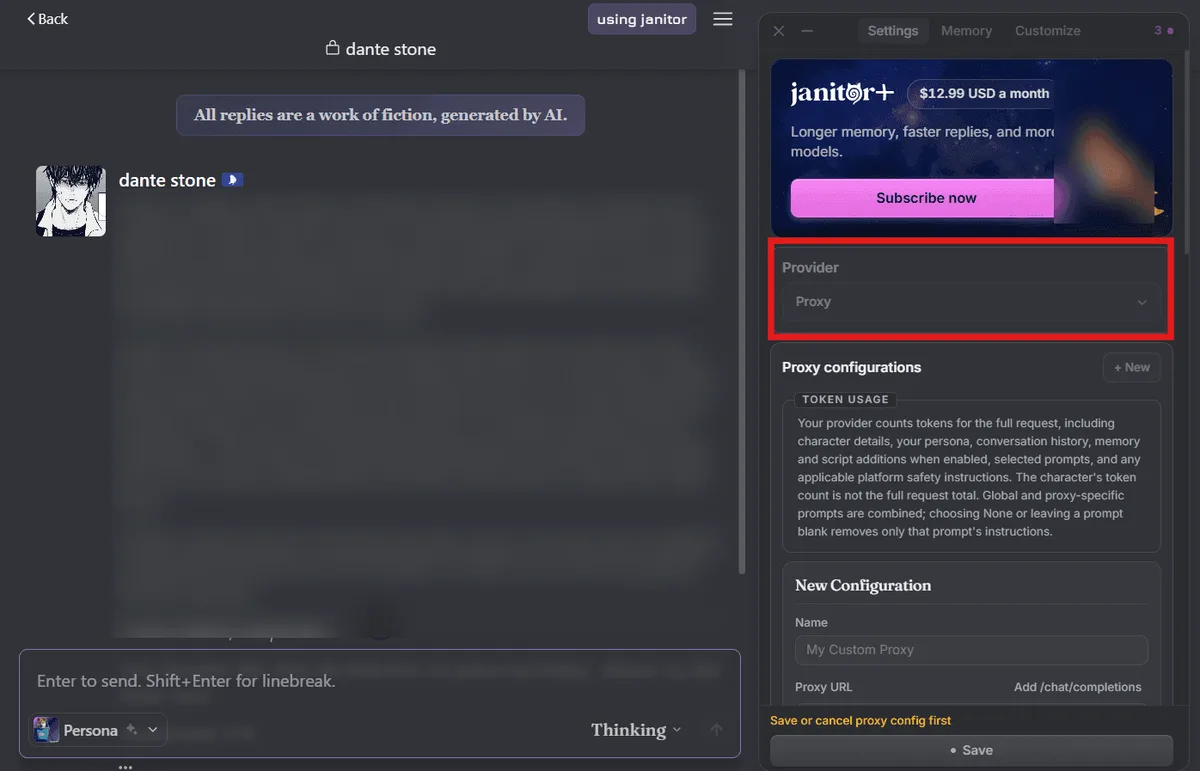
Hit the gear symbol at the top right of the conversation and pick API Settings. Move away from the built-in model to the proxy variant, then choose Add Configuration.
Step 3. Fill in the configuration
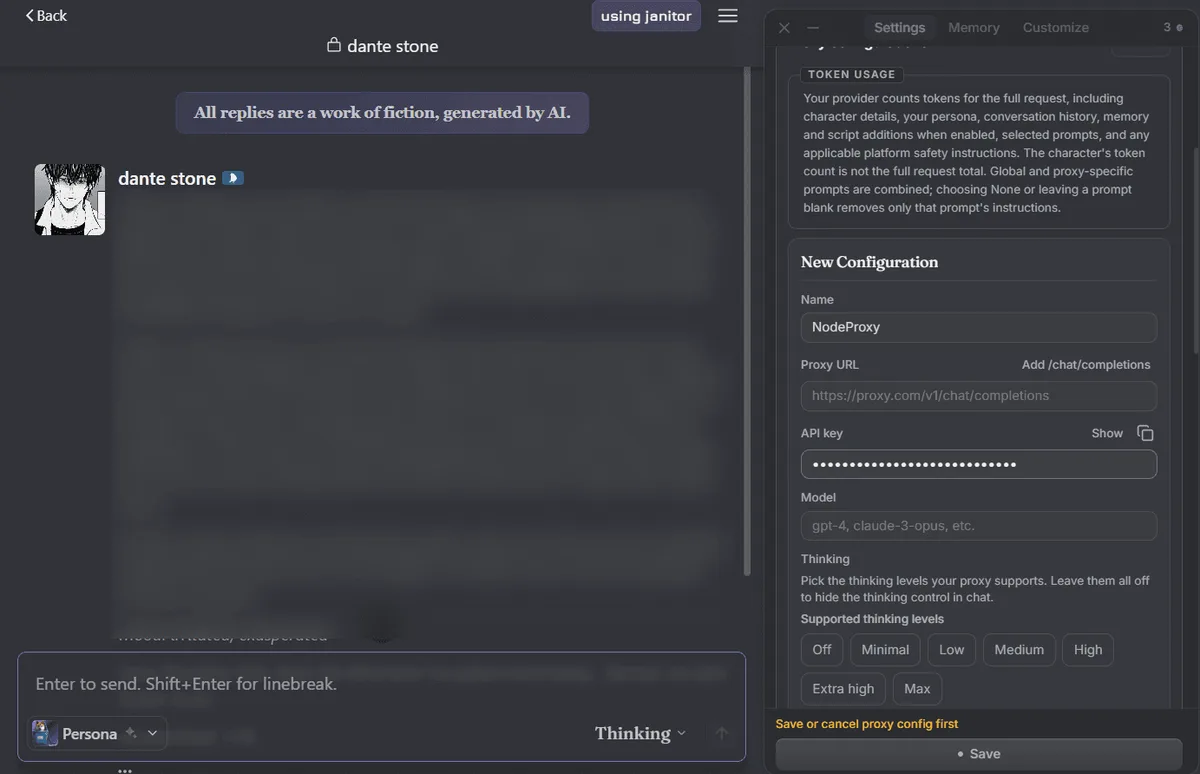
- Config Name. A free-form label; naming it after model and provider keeps things tidy.
- Model Name. The identifier exactly as the provider lists it. A marketing title or a single wrong character produces a model error.
- Proxy URL. The complete route; OpenRouter users enter
https://openrouter.ai/api/v1/chat/completions. Insert it as plain characters, never as a clickable hyperlink. - API Key. The provider secret, trimmed of leading or trailing blanks.
- Custom Prompt. Optional; keep it blank during the first trial.
Step 4. Save and test
Confirm with Add and then Save Settings, reload the tab and type a brief line. Getting an answer back proves the chain works end to end. Sampling options such as temperature or reply length can be adjusted later in the same panel.
Common Errors and Fixes
401 Unauthorized. The secret is mistyped, revoked or carries a stray symbol. Issue a new one and paste it again.
402 Payment Required. OpenRouter reports an empty balance or an exhausted spending cap on that particular key. Top up or raise the cap.
Model not found or 400 Bad Request. Your identifier does not match the provider listing letter for letter, or that model was withdrawn. Grab the current identifier from the model page.
429 Too Many Requests. A quota kicked in: the free daily allowance, the per-minute ceiling or congestion at the upstream vendor. Pause, try a different model or add balance.
Network error or silence. Make sure the address finishes with /chat/completions, contains no blanks and that the provider's status page shows no incident.
Keeping Your API Key and Chats Safe
A provider key works like a bank card: whoever holds it spends your money. Therefore:

- Keep it away from public relays, shared spreadsheets and chat servers advertising free premium models.
- Assume that a third-party reverse proxy reads every message. Prefer the official addresses of vendors you trust.
- Put a spending cap on the key where the provider supports it, so a leak cannot empty the account.
- Revoke and replace the key the moment it shows up in a screenshot or a message.
- Dedicate one key to Janitor alone, so cancelling it leaves your other tools untouched.
Janitor AI targets adults, and both the platform and each model vendor enforce their own content policies. Plugging in an outside model does not switch those policies off.
When a Network Proxy Comes Into Play
An ordinary proxy enters the picture only when the connection itself fails: a workplace firewall that blocks AI sites, hotel Wi-Fi with aggressive filtering or a poor route to the vendor. Such a proxy is configured in the browser rather than in Janitor's settings. Read the terms of the services involved and your employer's rules first; a proxy does not expand the list of countries a model vendor serves. For a steady personal setup, static proxies keep one address, which spares your accounts repeated security prompts.
The same reasoning applies to other AI products. Our guide to ChatGPT and proxies covers OpenAI's services, a separate piece explains Claude AI access and proxies, and the article on AI in web scraping looks at where language models and proxies meet in data work.
Janitor AI Proxy FAQ
What is a proxy in Janitor AI?
The term refers to an endpoint of an external model provider, OpenRouter being the usual example, that speaks the OpenAI request dialect. Janitor sends dialogue there instead of to JanitorLLM, authenticating with your own key and the model ID you entered.
Is the Janitor AI proxy free?
Janitor charges nothing for the feature itself. Expenses depend on the chosen model: OpenRouter offers no-cost variants limited by a daily quota, and premium ones consume prepaid credit.
Which address belongs in the Proxy URL box?
Paste the complete completions route of your vendor. For OpenRouter that string terminates in /api/v1/chat/completions; compatible competitors expose an identical path under their own hostnames.
What does error 429 mean in Janitor AI?
It signals throttling on the vendor side. Typical triggers are an exhausted free quota for the day, bursts of rapid messages or a congested model. Wait a little, choose another model or add funds.
Are free reverse proxies for Janitor AI safe?
Generally no. Whoever runs the relay can read your conversations and may harvest keys. Stick to official vendor addresses, your own key and a spending cap.