ChatGPT Through a Proxy: When It Makes Sense and How to Set It Up


Putting ChatGPT behind a proxy means your browser, the desktop app or a backend script reaches OpenAI by way of a relay server rather than over the default route. Four situations justify that detour: an office that lets traffic out only via its own gateway, flaky hotel or airport Wi-Fi that keeps killing long replies, a security team insisting that AI traffic leaves from one documented address, and API calls fired from servers that sit in a closed subnet.
Notice what a relay cannot do. It does not alter your identity or the places where OpenAI lets you use its products. The Terms of Use and the supported-countries list stay in force whatever IP the traffic shows. Below we sort legitimate cases from the rest, list the proxy qualities that matter for a chat tool, show browser, Windows, Android and Python setups, and decode the failures readers report to us most.
Static proxies for work tools
A dedicated IP in your country for stable ChatGPT sessions and API calls
Legitimate Reasons to Use a Proxy With ChatGPT
- Office gateways. Plenty of firms push every outbound request through an explicit proxy or a secure web gateway. Until the browser knows that gateway and IT has allowlisted OpenAI hostnames, the chat simply hangs.
- Shaky links while travelling. Business trips inside supported countries often mean captive portals and crowded hotspots. A relay with a calm, steady path keeps a lengthy streamed answer from dying halfway.
- One exit address for the whole team. Some compliance rules demand that business software is reached from a single known IP so logs can be audited. A dedicated static relay hands every colleague that same exit.
- Backend jobs. Production machines frequently have no direct route to the internet; their calls to the OpenAI API leave through an HTTP relay placed in the DMZ.
What OpenAI's Rules Say
OpenAI publishes the countries and territories where ChatGPT and the API are offered. Reaching the service from somewhere outside that list via a foreign IP breaches the terms, and the API rejects such calls with HTTP 403 and the code unsupported_country_region_territory. OpenAI also judges location by signals beyond the IP, billing data and phone number among them.
A relay is therefore no answer to a regional block, a suspended account or an identity check. Accounts that were restricted go through the appeal option in OpenAI's help center. Everything that follows assumes you sit in a supported country and only want a route that works.
The same logic holds for Anthropic's assistant: see how to restore access to Claude on a corporate network or while travelling.
What to Look for in a Proxy
An Address That Stays Put
ChatGPT keeps you logged in with cookies plus background risk checks. When the exit hops between cities every few minutes, verification screens and sudden sign-outs follow. Choose a static proxy, or at least a sticky session pinned to one IP for hours; rotation belongs to scraping jobs, not to conversations. We compare both modes in the piece on sticky versus rotating sessions.
Your Own Country
Take an exit located in the very supported country where you and the account really are. That keeps the session in line with your billing profile and spares you pointless security prompts.
Streaming-Friendly Protocol
Replies trickle in over one long-lived HTTPS connection. An HTTP relay that handles the CONNECT method (sold as an "HTTPS proxy") copes fine, and so does SOCKS5. Relays that buffer whole responses show text in big lumps or drop the link on timeout.
Skip Free Public Servers
Open lists are sluggish, crowded with strangers and frequently blacklisted, and whoever runs them may read what flows through. We dig into that in the article on why free proxies are risky.
How to Set Up a Proxy for ChatGPT
Your provider's dashboard lists four things: host, port, login, password. Our samples use invented values such as 203.0.113.40:3128 and user-7f3k.
Option 1. A Browser Extension
On a computer shared with other programs, routing only the browser is tidiest:
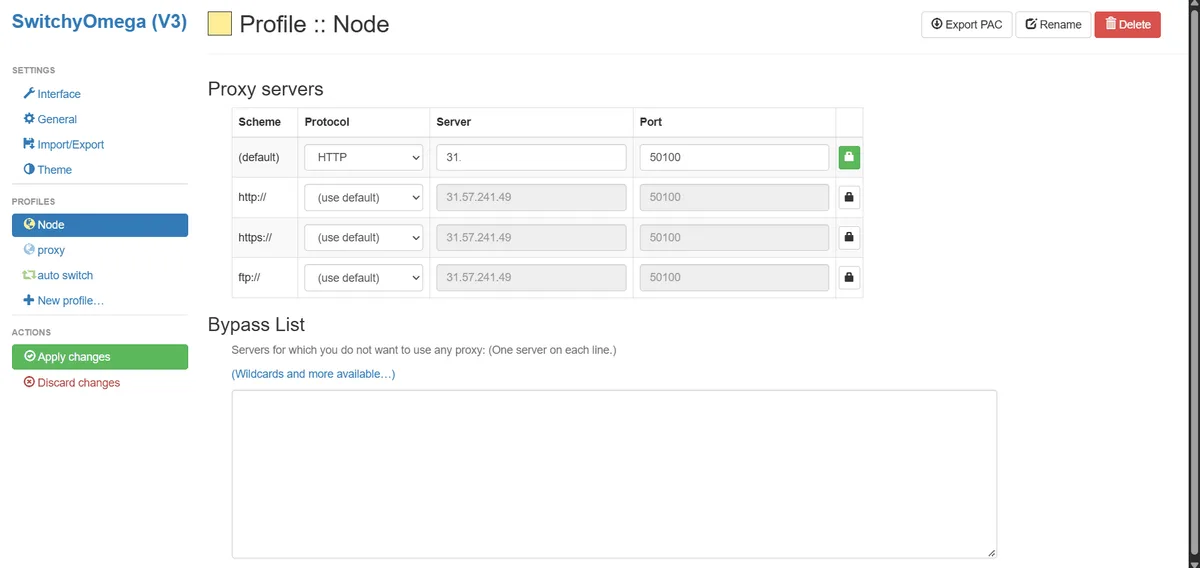
- Add a proxy manager, say Proxy SwitchyOmega; our SwitchyOmega walkthrough explains each box.
- Make a new profile, pick HTTP or SOCKS5, type host and port.
- Supply the credentials there, or type them into the pop-up the browser shows on its first request.
- Activate the profile, then load chatgpt.com.
Auto-switch rules can send OpenAI hostnames to the relay while every other site keeps its usual path.
Option 2. Windows System Settings
In Windows 11 the relevant page lives at Settings → Network & internet → Proxy. Find the manual section, press the Set up button beside Use a proxy server, flip the toggle, fill in address and port and confirm with Save.
Edge, Chrome and the desktop ChatGPT client all read that system value. Because Windows keeps no relay password, a credentials dialog pops up on first use.
Option 3. Android Wi-Fi Settings
Hold your finger on the current Wi-Fi network, tap Modify network, expand Advanced options, switch Proxy to Manual, type the hostname and port, and save. Only that hotspot is affected; cellular data keeps going out unproxied. Dedicated apps give finer control, and our Android proxy guide compares them.
Option 4. The OpenAI API From a Server
OpenAI's Python package sits on httpx, which honours the usual HTTPS_PROXY variable on its own. To be explicit, hand the client a configured transport:
import os
from openai import OpenAI, DefaultHttpxClient

egress = os.environ["EGRESS_PROXY"]  # e.g. http://user-7f3k:secret@203.0.113.40:3128

client = OpenAI(http_client=DefaultHttpxClient(proxy=egress))

reply = client.responses.create(model="gpt-4.1-mini", input="Ping from the build server")
print(reply.output_text)
From a terminal, curl accepts the relay through -x:
curl -x "$EGRESS_PROXY" https://api.openai.com/v1/models \
  -H "Authorization: Bearer $OPENAI_API_KEY"
Store the relay password in an environment variable or a vault, never inside the repo.
How to Check That Everything Works
- Look at the exit IP. Load an IP lookup page in that same browser profile; it ought to display the relay's address and your own country. Our free proxy checker can test the server apart from the browser too.
- Log in and ask something. The interface should render completely, past chats should appear and the reply should flow without stalls.
- Give it a few minutes. Watch for frozen answers, red network banners or fresh verification screens. If they show up only while the relay is active, the relay is to blame.
Common Problems
"Unusual activity" warnings or endless checks. The exit is shared, flagged or hopping. Move to a dedicated static address inside your country.
A reply freezes mid-sentence with "Network error". Something on the path is cutting long connections or buffering the stream. Try SOCKS5 or another server, and ask IT about the idle timeout on the corporate gateway.
HTTP 407. The relay refused your credentials. Type them again, or check whether the provider expects IP allowlisting instead.
Certificate warnings at the office. A TLS-inspecting gateway swaps certificates. IT should install its root certificate on your machine or exempt OpenAI hostnames from inspection.
API 403 unsupported_country_region_territory. The call originates from, or is tied to, a location OpenAI does not serve. A new IP is not the cure; both account and server must be in a supported country.
Turning the Proxy Off
Switch the extension to Direct or disable its profile, flip Use a proxy server off in Windows, or set Android's Proxy field back to None. In code, drop the variable or the custom client.
ChatGPT proxy FAQ
Is it allowed to use ChatGPT through a proxy?
Relaying for network reasons, like a corporate gateway or a fixed company IP, is ordinary practice. Relaying to look as if you were in a supported country while being elsewhere breaks OpenAI's terms.
Which proxy type is best for ChatGPT?
A static residential or ISP address in your own country. It holds one IP through the whole session, sparing you repeated logins and checks.
Why does ChatGPT keep asking me to verify through a proxy?
Most often the exit is shared by many people or changes mid-session. A dedicated, unchanging IP removes the bulk of those prompts.
Can I use a SOCKS5 proxy for ChatGPT?
Yes. Browsers and extensions take SOCKS5 natively, and the Python client does as well after you install the httpx[socks] extra. Streamed answers pass through it fine.
Will a proxy restore a suspended ChatGPT account?
No. Suspensions attach to the account, not to an IP. File an appeal through OpenAI's help center.