Claude AI Not Loading? Network Causes and How to Use a Proxy Correctly


When Claude refuses to load, the culprit is nearly always one of four things: an incident on Anthropic's side, a company or campus firewall, something broken in the browser, or a location where Claude simply is not offered. A proxy fixes only the network-shaped cases, for instance an office that releases web traffic solely through its gateway, a company wanting one fixed IP to whitelist in its Claude organisation, or developer tooling and scripts hosted on machines with no direct way out.
Here you will learn to pin down the real cause within minutes, read what Anthropic says about location, and route the web app, the coding CLI and API calls via a relay wherever a relay genuinely belongs.
Static proxies for teams
A dedicated IP for corporate gateways and IP allowlists
First, Find Out Why Claude Is Unavailable
Check the Service Status
Before changing anything, visit Anthropic's status page. A listed incident means nothing on your end will help; wait until it is resolved.
Compare Two Networks
Load claude.ai over cellular data instead of the usual Wi-Fi. Working on mobile yet failing on the office line points at that line: a firewall, DNS filtering or a gateway lacking Anthropic hostnames on its allowlist. Failing on both points elsewhere, toward the account, the browser or your whereabouts.
Read the Message Carefully
- A notice that Claude is unavailable in your region. Either your network or your profile points to a place outside the supported list.
- Blank page or a spinner that never stops. Some required hosts are blocked, often the asset servers rather than claude.ai itself.
- A sign-in loop. Corrupted cookies or an extension tampering with requests.
- The chat opens but replies break off. A relay or gateway is cutting long streaming connections.
Rule Out the Browser
Wipe cookies and cached files for claude.ai, then try a private window with every extension off. Ad blockers and traffic filters cause trouble surprisingly often. If the private window behaves, re-enable add-ons one at a time until the offender reveals itself.
What Anthropic's Rules Say About Location
Claude.ai and the Claude API are available in a published set of supported countries and regions. Anthropic's terms require use from inside that set, and the company weighs more than the IP, billing details and phone number included. Bouncing traffic off a foreign server to seem located elsewhere breaks the terms and can get the account switched off.
Restrictions on an existing account work the same way. If Anthropic disabled yours, the only road back is its appeal form; a relay or a brand-new account will not repair anything and may deepen the problem. Travelling soon? Confirm that the destination appears on the supported list before you count on Claude there.
When a Proxy Is the Right Tool
- Corporate gateway. Policy forces every browser and developer tool through an explicit proxy. Claude starts working once the app points at that gateway and the gateway admits Anthropic hostnames.
- IP allowlisting for a Claude organisation. Enterprise plans can limit access to approved ranges. A static proxy with a dedicated address hands remote staff one unchanging exit you can drop into that list.
- Servers and CI. Build agents, data pipelines and containers frequently reach outside only through an egress relay.
- Unreliable hotel or café Wi-Fi inside a supported country, where a relay with a steady path stops long answers from stalling.
Choosing a Proxy for Claude
Steadiness tops the list. Claude keeps sessions open for hours and streams lengthy replies, so an IP that keeps changing invites re-verification and truncated output. Go for a dedicated static address or a sticky session, never a rotating pool. Static residential and ISP exits behave most predictably; plain datacenter IPs do fine for API traffic yet meet extra checks in the web app more often.
Stay away from open public relays. Beyond the poor speed, their operators could observe traffic and the session cookies riding inside it. Our explainer on how a proxy firewall works shows how company gateways inspect what passes through, which is also why a random free server makes a bad idea.
How to Set Up a Proxy for Claude
Grab host, port, login and password from your provider's panel. The snippets below rely on invented data such as 203.0.113.77:3128.
Claude in the Browser
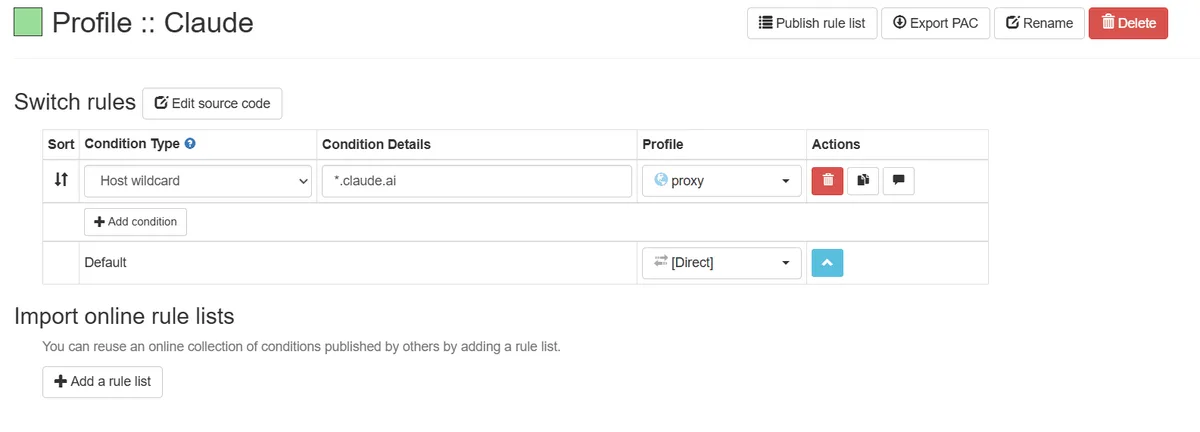
Keep the rest of the machine on its normal route by relaying only the browser through an extension. In Proxy SwitchyOmega (our SwitchyOmega walkthrough covers each field) build a profile with HTTP or SOCKS5, type the relay details and credentials, then write an auto-switch rule that sends claude.ai, anthropic.com and claudeusercontent.com to it.
Windows and macOS System Settings
- Windows 11: the page is Settings → Network & internet → Proxy. Beside "Use a proxy server" press Set up, put in host and port, store them. The relay password is requested by the browser later, since Windows keeps none.
- macOS: System Settings → Network → pick your link → Details… → Proxies. Turn on the HTTPS web proxy entry, supply host, port and credentials, finish with OK.
In most corporate setups the Claude desktop app inherits the system value; managed rollouts can also push relay settings from IT.
Claude Code
The CLI picks up the conventional proxy variables from the environment; put the login and password straight into the relay address:
export HTTPS_PROXY="http://user-7f3k:s3cret@203.0.113.77:3128"
export NO_PROXY="localhost,127.0.0.1,.corp.internal"
claude
Anthropic's documentation states that SOCKS relays are unsupported here, so stick with an HTTP or HTTPS endpoint. Background sessions pick the values up only if they also sit in the env block of ~/.claude/settings.json. Within a session, /status reveals the active relay.
The Claude API in Python
The official SDK rides on httpx, so HTTPS_PROXY is honoured with zero extra code. An explicit variant looks like this:
import os
import anthropic

client = anthropic.Anthropic(
    http_client=anthropic.DefaultHttpxClient(proxy=os.environ["CORP_PROXY"])
)
msg = client.messages.create(
    model="claude-sonnet-4-5",
    max_tokens=200,
    messages=[{"role": "user", "content": "Health check from the pipeline"}],
)
print(msg.content[0].text)
Domains to Allowlist on a Corporate Gateway
Ask IT to admit at least claude.ai, claude.com, api.anthropic.com, platform.claude.com plus asset hosts like assets-proxy.anthropic.com and *.claudeusercontent.com. Blocking those asset hosts produces an empty white page rather than a readable error.
How to Check the Connection
- In the same browser profile, open an IP lookup site; the relay's address, placed in your country, should appear. To examine the server on its own, run it through our free proxy checker.
- Sign in, scroll back to some earlier chat, then begin a new thread.
- Ask for something that yields a long answer and watch it stream all the way to the end.
Typical Mistakes
An exit in another country. It grants no access you lack and violates the terms. Choose an address where you physically are.
Rotating IPs for chat. Each change may trigger another check. A sticky or static exit avoids that.
SOCKS5 for Claude Code. Unsupported; ask the same provider for an HTTP endpoint.
Leaving out NO_PROXY. Internal services and localhost then travel through the relay and break.
Free relay lists. Shaky, frequently blacklisted and unsafe for session cookies. Our overview of free proxy risks has specifics.
The same subject for OpenAI's assistant is covered in our guide to ChatGPT through a proxy.
Claude AI proxy FAQ
Can I use Claude through a proxy?
Yes, when the reason is the network: a corporate gateway, a fixed company IP or servers lacking direct access. Relaying to appear in a supported country while staying elsewhere violates Anthropic's terms.
Why does Claude say it is not available in my region?
Your connection or account is associated with a country missing from Anthropic's supported list. Review the current list; swapping IPs is not a permitted remedy.
Does Claude Code work with a SOCKS5 proxy?
No. Claude Code accepts HTTP and HTTPS relays through HTTPS_PROXY and HTTP_PROXY, with login and password embedded in the URL.
Will a proxy help if my Claude account was disabled?
No. Such decisions concern the account, not the IP. Submit an appeal using Anthropic's official form.
Which proxy is best for working with Claude every day?
Pick a single static residential or ISP exit, reserved for you, in the country where you live. An unchanging exit keeps sessions calm and slots neatly into IP allowlists.