How to Launch and Test Localized Landing Pages for International Ad Campaigns Fast


When you expand into new markets on Google Ads, Meta, TikTok or Bing, results depend on more than targeting and creatives. The landing page carries a lot of the weight: how fast it loads, whether its language and currency fit the region, and whether it meets the platform's basic legal requirements.
For marketing teams and agencies testing several countries and niches at once, building every landing page by hand quickly becomes the bottleneck. This article covers the technical and content criteria ad platforms use to judge landing pages, why public templates and heavy CMSs slow launches down, and how to set up a fast workflow: from generating a lightweight multilingual site with AI to checking it through the eyes of a local visitor via residential proxies.
Residential proxies
Check your landing page from the target country and city
How Ad Platforms Judge Landing Page Quality
Google Ads and Microsoft Advertising (Bing) score the destination separately as Landing Page Experience. That score affects Ad Rank, cost per click and whether the campaign is allowed to serve at all. Meta also looks at where an ad leads: slow, thin or misleading pages are a common reason for rejections.

Before launch and periodically while a campaign runs, automated crawlers check the site across four groups of signals:
- Complete content and clear navigation. Algorithms look at the page structure, the menu, logical sections, topical descriptions and optimized images. Sites with shallow text or a broken structure score poorly, which raises traffic costs or gets ads disapproved.
- Required legal pages. To comply with Google Ads, Meta and Bing policies, a site needs accessible links to a Privacy Policy, Terms of Service and a contact page for the company or project. Missing documents are one of the most frequent reasons campaigns get paused during automated review.
- Language and regional consistency. If an ad targets users in Germany, France or Brazil, the interface, headings, forms and service pages should be in that country's language. Mixed languages on one page hurt user behavior signals and reduce the ad system's trust.
- Load speed and server stability. Crawlers request the target URL from servers around the world. If time to first byte (TTFB) goes beyond one or two seconds, or the host keeps returning errors, the system records the site as poorly available.
How different networks run these checks is covered in our article on White Page requirements across ad networks.
Why Standard Templates and Heavy CMSs Slow Down Market Tests
When a team needs to validate demand in five or ten countries, the usual ways of building sites turn out too slow or too expensive:
- Recycled code in free HTML templates. Ready-made templates from public catalogs save money at the start but bring technical risks. Identical DOM structure, stock CSS class names and overused text blocks are easy for algorithms to flag as unoriginal content.
- Hidden machine translation errors. Running a finished site through an automatic translator often leaves untranslated buttons, pop-ups, form placeholders or a wrong lang attribute on the html tag.
- Broken links in the menu and footer. In public starter kits, navigation items often point to empty anchors (#) or missing pages that return 404, which drags the quality score down.
- The overhead of popular CMSs. A full content management system with a database and a dozen plugins, just for a small informational site or a test landing page, means setup time, regular security updates and more powerful hosting.
Building Localized Static Pages Fast: A Look at WhitePage.House
To reach new markets faster and skip repetitive layout work, specialists use AI-based static site generators. One of the dedicated tools is the WhitePage.House AI site generator, built to produce topical web pages that fit current ad network requirements.
The service creates a lightweight site with no database or heavy engine behind it. Preparation takes four steps:
- Choose a direction and describe the topic. Enter the project name, pick a category (for example local services, education, technology, news or consumer goods) and add a short description. The model uses this to plan the sections and write coherent topical content.
- Pick the audience's language. According to the service, 14 languages are available, including English, German, Spanish, French, Portuguese, Turkish, Arabic and Hindi. Texts, menus, headings and legal pages come out in the target region's language from the start.
- Choose an AI model and generate the archive. Select a language model and start the build. The service says it takes a couple of minutes, after which the HTML/CSS code and media files are packed into an archive.
- Host it anywhere. Unpack the archive into the root folder of any shared hosting plan or VPS. Because the site is made of static files, it opens quickly and handles traffic peaks at launch without trouble.
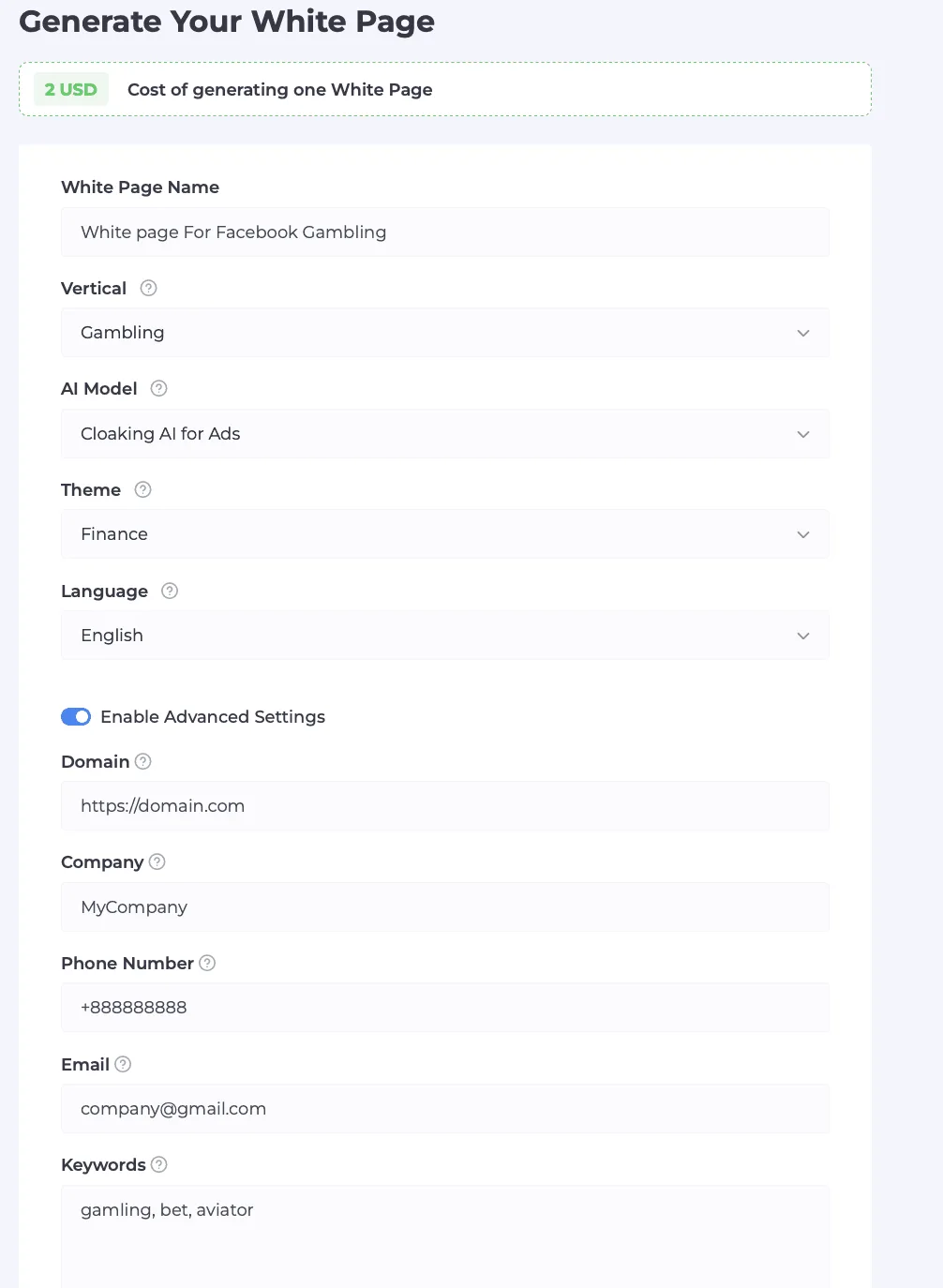
According to the service, generating one page costs $5 on the starter plan and drops to as little as $1 per page on extended plans. That is far cheaper than ordering each page from a developer.
Comparing Ways to Build Landing Pages for International Tests
The right tool depends on how many projects you run, your budget and how fast you need to test ideas. Here are three approaches side by side:
| Parameter | Free HTML templates | Custom development | AI generation in WhitePage.House |
|---|---|---|---|
| Time to prepare one site | 20–40 minutes of cleanup and edits | 4 to 24 hours | A couple of minutes |
| Cost | Free, not counting staff time | $20 to $80 per page | $1 to $5 per page |
| Uniqueness of text and layout | Low because of mass copying | High | High, content is generated from scratch |
| Multiple languages | Manual translation and layout fixes | Paid separately for each language | 14 languages |
| Legal pages | Often missing or outdated | Built and filled in by hand | Generated automatically |
| Load speed | Depends on how clean the template is | High with proper optimization | High thanks to light static code |
Automatic generation closes the gap between speed and quality: in a few minutes the team gets a unique multilingual site with clean code and the formal sections ad platforms expect. If you prefer to build one by hand, our White Page setup guide explains what it should contain.
Geo-Testing a Site With Proxies Before Launching Ads
Putting the site on a server is only half the job. Before paid traffic starts, the page needs to be seen the way a visitor from the target country will see it. Opening the link from your work computer and office IP does not give an honest picture: CDN settings, geo-routing rules or font rendering may behave differently in another region.
What to Check From the Target Region
- CDN and server filtering. Cloudflare or host firewall settings sometimes block requests from certain countries or networks by mistake, showing visitors a browser check or an access error.
- Local font rendering. Diacritics, Cyrillic, Arabic script or CJK characters should display correctly in ordinary browsers of the target country, with no encoding glitches.
- Real load time in the region. A server in Europe may serve the page in 120 ms in Germany but noticeably slower to users in Latin America or Asia.
- Forms and internal navigation. Every menu link, button and legal page should open without errors.
A Practical Check With Node Proxy
To see how the site behaves from a given location, use Node Proxy residential proxies. The pool holds about 30 million IPs of home connections in 234 countries and territories, and you can target down to a specific city and internet provider.
The pre-launch check has four steps:
- Set up geo-targeting. In the Node Proxy dashboard, build an HTTP(S) or SOCKS5 connection with the country, city and provider whose audience the campaign targets.
- Turn on a sticky session. If the site has several pages (home, services, contacts, privacy policy and terms), enable a sticky session, which keeps one IP for up to 24 hours. That way you can walk through every section from a single address, like a regular visitor. Before you start, confirm in a proxy checker that the address shows up in the right country.
- Check rendering and speed. Attach the proxy to a test browser profile (for example with the ZeroOmega extension) and open the hosted site. Review the layout, image loading, the SSL certificate and server response time.
- Give the team stable access. When several marketers run international campaigns in parallel, each needs a constant, predictable address for working with ad accounts within platform rules. Node Proxy static ISP proxies fit this job: 39 countries, unlimited traffic, and you can renew the same IP. A fixed internet provider address reduces extra security checks when you sign in to accounts regularly.
For more on checking landing pages from different countries, see our guide to GEO landing page testing.

Landing Page Readiness Checklist
Before you add the link to a Google Ads, Meta, TikTok or Bing campaign, check six points:
- Language consistency: text, headings, buttons and forms match the ad's language and target region, and the page code has the correct lang attribute.
- Legal documents: privacy policy, terms of use and contact pages are published and open.
- Internal links: no menu or footer item leads to an empty anchor or a 404 page.
- HTTPS: the domain has a valid SSL certificate and the site opens without browser warnings.
- Geo-test through a proxy: the page has been checked from a residential IP in the target country and provider, the CDN does not restrict access and the page loads within 2 seconds.
- Responsive layout: the interface looks right on desktop monitors and on smartphones with different screen sizes.
A set process for preparing and checking landing pages frees the team from routine layout work and lowers the risk of technical failures at the start of international campaigns. Try generating multilingual sites with WhitePage.House and check every page through residential and static ISP proxies before you spend the ad budget.
Localized Landing Pages FAQ
What is Landing Page Experience?
It is the landing page quality score in Google Ads and Microsoft Advertising. It reflects how relevant, usable and fast the page is, and it affects Ad Rank and cost per click.
Which pages does a site need to run ads?
Usually a privacy policy, terms of use and a contact page. Without them, automated reviews on ad platforms often pause the campaign.
How much does it cost to generate a site in WhitePage.House?
According to the service, $5 per page on the starter plan and as little as $1 on extended plans.
Why check a site through a proxy before launching ads?
To see the page the way a visitor from the target country will see it: with local CDN behavior, real load times and correct font rendering.
Which proxies work best for geo-testing?
Residential proxies with country, city and provider targeting and a sticky session for checking the site. Static ISP proxies for the team's day-to-day work with ad accounts.