A-Parser Proxy Setup: Proxy Checkers, Threads and Parser Settings for SEO Tasks

In A-Parser, proxies are loaded into a proxy checker: you create a checker, put your list into its proxy.txt (or give it source links), let it test the entries, and then select that checker in the thread settings preset your task uses. Every parser has Use proxy switched on by default, so once a working checker is attached to the task, requests go through your proxies automatically.
Overview articles about A-Parser list its parsers and stop there. This guide follows the path a proxy takes inside the program: checker, thread preset, task, parser. You will see which checker options matter for paid proxies, how threads relate to the size of your pool, what the ban and retry settings do, and how to set things up differently for a rotating gateway and for a list of static IPs.
Proxies for SEO parsing
Rotating residential and static proxies for SERP and rank tasks in A-Parser
What A-Parser Does and Why It Needs Proxies
A-Parser is a multithreaded scraper for Windows and Linux that you control through a web interface. It ships with more than a hundred built-in parsers: search engine results, keyword suggestions, site and link checks, plus custom parsers you can build yourself. For SEO work it typically collects SERP snapshots, ranks of your pages, autocomplete ideas and index checks.
All of these tasks send many requests to a few hosts in a short time. Search engines and many websites limit how often one address may ask, and answer heavy users with errors or challenges. Proxies split that load across many IPs, which is the practical reason the program revolves around them. Our article on SEO proxies explains the background in more detail.
How Proxies Travel Through A-Parser
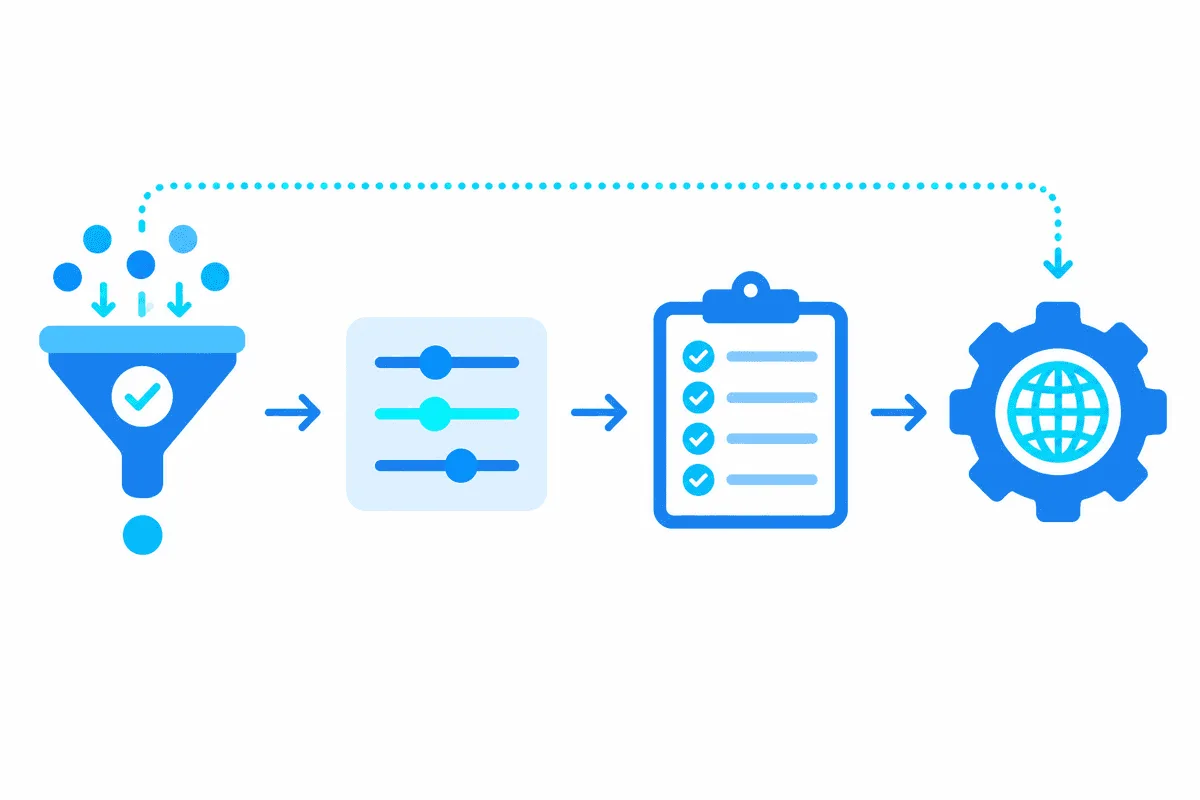
Settings live on four levels, and knowing the order saves a lot of guessing:
- Proxy checker — loads the list, tests it, keeps only live entries.
- Thread settings preset — decides how many threads a task runs and which checkers it may draw proxies from.
- Task — uses one thread preset and one or more parsers.
- Parser settings — can switch proxies off, change ban time and retries, or point a single parser at a different checker.
When the two disagree, the setting made inside a parser beats the one made for the whole task. So if your proxies look ignored, the first place to inspect is an override hiding in a single parser.
Step 1. Prepare the Proxy List
A-Parser reads one proxy per line. Supported layouts:
203.0.113.21:8080
198.51.100.40:1080
seo-user:k8Lq2v@203.0.113.22:8080ip:portsuits providers that recognise you by address. Add the public IP of the machine hosting A-Parser to the allowlist, which may be a VPS rather than your own computer.login:password@ip:portcarries a separate pair of credentials on every line. Tick the authorization option (Use proxy authorization) so A-Parser passes them on.- Many providers give one account for the whole pool. Then the bare
ip:portlines stay as they are, the same option is ticked, and the username and secret go once into the two credential boxes underneath it.
Protocol does not need a prefix: with the default Proxies type set to HTTP, SOCKS5, the checker tries HTTP first and falls back to SOCKS5. If your provider gives both, either works; our comparison of SOCKS5 and HTTP explains the difference.
Step 2. Create a Proxy Checker
In the web interface, go to the section with proxy checkers and press Add checker; cloning a checker you already have works too. The bundled default checker is locked and serves only as a starting template, so a separate checker per provider or per pool keeps things tidy.
Every custom checker gets its own folder named after it under files/proxy/. Four text files there do the work:
| File | Role |
|---|---|
proxy.txt | Holds the addresses you paste; keep it blank when the pool comes from links |
sites.txt | Web addresses of ready lists, one per line; convenient if your seller offers an export link |
regex.txt | Patterns that cut proxies out of a page with arbitrary markup: group one captures the IP, group two the port |
alive.txt | Receives the working entries, but only if Save alive proxies to file is enabled |
Step 3. Checker Options Worth Changing
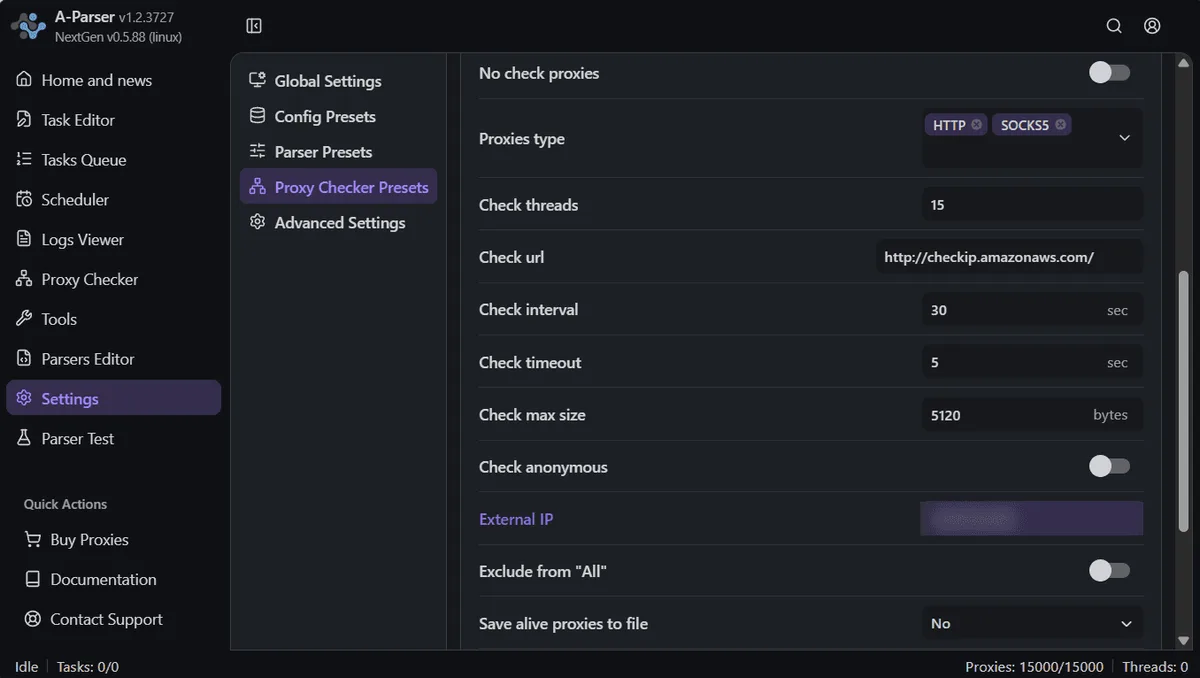
Most fields can stay as they are. These are the ones that tend to need attention with a paid pool:
- Proxies type. Leaving both protocols on is harmless, but if the provider sells only SOCKS5 or only HTTP, narrowing it speeds up testing.
- Check threads (15 out of the box). Plenty for a few hundred lines; a list of thousands tests faster with more.
- Check timeout (5 by default). Residential exits and servers on another continent often answer slower, so a bigger value saves good proxies from being thrown out.
- Check interval and Load interval (both 30). If the list barely changes, stretch them; constant rechecks only burn traffic.
- Loading type. The default Replace swaps the old list for the fresh one, which is what you want with a provider export.
- Check anonymous. Off by default and only meaningful together with your External IP; it filters out transparent proxies that leak your address.
- No check proxies. Marks everything as alive without testing. Handy for a gateway you trust, risky for a long list.
- Exclude from All. Hides the pool from tasks that take proxies from every checker, so only tasks that name it explicitly can use it.
Two notes on testing. Checks go through a check URL hosted by the developer, so a proxy that passes the check has proven only basic connectivity, not access to a particular search engine. And with a rotating gateway every check lands on a different exit, so one failed check says little about the gateway as a whole.
Step 4. Thread Settings Preset
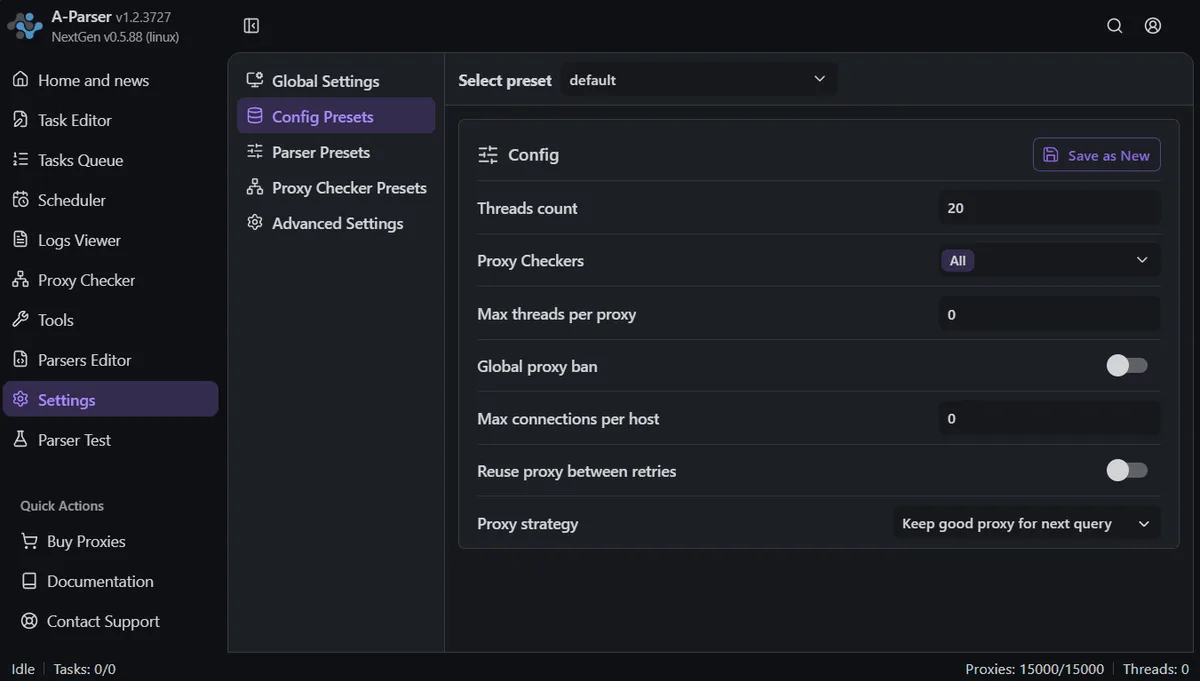
Go to Settings → Thread settings, pick a preset or create a new one, and look at these fields:
- Threads count — parallel requests for the task. The bundled presets use 20 and 100.
- Proxy Checkers — which checkers feed the task; the default is All.
- Max threads per proxy — caps how many threads share one proxy at a time;
0means no cap. - Max connections per host — limits simultaneous connections to one site, a polite brake for small targets.
- Global proxy ban — tasks with this option share one list of banned proxies per parser.
- Reuse proxy between retries — lets one proxy serve all retries of a request instead of switching.
- Proxy strategy — keep the proxy that just succeeded for the next request, or take a random one each time.
Save the preset and choose it in the Task Editor.
Step 5. Parser-Level Settings
Each parser has a common block of options you can override in the task:
- Use proxy — on by default; turn it off only for parsers that do not need it (for example, local text processing).
- Proxy ban time — how many seconds a proxy rests after the target rejects it; the default differs between parsers.
- Request retries — default 10; a query still failing after that is skipped.
- Request delay — default 0; a range such as
5,15adds a random pause in seconds. - Request timeout — default 60 seconds.
- Proxy Checker — a per-parser choice that overrides the task.
How Many Threads a Pool Can Carry
There is no universal number, but the logic is consistent: the stricter the target, the fewer parallel requests each IP should send.
| Task | Pool | Threads to start with |
|---|---|---|
| Search results and rank checks | 20 static IPs | 10–20, with a request delay |
| Search results and rank checks | Rotating residential gateway | Within your plan's concurrency limit |
| Keyword suggestions | 10–20 IPs | 20–40 |
| Checks on many different sites | Any | 50 and more, with Max connections per host set |
Raise threads in steps and watch the share of failed queries in the task log. If retries climb, more threads will only burn proxies faster; lower the count or add IPs. Read more about planning in our SERP data collection overview.
Rotating Gateway or a List of Static IPs
- Rotating residential gateway. One line in
proxy.txt(or a handful of ports) gives a new exit per connection. It suits search results at volume. Keep Proxy ban time short, because banning the gateway line bans all of its exits at once. Residential proxies with rotation are the usual choice here. - List of static IPs. Every line is a separate address, and the checker, bans and Max threads per proxy work as designed. This fits rank tracking at a calm pace and checks that need a stable country. See our static proxies for this setup.

Troubleshooting
The task reports zero working proxies. Three usual causes: the checker is switched off, the thread preset does not include it, or the whole list failed testing. Look at the live counter of the checker first, then at the preset.
All proxies fail with credentials. Check that Use proxy authorization is on and the list follows login:password@ip:port. For IP-authorised proxies, whitelist the public IP of the machine running A-Parser.
Proxies pass the check but the search engine returns errors. The check only proves connectivity. Lower the threads, add Request delay, or move to residential exits.
The gateway disappears from rotation. It was banned after a few rejections. Shorten Proxy ban time or enable Reuse proxy between retries for that parser.
Speed drops after an hour. The pool is too small for the thread count. Reduce threads first, then add IPs.
A-Parser proxy FAQ
Where do I put proxies in A-Parser?
Create a proxy checker and paste the list into its proxy.txt, which sits in a folder named after the checker inside files/proxy. Tasks pull addresses from whichever checkers their thread preset allows.
Does A-Parser support SOCKS5 proxies?
It does. Out of the box each address is tried over HTTP first and then over SOCKS5, so a list mixing both protocols needs no prefixes.
How do I add proxies with a login and password?
Write each line as login:password@ip:port and tick the authorization option of the checker. If a single account serves every address, keep plain ip:port lines and type that username and secret once in the credential boxes.
Can I use a rotating proxy gateway with A-Parser?
Yes. One or several lines with the gateway host and port are enough. Keep the ban time short and stay within the number of simultaneous connections your plan allows, because each connection already exits from a fresh IP.
Why are my proxies alive in the checker but blocked during parsing?
Passing the check proves only that the proxy answers the developer's test address. A search engine judges the IP on its own, so cut threads, add pauses or move to addresses with a cleaner reputation.