How to Build a Reliable Multi-Account Workflow: Choosing Accounts, Proxies, and Managing Sessions

Managing multiple online accounts has become a regular part of digital marketing, advertising, social media management, and online business operations. Agencies handle several client profiles, marketing teams work with different advertising platforms, and businesses often need separate environments for regional campaigns, customer support, and content management.
However, working with multiple accounts involves more than creating profiles and logging into them. Without a structured workflow, teams run into session conflicts, inconsistent account information, access problems, and difficulty tracking which account belongs to which project.
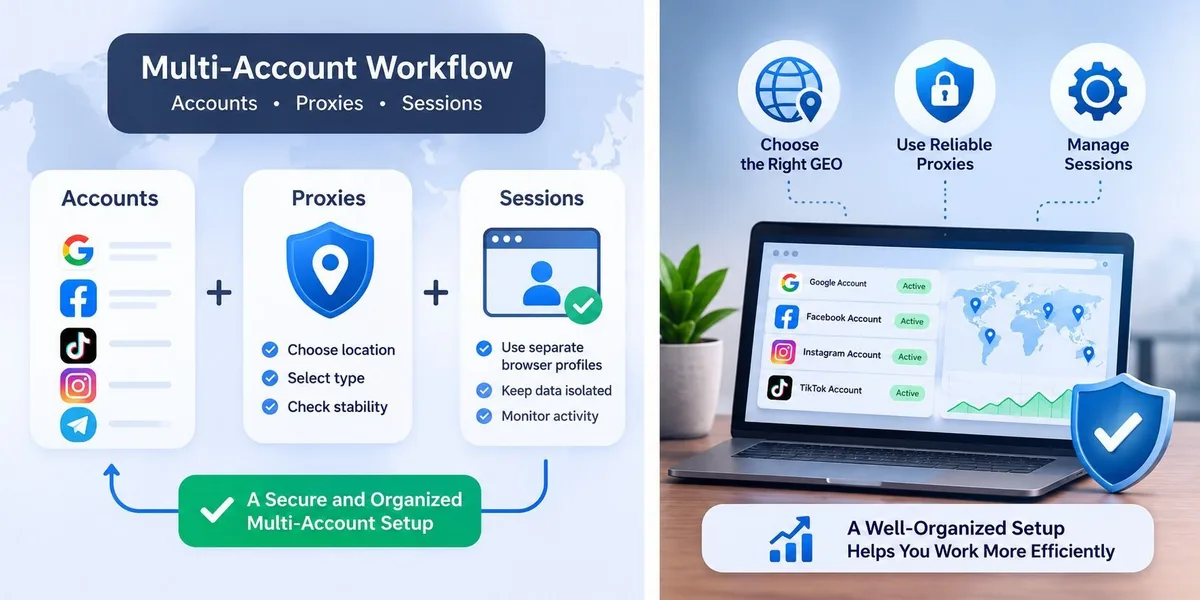
A reliable multi-account workflow combines three elements:
- Account quality: selecting accounts that meet the requirements of a particular task.
- Network infrastructure: choosing appropriate proxy connections when a project requires specific geographic locations or network configurations.
- Session management: keeping browser profiles, cookies, credentials, and access permissions properly organized.
These elements should work together rather than being treated as independent tools. This guide explains how to build a structured multi-account environment, what to consider when choosing accounts and proxies, and how to organize daily operations while respecting platform policies and security requirements.
Residential proxies
Stable sessions and city-level GEO for every project
What Makes an Online Account Suitable for Professional Use?
Not every account is equally suitable for every business task. Before selecting an account, it is important to understand its history, verification status, available features, and intended purpose. An account used for ordinary communication may have very different requirements from one used for advertising, content publishing, or business administration.
Account Age and Registration History
Account age is one of the characteristics buyers often consider. An older account may have an established history, previous activity, and completed profile information. However, age alone does not prove that an account is trustworthy, secure, or suitable for a particular purpose.
When evaluating an account, consider:
- the approximate registration date;
- whether the account has a consistent registration history;
- whether the original registration email is available;
- whether the account has completed the required verification steps;
- whether recovery information can be updated;
- whether its previous activity is relevant to the intended use.
It is also important to distinguish between an account's registration date and its actual activity history. An account created several years ago but never used may have a different operational profile from one that has been actively maintained.
Email Verification and Recovery Access
A verified email address helps with account recovery, security notifications, and confirmation of sensitive changes. However, buyers should understand exactly what is included with an account. A listing may include an email address, but that does not necessarily mean the mailbox is fully accessible or that recovery is guaranteed.
Before using an account professionally, check:
- Whether the associated email address is accessible.
- Whether incoming verification messages can be received.
- Whether recovery options are available.
- Whether the email provider allows the intended use.
- Whether the account owner can securely update recovery details.
Two-Factor Authentication (2FA)
Two-factor authentication adds another security layer by requiring an additional verification method during login or sensitive operations. Depending on the platform, this may be an authenticator app, a security key, an SMS code, or another supported method.
For professional account management, document how 2FA is configured and who controls the recovery methods. A shared account without a clear recovery process becomes difficult to manage when team members change or access needs to be transferred.
How to Choose Accounts for Different Business Tasks
The account selection process should begin with the business objective, not the available inventory. Different platforms have different account requirements, and the same characteristics are not equally important in every use case.
| Platform | Typical business use | Important account considerations |
|---|---|---|
| Advertising and community management | Verification, business access, security settings | |
| Email, analytics, and business tools | Recovery access, verification, account permissions | |
| TikTok | Content publishing and marketing | Profile completeness, account status, feature availability |
| Telegram | Communication and community management | Phone number access, 2FA, recovery settings |
| Brand management and content publishing | Email access, security, account ownership |
These are general evaluation criteria. Actual requirements depend on the platform, account type, and applicable policies.
Match Account Characteristics to the Task
A common mistake is choosing accounts based only on price or age. Instead, create a checklist based on the intended use. For example, a marketing agency managing several client projects may prioritize:
- clear account ownership;
- reliable recovery access;
- appropriate verification status;
- availability of the required platform features;
- documented access permissions;
- compatibility with the client's internal security procedures.
An account that looks attractive in a marketplace may still be unsuitable if it lacks an important feature or has unclear ownership.
Where to Source Accounts
When businesses need accounts for legitimate operational purposes, they should evaluate the source as carefully as the account itself.
A marketplace such as Fire Accs lets buyers explore different categories of digital accounts. For example, businesses looking for accounts on a specific platform can browse specialized categories such as Google accounts and check account details, verification status, included credentials, and recovery options before use.
When evaluating any marketplace, pay attention to product descriptions, included credentials, verification information, support availability, and the conditions under which accounts are provided. Do not assume that a listing guarantees future access, platform approval, or unrestricted functionality, and always verify the details before adding an account to an important business workflow.
It is equally important to check whether account transfers and third-party account use are permitted under the relevant platform's terms.
Why Proxy Selection Matters in Multi-Account Operations
A proxy server acts as an intermediary between a device and an online service. Instead of connecting directly to a website, the connection is routed through the proxy, and the destination service generally sees the proxy's IP address as the source.
Proxies are useful in several legitimate business scenarios:
- testing how a website appears from different geographic locations;
- accessing region-specific content where permitted;
- managing network requirements for distributed teams;
- testing localized website and advertising experiences;
- conducting regional quality assurance;
- supporting technical workflows that require specific network configurations.
However, a proxy does not guarantee anonymity, account security, or acceptance by a platform. Services may use additional signals to evaluate logins and account activity.
Residential, Mobile, and Datacenter Proxies
Different proxy types have different characteristics.
| Proxy type | Network source | Common applications | Considerations |
|---|---|---|---|
| Residential | Home internet connections | Regional testing and localized browsing | Quality and availability can vary |
| Mobile | Mobile carrier networks | Testing mobile network experiences | Connection characteristics may change |
| Datacenter | Hosting and data center infrastructure | Development, automation, and technical testing | Some services may classify these IP ranges differently |
There is no universally best proxy type. The right choice depends on the application, technical requirements, geographic coverage, connection stability, and budget. A company testing its website in several countries may prioritize coverage and predictable connectivity, while a development team running automated tests may care more about response times and stable infrastructure.
Static and Rotating IP Addresses
Another important distinction is whether the proxy uses a static or a rotating IP address.
A static IP remains the same for an extended period, depending on the provider's configuration. This is useful when an application requires a consistent network endpoint. A rotating proxy changes the IP address on a schedule or per request.
Rotation helps with certain testing and data collection tasks, but frequent IP changes can also disrupt applications that expect stable sessions. The comparison of sticky and rotating proxies explains when each mode fits. The key point is to choose an IP configuration that matches the requirements of the service you use.
What to Consider When Selecting a Proxy Provider
Beyond the proxy type, evaluate several practical characteristics:
- Geographic coverage. Does the provider offer the countries or cities the project needs?
- Session duration. Can a connection stay stable for the time needed to complete a task?
- Connection protocols. Are the supported protocols compatible with your applications?
- IP quality. Does the provider explain how addresses are selected and checked?
- Scalability. Can the infrastructure support the required number of simultaneous connections?
- Technical support. Is help available when connection problems occur?
For example, Node Proxy residential proxies cover about 30 million IP addresses in 234 countries and territories and more than 48,000 cities, according to network data for the last two weeks. Sticky sessions keep one IP for up to 24 hours, and there is no limit on connections.
These characteristics matter for teams that need geographic flexibility and longer-running sessions. Still, any provider's specifications should be checked against the actual requirements of a project.
How to Match Network Settings to Different GEOs
Geographic targeting is an important part of international digital marketing. A business may need to check how a landing page appears in Germany, compare advertising content in the United States, or test localized website functionality in several regions. In these situations, geographic proxy selection helps reproduce different network environments.
There is an important distinction, though, between testing geographic availability and misrepresenting identity or location. A proxy changes the apparent network location. It does not change an account's registration country, legal ownership, verification information, or eligibility for regional services.
Practical GEO Testing Workflow
Consider a company preparing a marketing campaign for three markets: Germany, the United Kingdom, and the United States. A structured testing process could look like this:
- Define the geographic requirements for each campaign.
- Identify which pages, features, and advertising materials need regional testing.
- Select proxy endpoints in the relevant locations.
- Use dedicated browser profiles for authorized testing environments.
- Check language, currency, page availability, and localized content.
- Record any differences and share the results with the marketing team.
This creates a repeatable process without confusing geographic testing with account eligibility.
Why Consistency Matters
When a project requires a specific regional network environment, consistency makes test results easier to interpret. If a website is tested from Germany today and from the United States tomorrow, the results may differ because of regional content delivery, currency settings, localization, or service availability. Documenting the network location used in each test makes comparisons more meaningful.
A simple testing record can include:
| Field | Example |
|---|---|
| Project | European landing page review |
| Target location | Germany |
| Proxy location | Germany |
| Browser profile | DE-Website-QA |
| Test date | November 2026 |
| Checks performed | Language, currency, page availability |
| Result | Passed / Needs review |
This makes it easier for another team member to reproduce the same test later.
Browser Profiles and Session Isolation
Account management is not only about credentials and network connections. Browser sessions are equally important. A browser profile stores:
- cookies;
- local storage;
- cached website data;
- login sessions;
- browser preferences;
- extensions and other profile-specific settings.
When several people or projects share the same browser environment, this information becomes hard to organize. A team member may accidentally open a client account in the wrong profile or overwrite an existing session.
Why Separate Browser Profiles Help
A dedicated browser profile creates a more organized working environment. Instead of keeping everything in one session, teams can maintain separate profiles for different clients, projects, or authorized testing environments, for example in an anti-detect browser with a proxy per profile.
This makes it easier to:
- identify which project a session belongs to;
- keep cookies and local storage separate;
- reduce accidental account switching;
- organize access between team members;
- troubleshoot login and session problems.
Browser profile separation is an organizational and security measure. It should not be treated as a way to bypass platform restrictions or enforcement systems.
What Information Should Be Documented?
A simple internal register prevents many common mistakes.
| Field | Example |
|---|---|
| Project | Client A |
| Platform | |
| Browser profile | Client-A-Facebook |
| Responsible person | Marketing manager |
| Recovery method | Company-controlled email |
| 2FA status | Enabled |
| Network configuration | Approved project endpoint |
| Last security review | October 15, 2026 |
Sensitive credentials and recovery codes should not be stored in an ordinary spreadsheet. Use an approved password manager or a dedicated secrets management tool instead.
Organizing Access for Teams
When multiple employees work with the same platforms, access management becomes especially important. A practical approach includes:
- giving each team member only the permissions their role requires;
- using official business access and role-based permissions wherever available;
- keeping account ownership and recovery information under company control;
- reviewing access when employees change roles or leave;
- avoiding unnecessary sharing of personal passwords.
This reduces confusion and makes access problems easier to investigate. More on running multiple accounts for business is covered in a separate guide.
A Practical Example: Building a Multi-Account Workflow
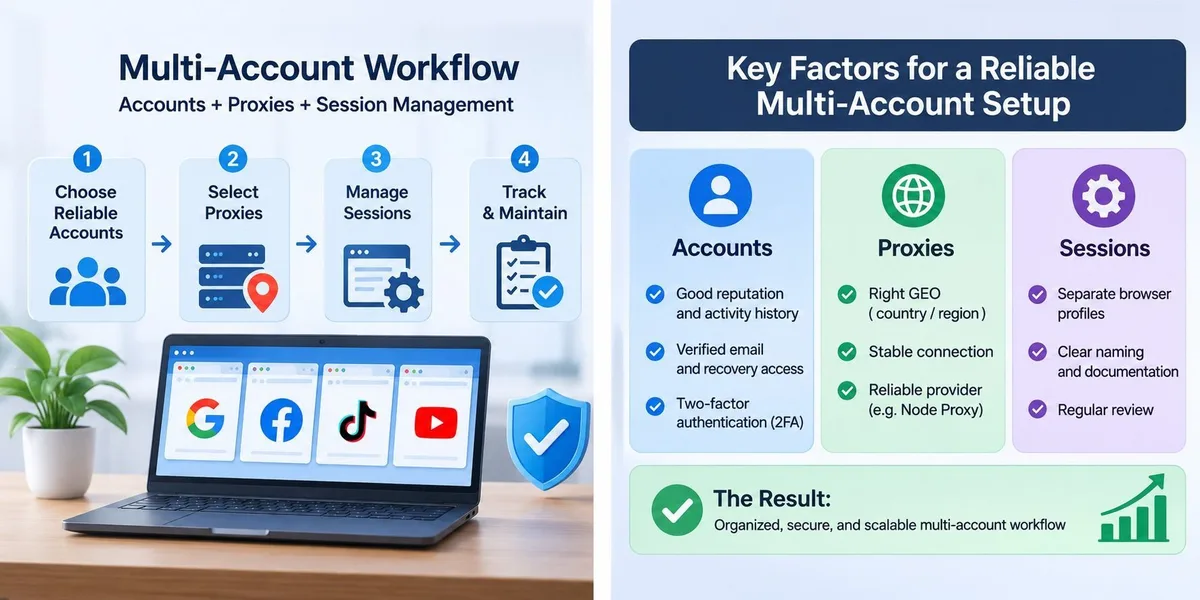
Consider a small digital marketing agency managing campaigns for three clients. Each client has separate business requirements, authorized platform access, and different geographic audiences. Without a structured process, the agency may lose track of account ownership, browser sessions, permissions, and network settings. A better workflow can be divided into five stages.
Stage 1: Define the Project Requirements
Before setting up any accounts, document:
- which platforms are required;
- who owns each account;
- which team members need access;
- which permissions are necessary;
- which geographic markets are relevant;
- which security and recovery procedures apply.
Stage 2: Verify Account Suitability
Review the available accounts against the project requirements: verification status, recovery access, account features, and ownership conditions. If accounts come from an external marketplace, read the product description and applicable terms before using them. Avoid bringing accounts with unclear ownership or incomplete recovery information into important business operations.
Stage 3: Configure the Network Environment
Decide whether the project actually requires a proxy. For regional website testing, choose a suitable geographic endpoint; for other projects, a normal company connection may be enough.
If you use a provider such as Node Proxy, check the available locations, connection type, IP configuration, authentication method, and compatibility with your application. For longer testing sessions, check whether the provider supports sticky sessions and how long they stay active. Document the configuration so team members know which network environment is used for each authorized project.
Stage 4: Organize Browser Sessions
Create dedicated browser profiles for separate projects and assign access to the right team members. Use descriptive profile names, enable the available security protections, and document session ownership. For shared business accounts, set clear rules on who can open the profile and how access is revoked when someone leaves the project.
Stage 5: Monitor and Maintain the Setup
A multi-account workflow needs regular maintenance: account access, security settings, recovery methods, proxy availability, and browser profile organization. A basic weekly review can include:
- checking that all required accounts are accessible;
- reviewing unexpected login notifications;
- confirming that recovery information is current;
- checking proxy connection availability;
- removing unnecessary team permissions;
- updating internal documentation.
This helps catch operational issues before they affect important campaigns.
Common Mistakes in Multi-Account Management
Even a well-planned setup becomes unreliable if basic practices are ignored.
Choosing Accounts Based Only on Age
An older account is not automatically better. Verification, ownership, recovery access, and feature availability matter too.
Using Proxies Without a Clear Purpose
A proxy should solve a specific network or geographic requirement. Unnecessary infrastructure adds complexity and maintenance costs.
Ignoring Browser Session Organization
Mixing cookies and sessions across unrelated projects creates confusion and raises the risk of opening the wrong account.
Storing Credentials in Insecure Documents
Spreadsheets, shared text files, and unprotected documents are not suitable for login details or recovery codes.
Failing to Document Account Ownership
When several employees manage the same project, unclear ownership can cause serious access and recovery problems.
Assuming Proxies Guarantee Account Security
A proxy only changes the network path and the visible IP address. It does not guarantee that an account stays accessible or complies with platform requirements.
Ignoring Platform Policies
Each platform has its own rules on account ownership, sharing, automation, advertising, and regional access. A technical setup does not override those rules.
Making Too Many Changes at Once
When troubleshooting, changing account settings, browser profile, and network connection at the same time makes the cause hard to find. Test one variable at a time and record the results.
How to Evaluate Your Multi-Account Infrastructure
Once the workflow is running, measure whether it actually improves day-to-day work. Instead of relying on impressions, track a few practical indicators.
| Metric | What it measures | Why it matters |
|---|---|---|
| Account availability | Share of required accounts that are accessible | Shows operational continuity |
| Session errors | Number of session-related problems | Points to browser configuration issues |
| Recovery time | Time needed to restore access | Measures preparedness |
| Proxy availability | Successful connection rate | Shows network reliability |
| Access review completion | Share of accounts reviewed | Supports security and accountability |
| Setup time | Time to onboard a new project | Measures workflow efficiency |
These metrics can be reviewed weekly or monthly, depending on the size of the operation. If a team often has session problems, the cause may be inconsistent browser profile management rather than account quality or proxy performance. Repeated connection failures may mean the chosen proxy configuration does not meet the project's technical requirements. Measuring each component separately makes troubleshooting much more effective.
A Simple Monthly Review Checklist
At the end of each month, a team can check:
- whether all accounts still have valid ownership and recovery information;
- whether access permissions match current responsibilities;
- whether browser profiles are still organized correctly;
- whether proxy locations and session settings meet project requirements;
- whether any recurring connection or login problems need investigation;
- whether the current infrastructure is enough for upcoming projects.
Conclusion: Build a Workflow, Not Just a Collection of Tools
Reliable multi-account management requires more than buying accounts and connecting proxies. It depends on how well the whole environment is organized.
Account quality determines whether a profile meets the requirements of a task. Proxy infrastructure gives network flexibility when geographic or technical requirements call for it. Browser profiles and session management keep projects separated and access organized.
The most effective approach is to start with clearly defined business requirements, verify account suitability, choose appropriate network infrastructure, and set consistent security and maintenance procedures. For businesses working with many digital platforms, combining a suitable account source such as Fire Accs with properly configured proxy infrastructure such as Node Proxy can be one part of a more structured operation.
The goal is not simply to manage more accounts, but to build a workflow that is understandable, secure, maintainable, and in line with the rules of the platforms you use.
Multi-Account Workflow FAQ
What do I need for a reliable multi-account workflow?
Three things working together: accounts that suit the task, a proxy setup that matches the required GEO and session length, and separate browser profiles with documented access.
Is an older account always better?
No. Age is only one signal. Verification, clear ownership, recovery access and the features you need matter just as much.
Does a proxy keep an account safe from restrictions?
No. A proxy only changes the network path and the visible IP. Platforms look at other signals too, and their rules still apply.
Static or rotating proxies for account work?
Static or sticky addresses suit work that needs one stable IP for a long session. Rotating proxies fit testing and data collection where the address can change.
Where should login details and recovery codes be stored?
In an approved password manager or a secrets management tool, not in spreadsheets or shared text files.