Avito Scraping: How to Collect Listing Data with Residential Proxies
 ·October 6, 2026·5 min read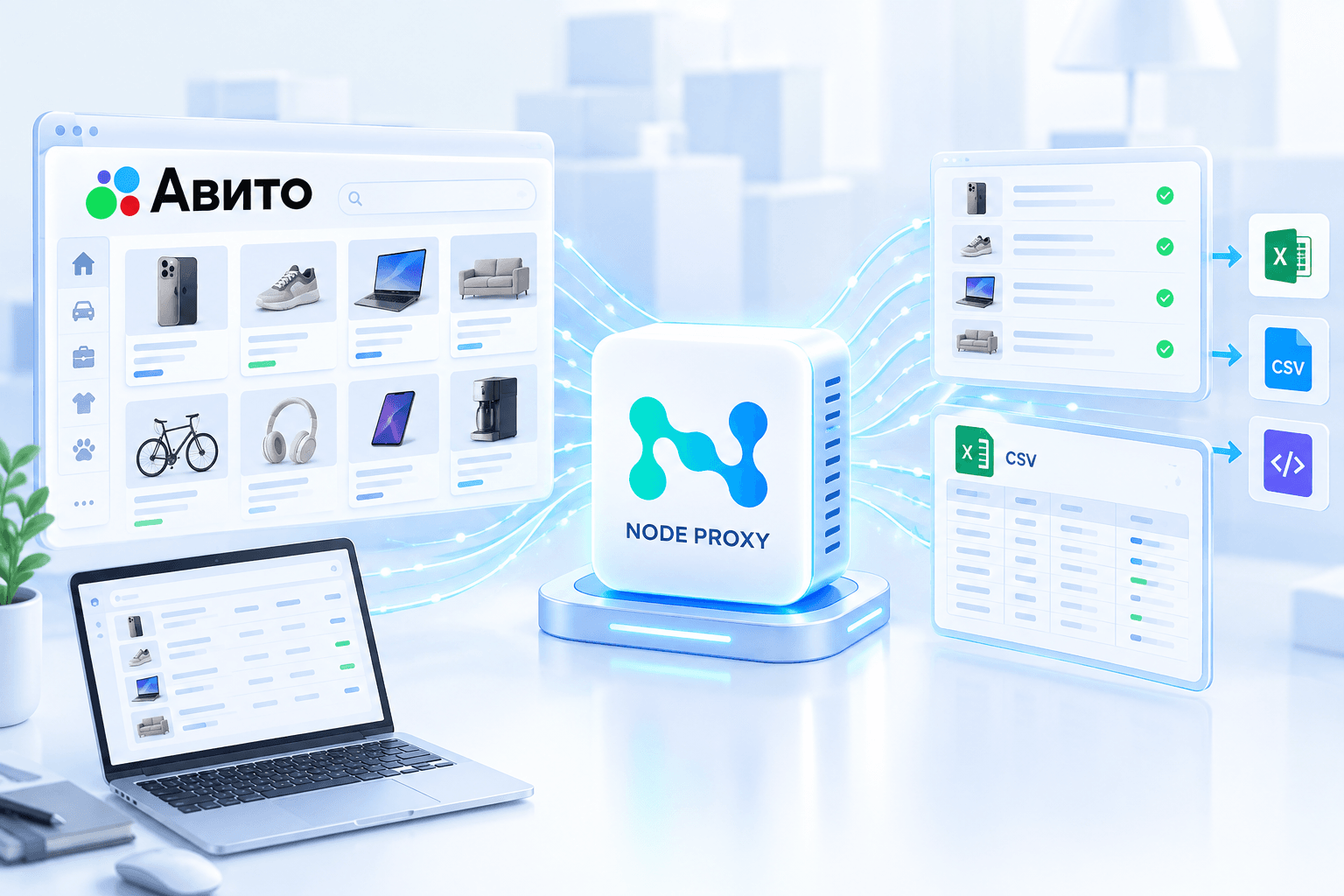
Avito contains a large number of listings that are constantly being updated: prices change, new offers appear, some listings are removed from sale, while others receive additional views and reviews. Manually collecting this amount of information quickly becomes inconvenient.
Automated scraping makes it possible to regularly collect data from listings and save it to your own database. This can be useful for price monitoring, competitor analysis, market research, finding new offers, and other tasks involving large volumes of listings.
When collecting data at scale, there is also a separate technical challenge — organizing network connections. Residential proxies can be used for this purpose, allowing the program to send requests to Avito through proxy servers.
What Data Can Be Collected from Avito
The data set depends on the specific task and project structure. Before starting the scraping process, it is better to determine the required fields in advance so that you do not process information that will not be used later.
For example, the following data can be collected from listings:
- listing title;
- link;
- listing ID;
- price;
- category;
- subcategory;
- description;
- product specifications;
- product condition;
- seller information;
- region and city;
- publication date;
- number of views, if available;
- photos and image links;
- delivery information;
- other parameters displayed in the listing.
Information can also be collected not only from individual listings but from search results. In this case, the object of analysis is a list of offers matching a specific query, category, or region.
For example, you can create a selection of listings for a particular product and then compare prices from different sellers.
Collect. Analyze. Use.
Residential proxies for web data collection and analysis.
How Data Collection Works
The program receives a list of pages or search queries, accesses the required URLs, extracts the necessary values, and saves the results.
A typical workflow may consist of several stages:
- Define categories, search queries, or a list of URLs.
- Configure the fields that need to be collected.
- Pass the tasks to the scraper.
- Send requests to Avito pages.
- Extract the required parameters.
- Validate the collected values.
- Save the data to CSV, JSON, Excel, or a database.
- Repeat the collection process at a specified interval if necessary.
Regular runs are particularly useful for monitoring. For example, if the same categories are checked every day, the results of each check can be saved to create a history of price and assortment changes.
Monitoring Listings and Prices
One practical use of Avito scraping is tracking product prices.
Suppose you need to monitor several models of equipment. During each check, the scraper saves the price and the time when the data was collected.
Over time, such records can be used to build a history of price changes.
The same approach can be used to track new listings. If a listing ID has not previously appeared in the database, the system can add it as a new item.
During a subsequent check, the opposite situation can also be identified: a listing no longer appears in the results, which may indicate that its status has changed or that it is no longer included in the current selection.
Why Use Proxies for Avito Scraping
When there are only a few requests, the network aspect may have little impact on the project architecture. However, when regularly collecting a large number of pages, it is important to consider how the program connects to the website.
A proxy server acts as an intermediary between the scraper and Avito:
Scraper → Node Proxy → Residential IP → Avito → Response → Scraper
Instead of connecting directly, the program sends the request through a proxy. As a result, the external IP address of the connection is determined by the proxy server being used.
Residential proxies provide access to a pool of IP addresses associated with networks used by regular users. For data collection tasks, this can be part of the project's overall network infrastructure.
At the same time, it is important to distinguish between the functions of the individual components. A proxy does not extract information from a listing or analyze the page. It is responsible for the network connection, while the scraper handles data retrieval and processing.
IP Rotation When Collecting Listings
When working with a large number of tasks, IP address rotation can be used.
Node Proxy allows you to select a proxy mode when creating a new list.
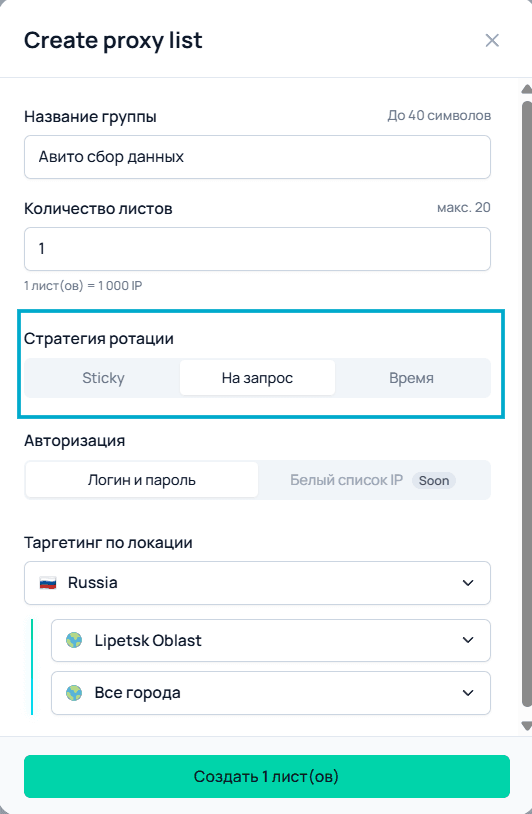
Depending on the project logic, different options can be used:
- time-based rotation — the address changes after a specified interval;
- IP change per request — a new address is requested by the program;
- Sticky — one IP is retained for as long as possible within the selected strategy.
The specific mode should be selected based on the nature of the tasks.
If listings are processed independently, the IP can be changed between individual requests or groups of requests. If the program needs to maintain a specific network environment throughout a sequence of operations, a longer period of using the same IP may be required.
Rotation is only one part of the system. Collection stability is also affected by request frequency, the number of parallel tasks, repeated requests, and proper error handling.
How to Add a Proxy to a Scraper
After creating a list in Node Proxy, the program receives the parameters required for the connection.
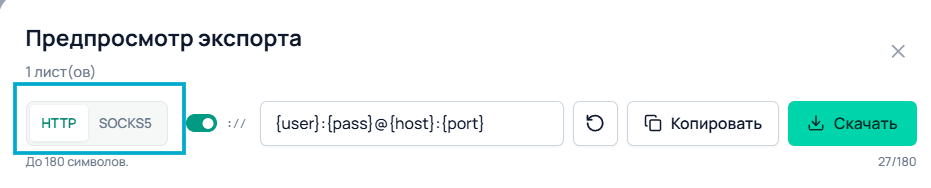
Depending on the configuration, these may include:
- IP address or hostname;
- port;
- username;
- password;
- protocol.
If the scraper supports HTTP or SOCKS5, you can specify the corresponding Node Proxy protocol.
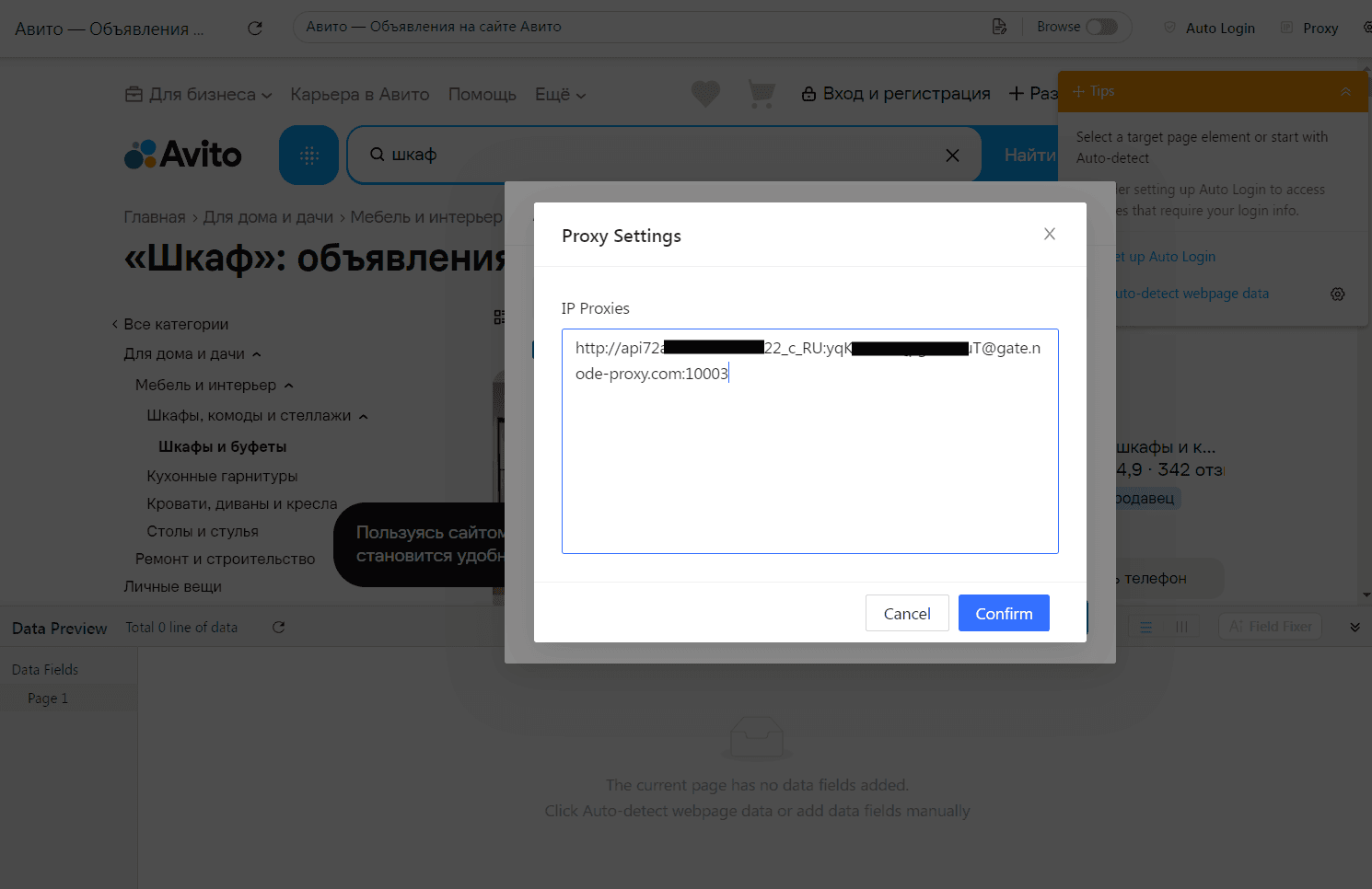
After filling in the fields, it is recommended to run a small test first.
For example, you can check several pages and make sure that:
- the connection is established;
- authentication works correctly;
- the program is using the selected proxy;
- responses are processed without errors;
- the required fields are extracted correctly.
Only after this is it worth launching a large task list.
This approach makes it easier to identify the cause of a problem. If requests do not go through at all, you should check the network connection and proxy parameters. If the connection works but the data is extracted incorrectly, the problem is already related to the scraper's settings or logic.
What Scraping Results Look Like
After processing the tasks, the program can generate a table containing the collected listings.
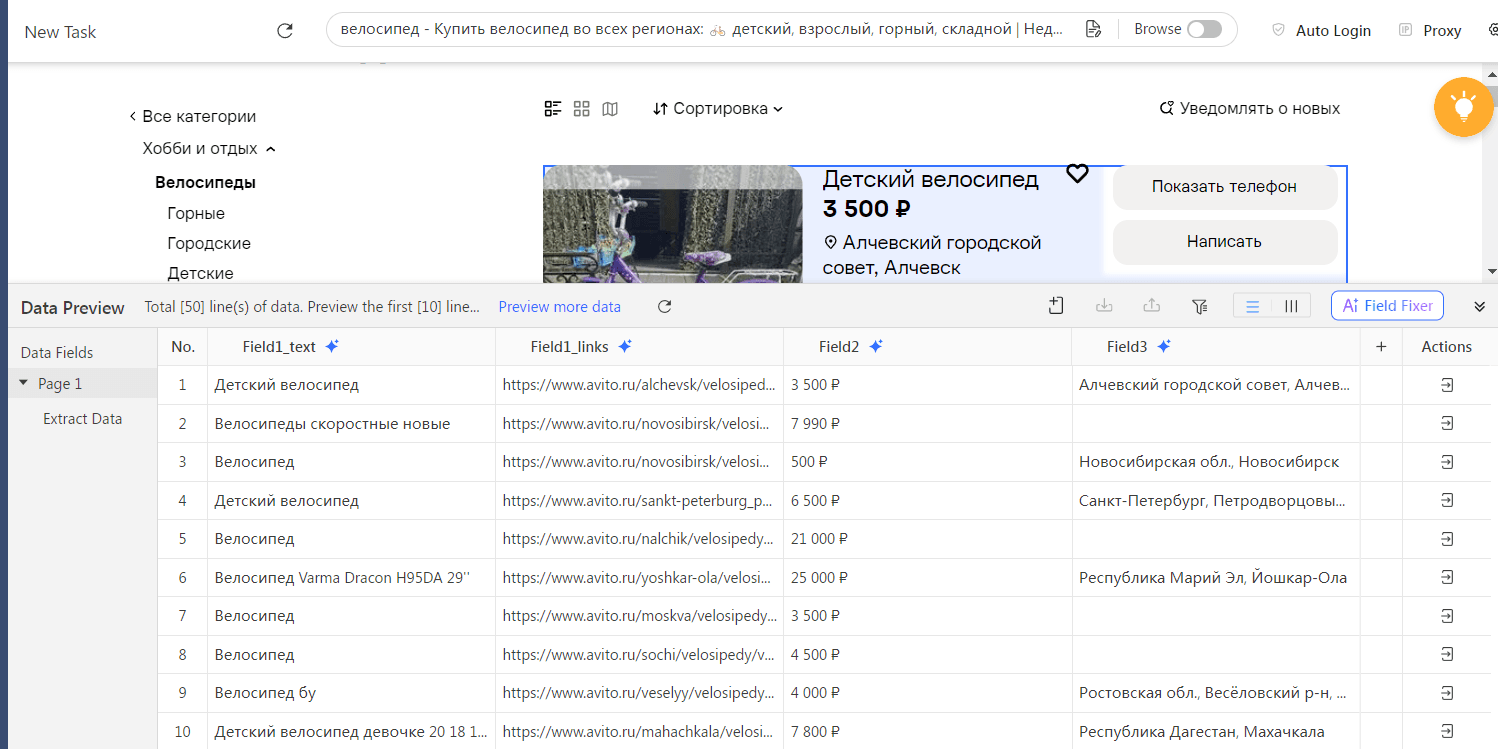
The resulting data set can then be cleaned and converted to a consistent format.
For example, prices are better stored as numbers, while the city and category should be kept in separate fields. The listing URL should also be stored separately so that the original publication can be accessed quickly when necessary.
If data is collected regularly, the date and time of each check can be added to every record. This makes it possible to distinguish current data from the results of previous runs.
What Can Avito Data Be Used For?
Listing scraping can be used in a wide range of scenarios.
Price Analysis
You can collect offers within a single category and determine the price range, average price, or changes in prices over time.
Competitor Monitoring
If you need to track offers from specific sellers or categories, regular collection allows you to build your own observation database.
Assortment Analysis
Search can be used to study which products are available on the platform and how the number of offers changes over time.
Finding New Listings
When the scraper runs periodically, new IDs can be compared with those already stored. This makes it possible to distinguish new listings from those that have been detected previously.
Regional Analysis
Listings can be grouped by cities and regions and then used to compare prices and assortment across different locations.
Choosing the GEO for a Proxy
The connection's geographic location may be important when a project collects data for a specific region.
For example, when analyzing a regional market, you can use a proxy with the corresponding GEO and separately check results for different locations.
In Node Proxy, the required GEO can be selected when creating a residential proxy list.
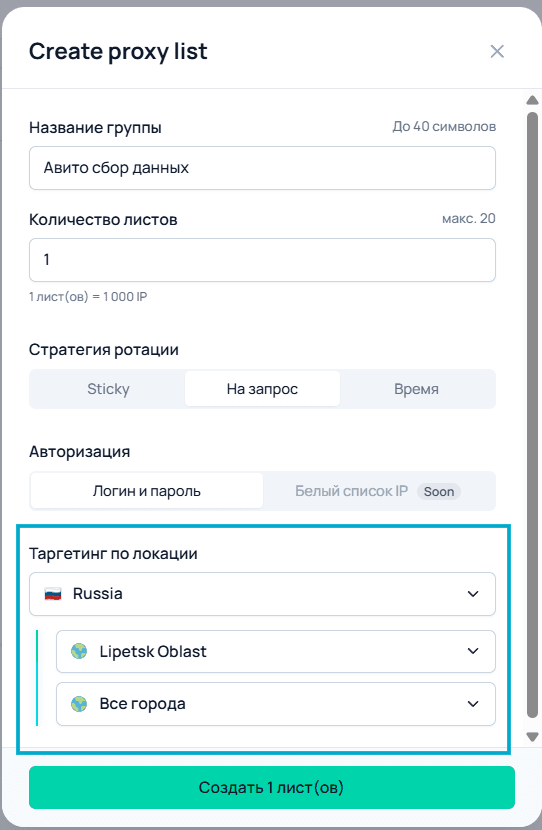
After that, connections are made through IP addresses from the selected geographic location.
When working with regional scenarios, it is advisable to check how the IP is actually geolocated. The proxy's geolocation and the region displayed within a particular service are not necessarily identical concepts: additional parameters and the website's own logic may affect the result.
Therefore, GEO should be considered one of the network connection parameters rather than a guarantee of specific page content.
How to Organize Regular Scraping
If you need to collect several dozen or a few hundred listings once, a relatively simple program may be sufficient. For continuous monitoring, the architecture becomes more complex.
A typical project may consist of the following components:
Scheduler — starts data collection at a specified interval.
Task Queue — stores URLs, search queries, or categories.
Scraper — sends requests and extracts information.
Proxy Manager — selects and rotates proxies.
Data Processor — validates and normalizes the results.
Database — stores current and previous results.
Analytics — uses the accumulated data for reports and comparisons.
This approach is more convenient for long-term operation because each component is responsible for its own part of the process.
What to Consider When Collecting Data
Having a proxy does not automatically solve all technical scraping challenges. For stable operation, the entire process needs to be monitored.
In particular, it is worth considering:
the number of simultaneous requests;
the interval between requests;
response timeout;
retries;
connection errors;
correctness of extracted values;
rotation performance;
history storage;
the number of successfully processed pages.
It is also useful to maintain an application log. It can store the URL, request time, response status, and error information.
An additional validation step is necessary to prevent a technical failure from being interpreted as an actual change in the data. For example, if the scraper fails to retrieve a price, an empty value should not automatically be recorded as a zero price.
Scraper, Proxy, and Data Processing Have Different Roles
When building a system, it is important not to mix the functions of the individual components.
Scraper is responsible for retrieving pages and extracting information.
Proxy provides the network route for the connection and allows a specific IP address to be used.
Data Processor validates, cleans, and converts the collected information into the required format.
Database stores the results and change history.
Analytics System works with the accumulated information and helps generate the required metrics.
Separating these functions simplifies configuration and further scaling of the project. For example, if the data storage requirements change, there is no need to rewrite the network connection logic. Likewise, replacing the proxy provider does not require completely changing the scraper itself.
Conclusion
Avito scraping can be used for price monitoring, finding new listings, assortment analysis, and researching regional differences. The specific set of collected parameters depends on the task: in some cases, price and URL are enough, while in others, it may be necessary to store product specifications, seller information, category, and change history.
For regular or large-scale data collection, proxies become part of the network infrastructure. Node Proxy residential proxies allow you to select a GEO, work with a pool of IP addresses, and use different rotation strategies.
At the same time, a proxy does not replace the scraper itself: the program is still responsible for sending requests, extracting information, processing results, and storing them.
By separating these tasks between individual components and planning the request queue, error handling, and history storage in advance, you can build a convenient system for regularly monitoring Avito data. When organizing automated data collection, it is important to take the platform's rules into account and avoid placing excessive load on its infrastructure.