Proxies for Email Clients: Outlook, Thunderbird and Mobile Mail


How a mail client handles a proxy depends on the protocol it speaks. Programs that sync over HTTPS, such as Outlook with Microsoft 365 or Exchange, simply follow the system proxy of the computer. Classic IMAP, POP3 and SMTP connections are another story: most clients open them directly, and only a few, Thunderbird above all, can send them through a SOCKS server. On phones the built-in Wi-Fi proxy covers web traffic, so routing mail protocols needs a device-level tunnel.
Competitor guides usually cover one product, typically Outlook on Windows, and stop at the proxy dialog. This article goes across clients: where the settings live in classic and new Outlook, how Thunderbird routes IMAP and SMTP through SOCKS5, what changes on Android and iPhone, why outgoing mail ports are a frequent blocker and how a new IP affects sign-in checks.
SOCKS5 proxies for mail clients
Static SOCKS5 addresses for stable IMAP sessions and webmail
What a Proxy Changes for Email
A proxy changes the address your mail provider sees when the client connects. It does not change the address recipients see in the message path from your provider onward, because after you submit a message, your provider's own servers deliver it. That has practical consequences:
- Deliverability stays the same. SPF, DKIM and sender reputation belong to your provider's servers, not to the proxy.
- Sign-in checks may fire. A login from a new country or a range the provider dislikes can trigger a confirmation request or a temporary hold.
- Office policies can be met. Companies that require all traffic to leave through a gateway can include mail clients in that rule.
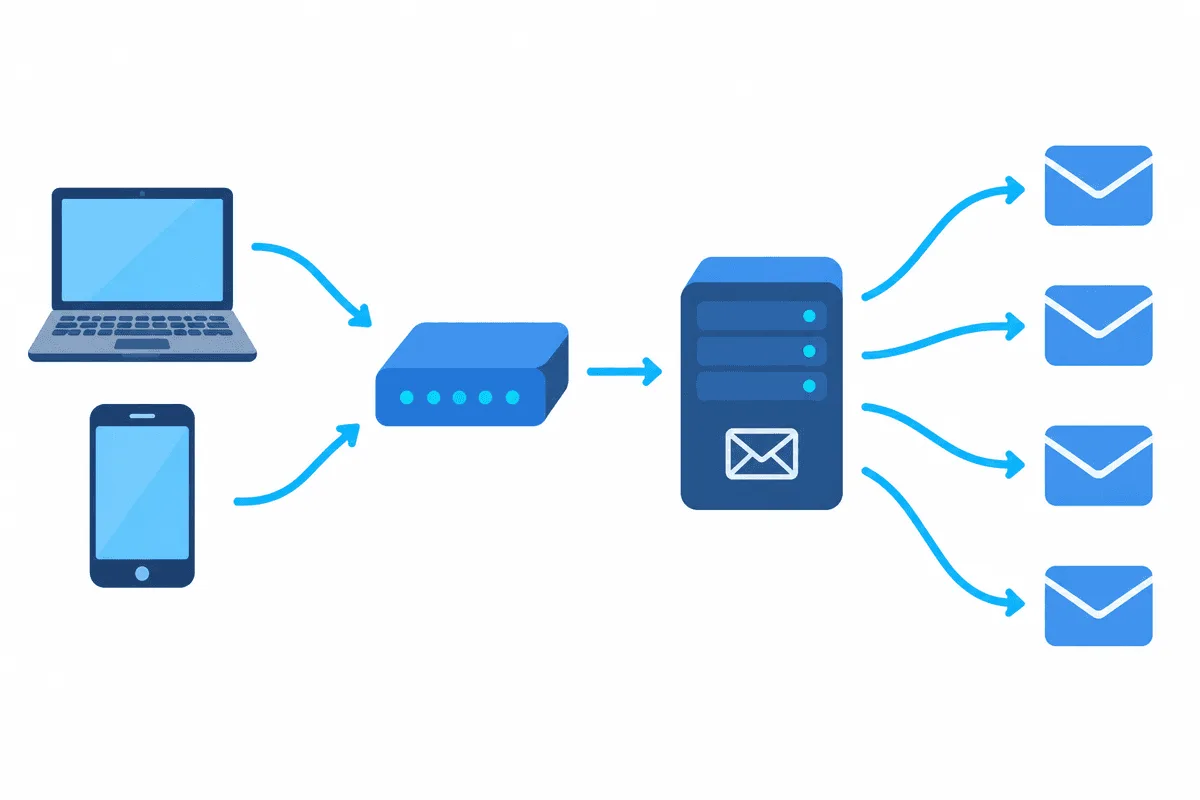
Which Protocol Goes Where
| Connection | Typical client | Goes through a system HTTP proxy | Goes through SOCKS5 |
|---|---|---|---|
| Microsoft 365 / Exchange (HTTPS) | Outlook, new Outlook | Yes | Only through a device-level tunnel |
| Webmail in a browser | Any browser | Yes | Yes, if the browser is set up for it |
| IMAP / POP3 (993, 995) | Thunderbird, Apple Mail, Outlook | Usually no | Thunderbird natively, others via tunnel |
| SMTP submission (587, 465) | Same clients | Usually no | Same as IMAP, if the proxy allows the port |
The last row is where many setups break, which is why it gets its own section below.
Outlook on Windows
Classic Outlook
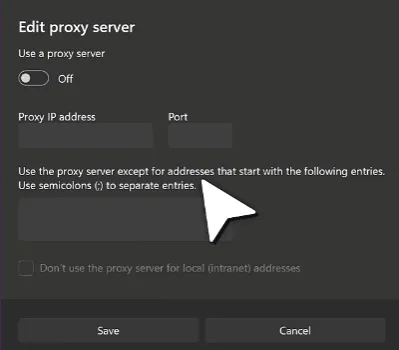
Classic Outlook has no proxy fields of its own. For Exchange, Microsoft 365 and Outlook.com accounts it relies on the Windows proxy:
- In Windows Settings, the gateway options sit in the Proxy page of the Network & internet group.
- Use the manual section of that page: its form wants just two values, the gateway host and the port number, plus the switch that activates them.
- Close Outlook completely and launch it again, otherwise it keeps its old connections alive.
Credentials are requested in a separate Windows prompt when the proxy demands them. IMAP and POP3 accounts in classic Outlook generally connect directly and ignore this setting, so for them use a device-level tool such as Proxifier with a rule for outlook.exe.
New Outlook for Windows
The new Outlook is built on web technology and uses the same Windows proxy. One difference matters: when you add a non-Microsoft account such as Gmail or a self-hosted IMAP box, new Outlook syncs it through the Microsoft cloud. Your mail server then sees connections from Microsoft, not from your proxy, and only the link between your computer and Microsoft passes through the gateway.
Thunderbird
Thunderbird is the most flexible desktop client here, because its proxy settings apply to mail protocols too.
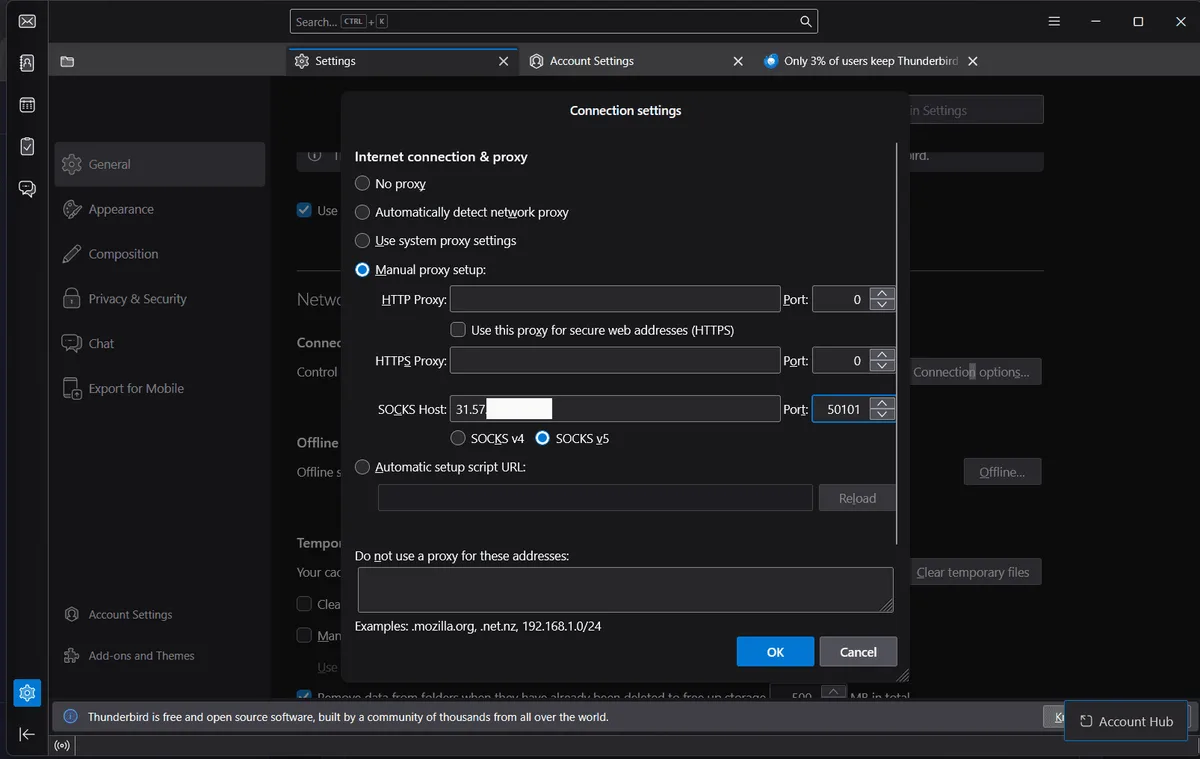
Step 1. Open the connection settings
Thunderbird keeps this dialog far from the account settings. It hides near the end of the General tab, in the block about network and disk usage, behind the button on the Connection row.
Step 2. Fill in the SOCKS host
Select the manual mode. The HTTP rows can stay blank, since only the SOCKS row matters for mail: host on the left, port number on the right, version 5 below. One more checkbox deserves a tick, the one that sends DNS lookups through SOCKS v5, so mail server names are looked up by the gateway too and not by your local network.
Step 3. Solve authorisation
The dialog has no fields for a SOCKS username and password. Two working answers: authorise your own IP in the provider panel so the proxy accepts connections without a password, or run a small local helper that adds credentials and point Thunderbird at it. A SOCKS5 proxy with IP allowlisting fits this client best.
Step 4. Test both directions
Fetch new mail, then send yourself a message. If receiving works and sending hangs, the outgoing port is closed somewhere along the path.
Phones and Tablets
- iPhone and iPad. The proxy in Wi-Fi settings handles web traffic. Apple Mail IMAP and SMTP connections are not guaranteed to use it, so a client that tunnels all apps through SOCKS5 is the dependable route. Our guide to proxy setup on the iPhone compares the options.
- Android. The Wi-Fi proxy is also web-oriented and many apps skip it. Tunnelling apps that take the VPN slot send chosen apps, including mail clients, through a SOCKS5 server with a login and password.
- Gmail and Outlook apps. Both sync through their own web services, so any tunnel that carries HTTPS is enough. Provider-specific notes are in our articles on Gmail through a proxy and on the Yahoo Mail proxy.
SMTP Ports: the Usual Blocker
Proxy services, hosting companies and home ISPs often close outgoing mail ports to stop spam from passing through their networks. Port 25 is blocked almost everywhere; submission ports 587 and 465 are restricted by some providers too. Ask your provider which ports are open before blaming the client.
Mail clients are not tools for bulk sending. Newsletters and transactional mail belong with an email service provider that handles consent, unsubscribe links and reputation, and no proxy setup changes that rule.

Which Proxy Suits a Mail Client
- Static, not rotating. Mail clients keep long IMAP sessions open and reconnect every few minutes. A changing IP looks like the account moving around and invites security checks. Static proxies give one stable address.
- Your own country. A login from the place where you usually read mail raises no questions.
- SOCKS5 for mail protocols. HTTP proxies carry HTTPS sync and webmail, while IMAP and SMTP need SOCKS5 or a device-level tunnel. The differences are explained in our comparison of SOCKS5 and HTTP.
Troubleshooting
- Outlook ignores the proxy. The account uses IMAP or POP3. Route
outlook.exewith a rule-based tool or move to Exchange or Microsoft 365 sync. - Thunderbird reports a connection timeout. Check the SOCKS port, the version (v5) and whether your IP is authorised on the proxy.
- Incoming mail works, outgoing fails. Port 587 or 465 is closed on the proxy or network; ask the provider or send without the proxy.
- The provider asks to confirm a sign-in. Expected after an IP change. Confirm it once and keep the same exit afterwards.
Email Client Proxy FAQ
Does Outlook have its own proxy settings?
No. Classic and new Outlook use the Windows proxy for Exchange, Microsoft 365 and Outlook.com accounts. IMAP and POP3 accounts in classic Outlook usually connect directly.
Can Thunderbird send IMAP and SMTP through a proxy?
Yes. Thunderbird routes mail protocols through a SOCKS4 or SOCKS5 server set under Connection Settings. It has no fields for SOCKS credentials, so IP authorisation is the simplest option.
Why can I receive mail through a proxy but not send it?
The proxy or the network blocks outgoing mail ports. Port 25 is closed almost everywhere, and some providers restrict 587 and 465 too.
Will a proxy hurt my email deliverability?
No. After submission your provider's servers deliver the message, so SPF, DKIM and reputation depend on them rather than on the proxy.
Which proxy type works best for an email client?
A static SOCKS5 proxy in your own country, so long IMAP sessions stay on one address and sign-in checks stay quiet.