Yahoo Through a Proxy: Setup on Any Device and Picking the Right IP Type


Using Yahoo through a proxy means configuring the proxy in your browser, your operating system or your phone's network profile, after which Yahoo Mail, Finance, News and Search all see the proxy's address in place of yours. Yahoo has no proxy switch of its own, so the mechanics match any other site. The IP type is where the real decision lies: a mailbox wants a quiet address that never moves, whereas pulling data from Yahoo Finance wants a pool of addresses and an unhurried request rhythm.
Below you will find which proxy fits which Yahoo job, configuration for Chrome, Windows, macOS, Android and desktop mail programs, ways to confirm the result and a decoder for the errors Yahoo throws at proxy users.
Proxies for Yahoo
Residential and datacenter proxies with country targeting for Yahoo Mail, Search and Finance
What People Use Yahoo Through a Proxy For
- Mail while travelling or behind an office gateway. A permanent home-country IP spares you Yahoo Mail's extra checks every time you move to another hotel.
- Comparing regional editions. Yahoo builds different front pages, news selections and finance sections for different countries. Editors and marketers borrow a local IP to see exactly what readers there see.
- Auditing search results and ads. Yahoo Search pages and their ads depend on location, so a proxy in the target city reveals the local picture. Worth knowing: the organic listings in Yahoo Search come from Bing, so positions there largely mirror Bing.
- Gathering public figures. Quotes, price history and headlines on Yahoo Finance and Yahoo News feed plenty of analytics projects, and the requests have to be shared among several addresses.
Yahoo's terms keep applying regardless of the purpose. A proxy is no instrument for bulk sign-ups, spam or sidestepping a block placed on somebody's account, and Yahoo spots those patterns fast.
Matching the Proxy Type to the Job
| Job | Suggested type | Reasoning |
|---|---|---|
| One Yahoo Mail account | Static residential or ISP | Same address for weeks, no repeated checks |
| Regional editions, ad audits | Residential with country or city choice | Blends in as an ordinary local reader |
| Finance and News data | Rotating residential or a datacenter pool | Spreads the load and keeps spending sane |
| Quick experiments where speed rules | Datacenter | Fast and cheap, though captchas appear more often |
Where Yahoo looks closely at visitors, notably accounts, residential proxies give the highest share of clean connections; enable a sticky session so the IP stays put while you are logged in. For high-volume requests to public pages, where price and throughput matter more, datacenter proxies frequently suffice as long as the tempo stays moderate.
Gather These First
- Host and port as shown in the provider's dashboard.
- Which protocol that port speaks, HTTP or SOCKS5.
- Credentials, or your own IP whitelisted by the provider.
- The target country: an exact location for regional checks, or the account's usual country for mail.
Chrome: Proxy Only for the Browser
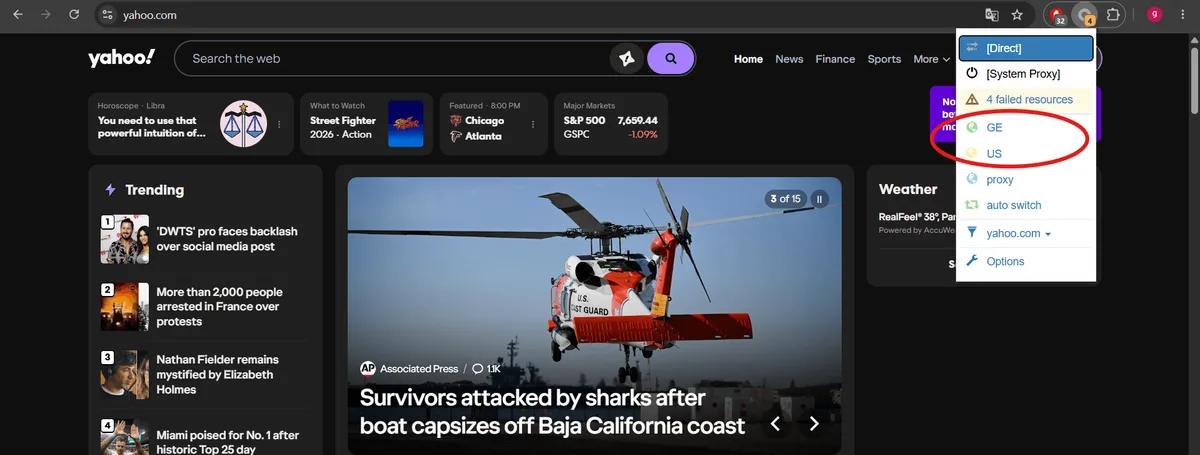
An add-on reroutes the browser and nothing else, which is ideal when Yahoo is the only thing that needs the proxy.
- Choose a proxy manager whose developer is easy to identify; our walkthrough of Proxy SwitchyOmega and its maintained ZeroOmega fork shows every screen.
- Build a profile with protocol, host and port, and tuck the username and password behind the padlock icon. Chrome lets add-ons authenticate HTTP and HTTPS proxies only, so pick the HTTP port when credentials are involved.
- Activate the profile from the toolbar and load yahoo.com.
Working with several regions? Make one profile per country and hop between them from the toolbar.
Windows: System-Wide Configuration
- Bring up settings with
Win+I, pick the network and internet section, then the entry called Proxy. - In the manual part of that page, the row about using a proxy server carries a Set up button; press it.
- Slide the switch to On, put the address and port into their two boxes and confirm with Save.
- Relaunch the browser. Password-protected proxies trigger a credentials box on the first page.
From now on, every program obeying Windows networking goes through the proxy, so flip the switch back when the session is over.
macOS: Proxy per Network Service
- Through the Apple menu, open System Settings, go to Network and click the connection currently in use, Wi-Fi or Ethernet.
- A Details button leads to several tabs; Proxies is the one.
- Turn on the web proxy entries for HTTP and for HTTPS, give each the server and port and, if required, switch on authentication with your credentials. A SOCKS5 port goes into the SOCKS entry instead.
- Confirm with OK and reload Yahoo in Safari or Chrome.
Older macOS releases keep the same fields in System Preferences, under Network, Advanced and then Proxies.
Android: Proxy Inside the Wi-Fi Profile
Tap the cog beside your current wireless network, change the Proxy line to Manual and type host and port. That proxy works only on the network you edited, has no password field and may be ignored by some apps, the Yahoo Mail app among them. An authenticated proxy or cellular coverage calls for a client app; our Android proxy guide compares the options.
Yahoo Mail in Outlook, Thunderbird and Similar Clients
Desktop mail programs reach Yahoo via IMAP and SMTP, so browser add-ons have no effect on them. Two points deserve attention:
- Many third-party clients need a Yahoo app password rather than your normal one. Generate it in Account Info under Account security and paste it into the client.
- The client requires its own SOCKS5 setting. Thunderbird keeps it on the General settings page, near the bottom, behind the connection settings button; Outlook depends on system-wide tools.
Confirming It Works
- Open an IP lookup page and check that address and country belong to the proxy. Our free proxy checker can test the server separately.
- Visit yahoo.com. A European IP first shows a cookie consent screen; afterwards the headlines and edition should match the proxy's country.
- For mail, sign in and look at the Recent activity page in your Yahoo account settings. Recent sign-ins appear there with a location, and the newest one should show the proxy's region.
- For long sessions, reload the IP page half an hour later: a sticky or static proxy must report the same address.
Yahoo Errors You May Meet
"Error 999" or "Unable to process request at this time". Yahoo's rate limiter has blocked the address after too many requests. Slow down, add pauses, spread the load over more IPs and give that address a rest before retrying. Our article on avoiding blocks during web scraping goes deeper into pacing.
HTTP 429 "Too Many Requests" on Yahoo Finance. The same principle applied to the finance pages and their data endpoints. Cache what you already have and fetch only new data.
Yahoo Mail keeps asking for verification. The IP or country changes too often, or the address is crowded with other users. Move to a static address in the account's usual country.
Captcha after captcha. The address carries a bad reputation, or a datacenter IP is hitting a sensitive page. Switch to residential addresses and lower the frequency.
Yahoo will not open. Try the proxy on a different site first. Nothing loading anywhere points to host, port or protocol; if only Yahoo fails, try another IP or another proxy type.
Yahoo proxy FAQ
Can I set a proxy inside Yahoo Mail?
No. Yahoo has no network options. The proxy is set in the browser, the operating system, the mail client or the phone's Wi-Fi profile.
Which proxy is best for Yahoo Mail?
A static residential or ISP address in the country where you normally use the account. A fixed IP avoids repeated sign-in checks.
What does Yahoo error 999 mean?
It is a temporary block for too many requests from a single IP within a short time. It usually lifts after a pause, and slower requests spread across more addresses prevent it.
Do Yahoo Search results change with a proxy?
Yes. Results and ads depend on location, so a proxy in another country or city shows that local version. The organic part is supplied by Bing, which makes local Yahoo results resemble Bing's for the same place.
Are free proxies OK for Yahoo?
Not for mail. Free servers are shared, unreliable and able to read unencrypted data. They may do for a quick glance at public pages, but expect plenty of captchas and errors.