Proxies for Signal: How to Choose One and Set It Up

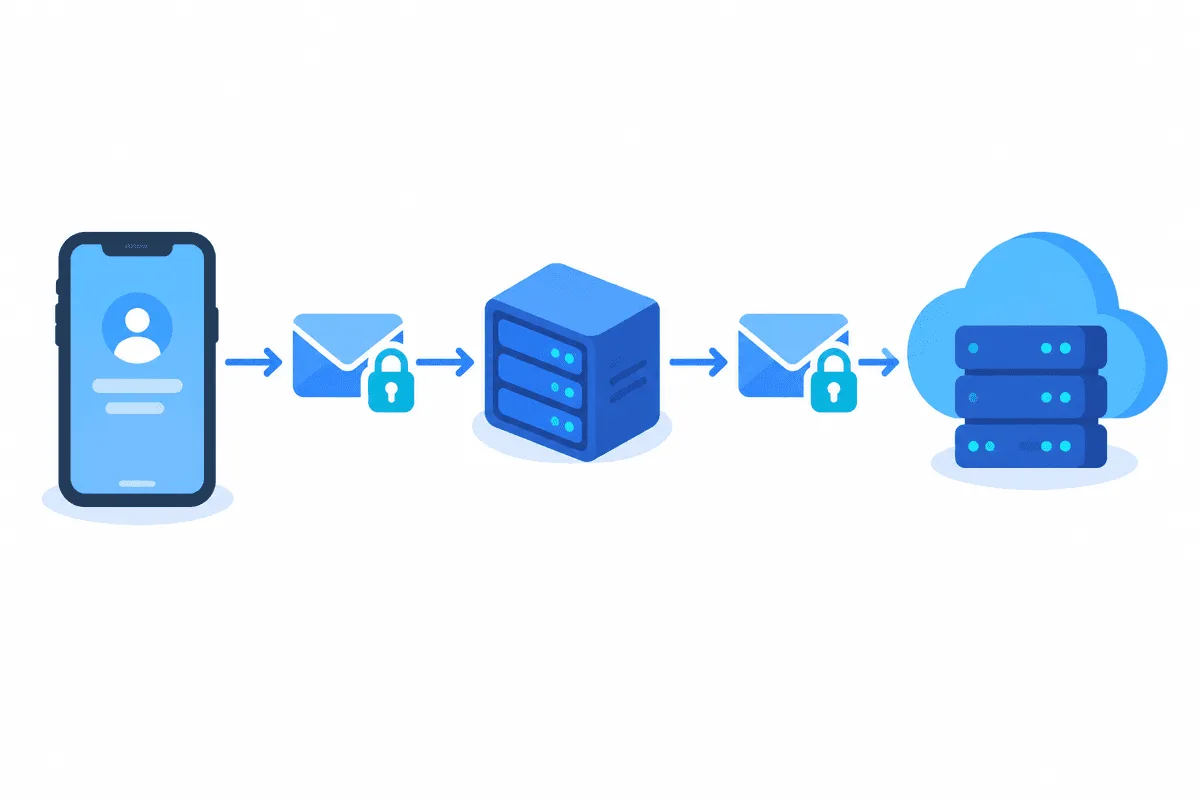
Signal can reach its servers through a proxy in two different ways. The first is built into the phone apps: you paste a special proxy link (or scan its QR code) under the proxy item in settings, and the messenger wraps its connection inside an ordinary-looking TLS session to a relay. The second is a regular SOCKS5 or HTTP proxy applied at device level, because Signal itself has no fields for a host, port and password.
Most guides blur these two together and then wonder why a purchased SOCKS5 address will not paste into Signal. Below we separate them: what the built-in relay is, where its switch lives on Android and iPhone, how to host your own relay, how to push Signal through a commercial proxy when you need a fixed exit, and what happens to voice and video calls along the way.
SOCKS5 proxies for messengers
Static SOCKS5 addresses with a login and password for device-level routing
Two Routes Signal Understands
| Built-in Signal proxy | SOCKS5 / HTTP at device level | |
|---|---|---|
| What you enter | A link such as https://signal.tube/#relay.example.org | Host, port, username, password in a separate app or OS setting |
| Where it is configured | Inside Signal on Android and iOS | Tunnelling app, Wi-Fi settings or Proxifier on a computer |
| Traffic it carries | Only Signal | Everything you route, or selected apps |
| Who runs the server | A volunteer, an organisation, or you | Your proxy provider or your own server |
| Typical reason | Signal blocked on the network or in the country | Stable exit IP, corporate rules, one address for several apps |
The built-in variant is a narrow tool. It does not hide your IP from other services and cannot be filled with credentials from a proxy shop. Device-level routing is broader and works with any provider, but you manage it outside the messenger.
When a Proxy Is Worth Setting Up
- The network blocks Signal. Office firewalls, campus Wi-Fi and some national filters cut access to Signal servers. The built-in relay exists precisely for this and is the option Signal itself documents.
- You need a predictable address. Teams that use Signal Desktop on shared machines sometimes have to leave the office network through an approved gateway.
- Travel. On hotel or airport connections a relay you trust is often more reliable than a random hotspot.
A proxy does not weaken or strengthen Signal encryption: messages are end-to-end encrypted before they leave the phone, so the relay operator sees encrypted bytes, not your chats. What the operator can notice is that your IP connected to their server and when.
Option 1. The Built-in Signal Proxy
Step 1. Get a Relay Link You Trust
Proxy links are shared by people who run relays: digital rights groups, colleagues, or yourself. Treat the link like any network setting and take it only from a source you know. A public link posted on social media tends to get blocked quickly once it spreads.
Step 2. Turn It On in Android
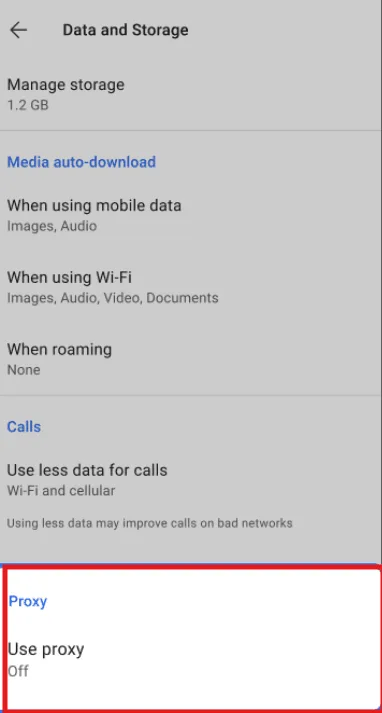
The simplest path is to tap the link on the phone: Signal opens and offers to enable the relay. To do it by hand, open Settings → Data and storage → Use proxy, switch the toggle on, paste the address and tap Save. If you have not registered yet, the same screen is reachable from the registration flow.
Step 3. Turn It On in iPhone
On iOS the item sits deeper: Settings → Privacy → Advanced → Proxy. Enable Use proxy, paste the address and save. Tapping the link in Safari or scanning its QR code with the camera does the same in one move.
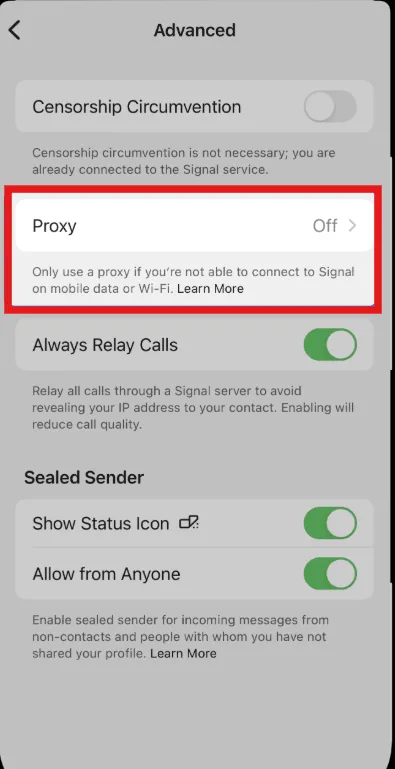
Step 4. Check the Status
A connected relay shows a green check next to the proxy entry. If the relay has been blocked or is offline, Signal shows that it cannot connect and messages stop arriving until you switch to another address or turn the proxy off.
Signal Desktop has no proxy screen of its own. It is a linked device, so the phone must stay registered, and for the computer you use the routing described in Option 2.
Running Your Own Signal Relay
If you need a relay for a team or for relatives, hosting one is a short job. Signal publishes the server as an open-source project called Signal-TLS-Proxy. You need:
- a small server with ports 80 and 443 free;
- a domain name that points to that server;
- Docker installed.
The flow from the project page is: clone the repository, run the certificate script, then start the containers with Docker Compose. After that the link for your users looks like https://signal.tube/#relay.example.org, where the part after the hash is your domain. The maintainers aim to ship updates ahead of changes on Signal servers, so pull a fresh version at least once a month.
git clone https://github.com/signalapp/Signal-TLS-Proxy.git
cd Signal-TLS-Proxy
./init-certificate.sh        # asks for the relay domain
docker compose up --detach
The relay does not store messages and does not need an account. Still, keep the host patched and give the link only to people you intend to serve.
Option 2. A Commercial SOCKS5 Proxy at Device Level
Pick this route when the goal is a fixed exit address rather than getting around a block. Since Signal will not accept host, port and credentials, the tunnel has to be built by another layer:
- Android. A tunnelling app takes the device VPN slot and forwards chosen apps to a SOCKS5 server with authentication. Our Android proxy guide compares the options.
- iPhone. Wi-Fi proxy settings handle only HTTP and do not cover every connection, so a client that supports SOCKS5 rules is more reliable. Details are in our article on proxies on the iPhone.
- Windows and macOS. Proxifier or a similar rule-based tool can send just Signal Desktop through the proxy. Older Signal Desktop builds also read the
HTTPS_PROXYenvironment variable; it is undocumented, so test it on your version before relying on it.
For this setup a SOCKS5 proxy with a login and password is the usual choice. If the protocol is new to you, start with our explainer on how SOCKS5 works.
Which Address to Choose
- Static rather than rotating. Signal does not ban accounts for using a proxy, but an exit that changes every few minutes breaks long-lived connections and delays notifications. Static proxies keep one address for the whole session.
- A nearby country. Every hop adds delay. An exit in your own region keeps messages and calls responsive.
- One provider you trust. The proxy cannot decrypt your chats, but it does see connection metadata. A paid service with clear terms beats an anonymous free list.
What Happens to Calls
Signal voice and video calls prefer direct UDP paths and fall back to Signal relay servers when a direct route is impossible. Through a TCP-only proxy chain, text keeps working while calls may connect slowly or drop. Two things help: enable Always relay calls under Settings → Privacy → Advanced, which routes calls through Signal servers and also hides your IP from the other party, and exclude Signal calls from the tunnel when your tunnelling app allows per-app rules.
Fixing Common Problems
- Proxy link saved, status stays red. The relay is down or blocked on your network. Ask the operator for a fresh link or try another one.
- The link opens a web page instead of Signal. Update the app; old builds do not recognise proxy links.
- Commercial proxy set up, Signal still on the old IP. The tunnel covers other apps but not Signal. Check per-app rules and restart the messenger.
- Messages arrive late. A rotating exit or a distant country. Switch to a static address closer to you.
- Desktop will not link. The phone must be online during linking. Finish linking first, then enable the proxy on the computer.
For a comparison with messengers that have richer proxy menus, see proxies in Telegram, where SOCKS5 and MTProto are configured directly in the app.
Signal Proxy FAQ
Does Signal have a built-in proxy?
Yes. The Android and iPhone apps accept Signal proxy links, which route the app through a TLS relay. It is a special relay for Signal only, not a SOCKS5 or HTTP field.
Can I enter a SOCKS5 proxy in Signal?
Not inside the app. Use a tunnelling app on Android, a SOCKS5-capable client on iPhone, or a rule-based tool such as Proxifier for Signal Desktop.
Can the proxy owner read my Signal messages?
No. Messages are end-to-end encrypted before they reach the relay, so the operator sees only that a device connected and how much data passed.
Why do messages work but calls fail through a proxy?
Calls rely on UDP and relay servers. A TCP-only tunnel can break them; turning on Always relay calls or excluding calls from the tunnel usually fixes it.
How do I run my own Signal proxy?
Install the open-source Signal-TLS-Proxy on a server with a domain name and free ports 80 and 443, start it with Docker Compose, and share the resulting signal.tube link with your users.