Streisand Setup: Adding a Proxy on iPhone, iPad and Mac

Streisand is a free iOS client that routes traffic through servers you bring yourself: paste a share link or subscription, scan a QR code, or type a SOCKS5 proxy in by hand, then tap the round button to connect. The app sells no servers, so it only becomes useful once you have a config from a provider or from a server you run.
Below we go through where to get the app, the three ways to add a profile, how a plain SOCKS5 proxy with a login fits in, how to confirm the new IP and what to do if nothing loads. Windows and Android users will find a short section on which clients replace Streisand there, because the app exists only for Apple devices.
SOCKS5 proxies
SOCKS5 proxies with a login and password that you can add to Streisand manually
What Streisand is and where it runs
The App Store listing describes Streisand as a proxy client with no built-in VPN service. It understands a long list of protocols: VLESS (including Reality), VMess, Trojan, Shadowsocks, SOCKS, SSH, Hysteria 2, TUIC and WireGuard. Under the hood it creates a system VPN profile on the device, so every app goes through the selected server without its own proxy settings.
| Platform | Status | How to install |
|---|---|---|
| iPhone, iPad | Supported, iOS/iPadOS 14 or newer per the store listing | App Store |
| Mac | Runs on Macs with Apple silicon (M1 and later), macOS 12 or newer | Mac App Store, as the iPad app |
| Windows | No official build | Use v2rayN, Throne or a similar client |
| Android | No official build | Use V2Box, Hiddify-type clients or SocksDroid |
Install the app only from the App Store and check that the publisher name matches the one listed there. Copies of the IPA floating around forums are a needless risk for a tool that sees all your traffic.
What you need before you start
- A config. Either a share link that starts with
vless://,vmess://,trojan://orss://, a subscription URL from your provider, or plain proxy details. - For a proxy: host, port, login and password. The listing mentions SOCKS and does not list HTTP, so ask for a SOCKS5 port. Our SOCKS5 proxies come with exactly these four values.
- iOS permission to add a VPN configuration. The system asks for it on the first connection.
How to add a profile in Streisand
All three methods start from the + button in the upper right corner of the main screen. Menu wording can shift a little between versions, but the options stay the same.
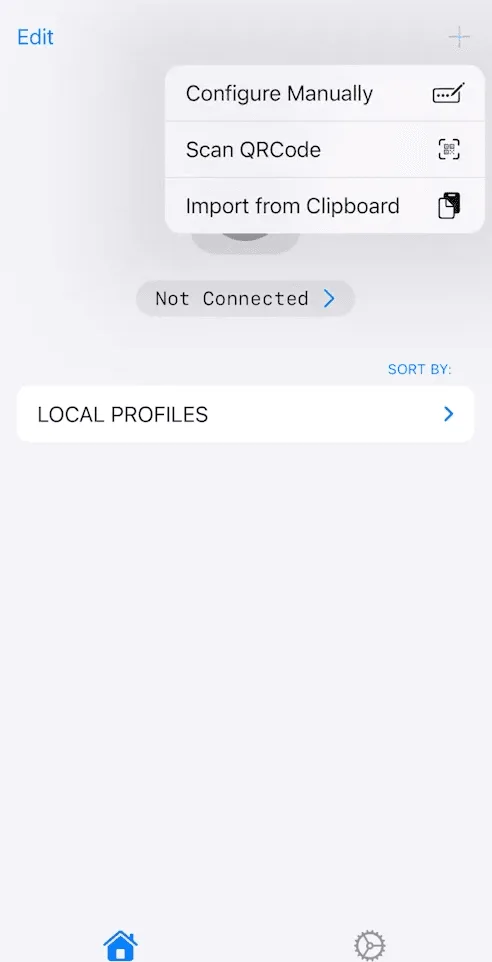
Option 1. Import from the clipboard
- Copy the whole share link or subscription URL from your provider's panel or message.
- Open Streisand, tap + and pick Import from Clipboard.
- If iOS asks whether Streisand may paste, allow it. You can make this permanent in the iOS Settings app, in the Streisand section.
- A subscription appears as a group of servers; a single link becomes one profile.
A subscription is handy when the provider changes servers: you refresh the group instead of re-adding every entry.
Option 2. Scan a QR code
- Tap + and choose the QR scanning option.
- Allow camera access.
- Point the camera at the code shown by your provider or server panel and save the profile if prompted.
Option 3. Enter a SOCKS5 proxy manually
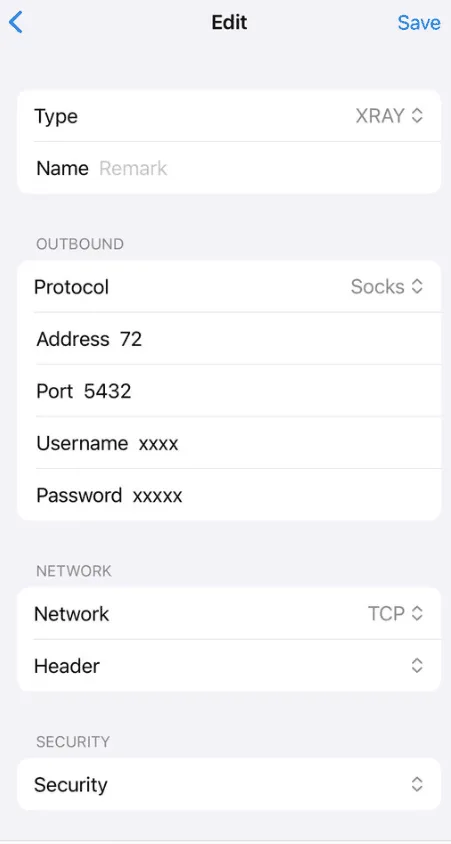
Manual entry is the safest route for a classic proxy, especially when the password contains characters such as @, : or # that break links.
- Tap + and choose manual configuration.
- Select the SOCKS type.
- Fill in the address (IP or domain) and the port.
- Turn on authentication if the profile has such a switch and type the login and password.
- Name the profile, for example by country, and save.
Can you paste a SOCKS link?
Many providers show a ready string in the socks:// link form. Different clients parse such links differently: some expect the credentials as plain text, others as a Base64 block. If Streisand imports the link but the connection fails with an authentication error, delete the profile and create it manually. This takes a minute and removes any parsing doubt.
Connecting and checking the IP
- Tap the profile you want to use so it becomes active.
- Press the large round button.
- On the first run iOS shows a request to add VPN configurations. Tap Allow and confirm with your passcode, Face ID or Touch ID.
- A VPN icon appears in the status bar once the tunnel is up.
- Open Safari and load any IP lookup page or our IP checker. The address and country should belong to the proxy, not to your mobile operator or home ISP.
If you have several profiles, the ping or latency test in the list helps pick a responsive one, but keep in mind that a low ping to the server says nothing about the speed of the sites behind it.
Routing: proxy everything or only some traffic
By default the tunnel catches all traffic of the device. Streisand also has routing settings where you decide which domains or IP ranges go through the profile and which go direct. The usual pattern is to send only the services that need another location through the proxy and leave banking apps, local sites and video calls on the direct line. If a particular app ignores the proxy, look there first: a rule may be sending it direct.
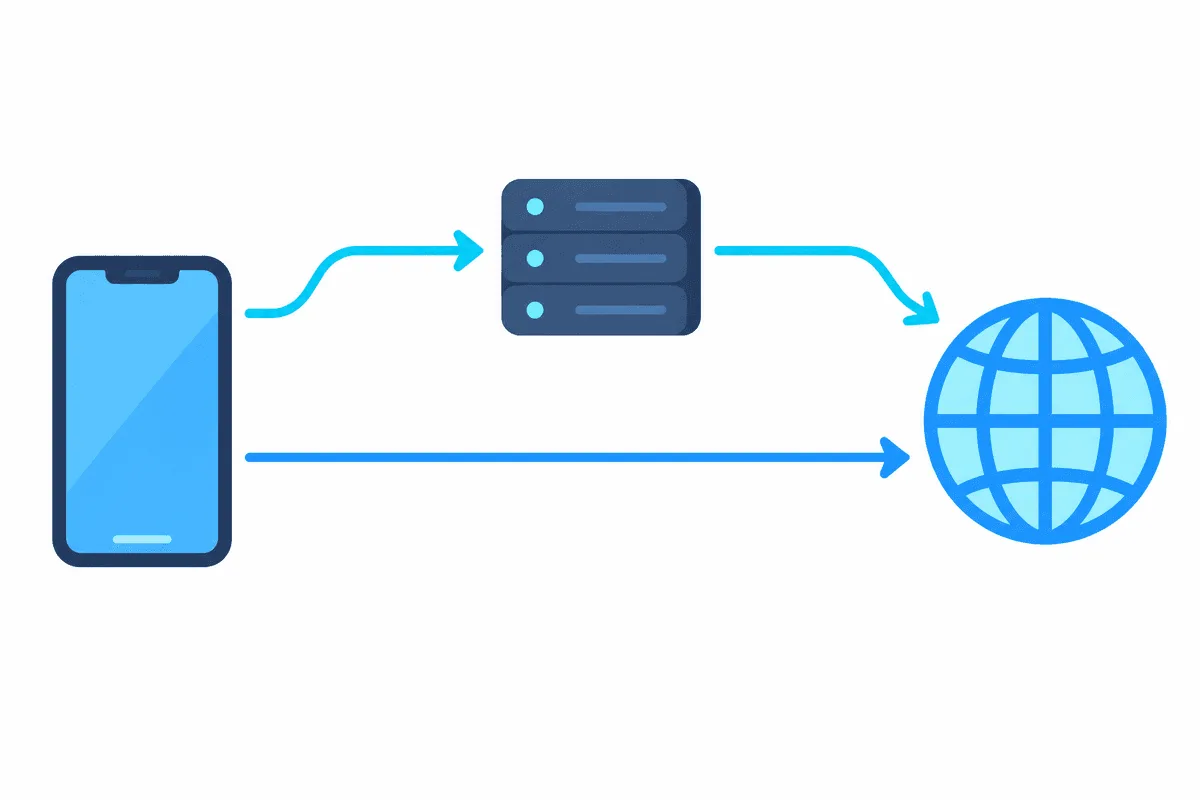
Streisand on Mac
On a Mac with Apple silicon the iPhone and iPad version installs from the Mac App Store. It works the same way: add a profile with +, connect, approve the VPN configuration in the macOS prompt. Intel Macs cannot run it; on those machines use a desktop client such as Clash Verge or the Mac version of a cross-platform app that handles SOCKS5 and rule files.
What to use on Windows and Android
There is no Streisand for these systems, and download sites offering a Streisand APK or EXE are not the official app. Clients that read the same share links:
- Windows: v2rayN accepts VLESS, VMess, Trojan, Shadowsocks and SOCKS links and subscriptions; Throne is a lighter alternative.
- Android: V2Box imports the same links and subscriptions; for a single SOCKS5 proxy without other protocols SocksDroid is enough.
- Another iOS option: Shadowrocket is paid, but it has separate fields for HTTP and SOCKS5 proxies and detailed rule files.
Wider instructions for phones, including system Wi-Fi proxy settings, are in our articles about a proxy on iPhone and a proxy on Android.

Troubleshooting
| Symptom | Likely cause | Fix |
|---|---|---|
| The button turns on, but pages do not open | Wrong port, a protocol mismatch (HTTP port in a SOCKS profile) or an expired server | Check the port type with the provider, recreate the profile |
| Authentication error | Typo in the login or password, a link parsed incorrectly | Enter the credentials manually |
| Clipboard import does nothing | The copied text is truncated or contains spaces | Copy the full link again, or use the QR code |
| Subscription shows no servers | The URL expired or the provider blocks the request | Refresh the subscription, ask the provider for a fresh link |
| Some apps keep the old IP | A routing rule sends them direct | Review the routing settings |
| Connection drops after locking the phone | iOS battery restrictions, an unstable server | Update the app, try another server or protocol |
When the proxy itself is in doubt, test the same details on another device or in a different client. If they fail everywhere, the issue is on the server side.
Streisand FAQ
Is Streisand free?
Yes, the app is free in the App Store. It contains no servers, so the cost depends on the provider whose links or proxies you add.
Does Streisand work with HTTP proxies?
The App Store listing names SOCKS among the supported protocols but not HTTP. Ask your provider for a SOCKS5 port; for HTTP-only setups on iOS, Shadowrocket has a dedicated HTTP type.
Is there Streisand for Windows or Android?
No. The developer publishes it only for iPhone, iPad and Apple silicon Macs. On Windows use v2rayN or Throne, on Android V2Box or SocksDroid.
Why does Streisand ask to add a VPN configuration?
iOS lets apps route traffic of the whole device only through a VPN profile. Streisand registers itself as one, and the system needs your consent once.
How do I know the proxy is active?
Look for the VPN icon in the status bar and open an IP lookup page in Safari. The address and location shown must match the proxy.