TLS Fingerprinting: How JA3 and JA4 Work and Why a Proxy Does Not Change Them

A TLS fingerprint tells a server which software opened an HTTPS session, judging only by the opening move. Before any encryption starts, the client announces what it can do: protocol versions, cipher lists, extension numbers, preferred key-exchange groups. Chrome, Firefox, curl and a Python script each announce this in their own recognisable way. JA3 packs that announcement into one MD5 string, and JA4, the newer method, keeps working even when browsers reorder their extensions on purpose. An ordinary proxy just passes the encrypted bytes along, so the website reads the signature of your program, never one belonging to the relay.
Below: the contents of that first handshake message, the arithmetic behind both hashes, the 2023 browser change that made the older method unreliable, the way anti-bot systems weigh these values alongside address reputation, and what all of it implies when your requests leave through a relay.
Residential proxies
Residential IPs with accurate geolocation for location-specific access
What a ClientHello Reveals
The handshake opens with a message called ClientHello, and most of its content travels unencrypted, visible to any network device in between; Encrypted Client Hello, a recent addition, conceals only an inner portion. Nothing in it is typed by a person. The values come from whichever crypto library the program was compiled with and from the defaults its developers picked:
- Version information — modern clients put 1.2 in the historical header field for compatibility and list 1.3 inside a dedicated extension.
- Cipher suites — which ones appear and in what sequence depends on the crypto library: Chrome ships BoringSSL, Firefox uses NSS, and Python plus most command-line tools rely on OpenSSL.
- Extensions — numbered add-ons: the target hostname (SNI), the application protocols on offer (ALPN), signature schemes, key shares, resumption tickets and dozens of rarer ones.
- Groups and point encodings — which curves (X25519, P-256 and so on) the client will accept for agreeing on keys.
- GREASE values — deliberate junk numbers from RFC 8701; Chrome sprinkles them in so that servers learn to ignore codes they do not recognise.
Pasting a browser identification string into a bot's headers alters a single line, but the handshake underneath still comes from the script's own library. The method lives in exactly that gap between what a client says about itself and how it actually behaves.
How JA3 Is Calculated
Three researchers at Salesforce released JA3 back in 2017. The recipe is short: pick five values out of the handshake, turn every number into decimal, glue the numbers inside one field with hyphens, separate the five groups by commas and feed the resulting string to MD5:
TLSVersion,Ciphers,Extensions,EllipticCurves,EllipticCurvePointFormats
Junk GREASE codes are filtered out first, otherwise every Chrome connection would hash differently. Here is a toy implementation fed with invented numbers:
import hashlib

GREASE_SET = {0x0a0a + 0x1010 * n for n in range(16)}

def build_ja3(version, cipher_ids, ext_ids, curve_ids, point_fmts):
    def joined(values):
        return "-".join(str(v) for v in values if v not in GREASE_SET)
    raw_text = ",".join([
        str(version),
        joined(cipher_ids),
        joined(ext_ids),
        joined(curve_ids),
        joined(point_fmts),
    ])
    return raw_text, hashlib.md5(raw_text.encode()).hexdigest()

sample_hello = dict(
    version=771,
    cipher_ids=[0x2a2a, 4865, 4866, 4867, 49195, 49199],
    ext_ids=[0x3a3a, 0, 23, 65281, 10, 11, 35, 16, 13, 51, 45, 43],
    curve_ids=[29, 23, 24],
    point_fmts=[0],
)
text_form, ja3_digest = build_ja3(**sample_hello)
print(text_form)
print(ja3_digest)
JA3S applies the same trick to the server's answer. Looking at both values at once came from threat hunting: an infected machine phoning home tends to repeat one distinctive combination, and defenders can alert on it.
Why JA3 Lost Accuracy: Extension Shuffling
The order of extensions goes into JA3 untouched. Google decided that servers should not rely on that order, and from Chrome 110 (early 2023) every Chromium-based browser deals its extensions in a random sequence on each connection. A single laptop running Chrome therefore emits a different JA3 almost every time, so the hash stopped being a reliable browser label. Programs with a frozen order, which includes plenty of HTTP libraries, still map neatly to one value.
JA4 and the JA4+ Family
In 2023 John Althouse, one of the people behind JA3, published JA4 through his company FoxIO. Its design rests on two choices. Lists are ordered numerically before hashing, which neutralises shuffling, and the opening segment stays readable for humans. A value looks like t13d1714h2_4f0c1a9d27be_93b2d6e1a0c4 (an invented sample), and underscores divide it into three segments:
| Part | Content | Example meaning |
|---|---|---|
| a | Readable header: transport letter, protocol version, whether a hostname is sent, two-digit counts of ciphers and extensions, ALPN marker | In t13d1714h2: t for TCP, 13 for the protocol generation, d because a domain is named, then 17 suites, 14 extensions and h2 as the leading ALPN entry |
| b | Truncated SHA-256 (12 hex chars) over the cipher IDs after sorting | Identical whatever order the client lists them in |
| c | Truncated hash of the extension numbers in ascending order, with signature algorithms appended unsorted | Unaffected by random extension order |
Since the opening chunk is plain text, someone reading logs can tell immediately that a client speaks TLS 1.3 over QUIC (q) or TCP (t), or that it sends no SNI. FoxIO grouped further methods under the JA4+ name, covering server replies (JA4S), HTTP request headers (JA4H), certificates (JA4X), TCP handshakes (JA4T) and more. JA4 itself is published under a permissive open-source licence, while the other JA4+ methods use FoxIO's own licence terms, so check them before using the methods commercially.

Other Layers: HTTP/2 and TCP
Security vendors seldom stop at the handshake. Two adjacent layers usually join the analysis:
- HTTP/2 fingerprint. Right after TLS, an HTTP/2 client sends its initial parameters and opens streams with headers in a particular sequence. Browsers and libraries pick different numbers here, and Akamai researchers proposed a compact text format that records them.
- TCP/IP fingerprint. Low-level packet fields set by the kernel hint at Windows, Linux, macOS or a phone. Behind a relay those fields describe the relay machine, so a Linux server signature next to a Windows browser handshake is ordinary for proxied traffic, and detection systems have to interpret combinations, not single values.
These layers belong to the same family as browser-level signals such as canvas and WebGL; our guide to browser fingerprinting covers that side.
Why a Proxy Does Not Change Your TLS Fingerprint
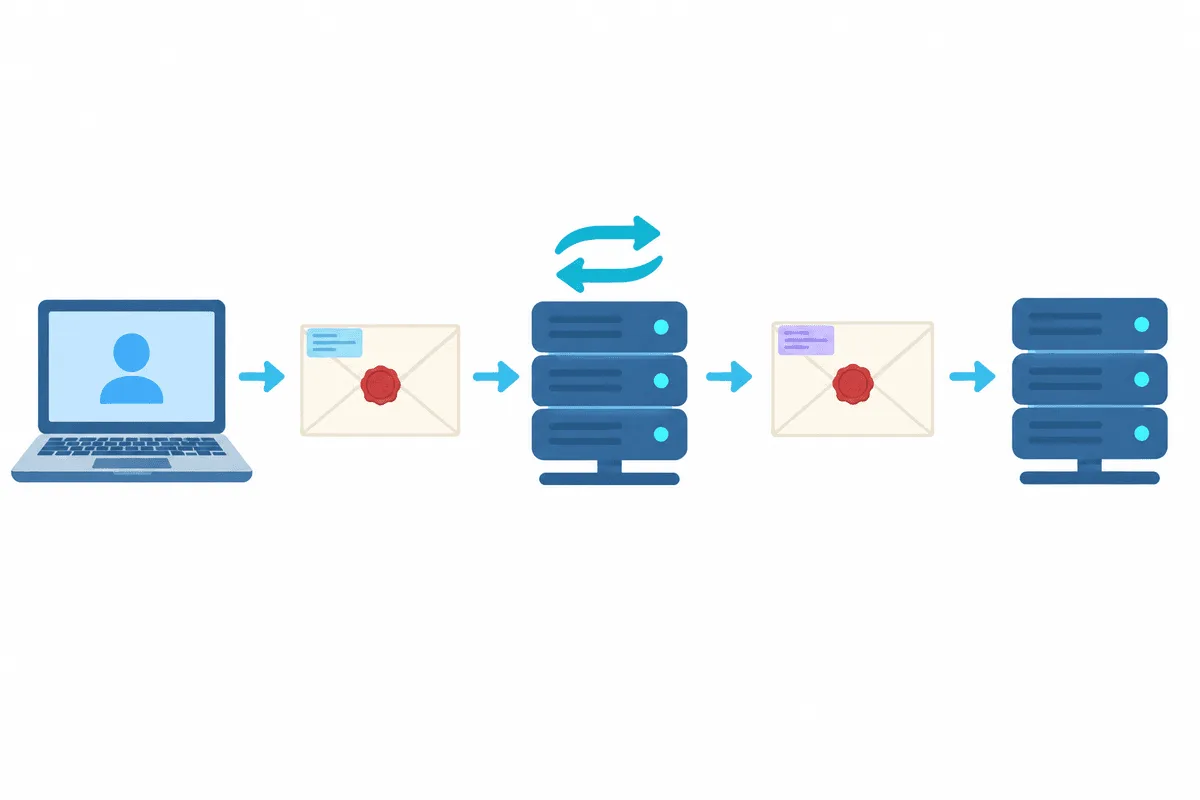
Commercial proxies normally relay ciphertext and never join the cryptographic conversation:
- With an HTTP proxy, the client issues a CONNECT request, receives an opaque byte channel to the target, and runs its own TLS negotiation inside it.
- A SOCKS5 proxy sets up a similar pipe one layer lower, without even reading HTTP; the protocols are compared in SOCKS5 vs HTTP.
So the bytes of the ClientHello are produced on your machine and arrive at the destination unchanged. The site logs a combination of two things: the relay's IP and your software's hash. Things differ only with interception, where a box in the middle ends your encrypted session and starts a fresh one of its own, as office inspection gateways and debugging tools do. In that setup the server meets the middlebox's signature instead. Tunnelling versus interception gets a fuller treatment in our piece on SSL/HTTPS proxies.
How Websites Use TLS Fingerprints
Anti-bot vendors and CDNs feed handshake hashes into their scoring; Cloudflare's Bot Management, for example, exposes both hashes as fields usable in its rule engine. Here is how such values are put to work:
- Cross-checking. A visitor whose headers announce Safari while its handshake belongs to a Go or Python HTTP package raises a flag, because genuine Safari never looks like that.
- Lookup tables. Security teams keep lists that map common hashes to request libraries, scanners and known malicious tools, each with a risk score.
- Trusted partners. A known uptime monitor or partner integration can be exempted from rate limits by its hash.
- Grouping. Thousands of addresses that share an uncommon hash and act alike are treated as one actor, so swapping IPs does little when the client stays the same.
For the remaining detection layers, from address reputation to mouse movement, read our overview of how websites detect bots.
What This Means for Automation Behind Proxies
TLS fingerprints are one more reason that responsible data collection starts with permission, not disguise:
- Prefer official APIs and data feeds. They are built for programmatic clients, and fingerprints do not matter there.
- Respect blocks and challenges. If a site's protection stops your client, treat that as a signal to slow down, ask for access or use another source. Our guide to reducing blocks in web scraping covers pacing, caching and other polite practices.
- Test your own services with real browsers. For monitoring and QA of sites you operate, automation frameworks that drive a full browser produce genuine browser handshakes. Libraries that reproduce browser handshakes also exist and are used in testing, but using them to defeat another site's bot protection can violate its terms.
- Keep proxies for routing and location. A proxy decides where traffic exits, which matters for geo-specific content; it does not and should not impersonate a different client. Our residential proxies are built for location-accurate access, not for changing what software you run.
How to Inspect Your Own Fingerprint
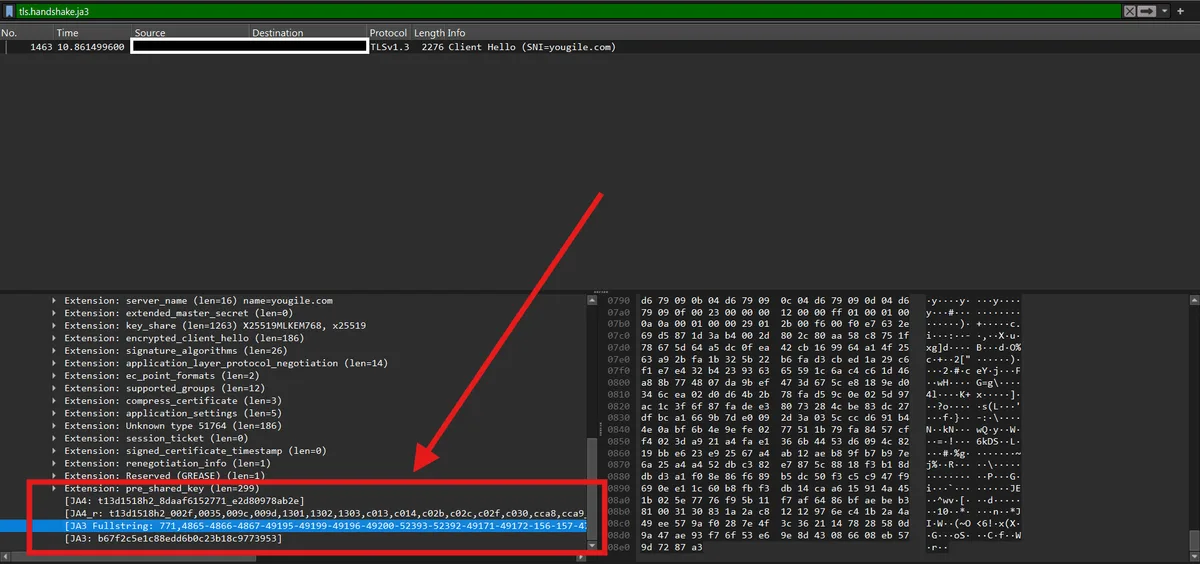
- Wireshark. Capture traffic, filter with
tls.handshake.type == 1and open a ClientHello. Recent versions display JA3 and JA4 values in the handshake details. - Echo pages. Some public test pages simply print back the handshake hashes and HTTP/2 data of whoever visits. Load such a page once from a normal browser and once from your program, and put the two outputs side by side.
- Logs on infrastructure you run. Edge servers and content delivery networks are able to record JA3 or JA4 per request, giving you a picture of which client stacks visit your own site.
TLS Fingerprinting FAQ
What is a JA3 fingerprint?
A JA3 value is an MD5 digest of five lists taken from the opening TLS message. Think of it as a tag for a software build rather than for a person: everyone on the same browser release tends to carry an identical one.
What is the difference between JA3 and JA4?
JA4 sorts the lists before hashing, so random extension order in modern Chrome does not alter the result, and anyone can decode its first block by eye: transport, protocol generation, how many suites and extensions. JA3 hashes the raw order and therefore splinters for Chromium browsers.
Does a proxy or VPN change my TLS fingerprint?
Normally not. CONNECT and SOCKS5 proxies, as well as VPN tunnels, only replace the source address. A TLS-inspecting gateway that opens its own session to the site is the exception.
Can websites block me based on a TLS fingerprint?
It is one input among several. Protection services weigh it together with address reputation, HTTP/2 parameters and on-page activity, and a mismatch with the claimed browser lowers the visitor's score.
Is TLS fingerprinting legal?
Reading the parameters that a client volunteers in every connection is standard security practice for fraud and abuse prevention. Legal questions arise mainly when such hashes are stored alongside personal data, which falls under privacy laws like the GDPR.