Proxies for Twitter (X): How to Choose the Right Type and Set It Up


X (the network once called Twitter) gives two groups a real reason to route traffic through a proxy. Social media teams that look after several brand handles want every handle to sign in from its own predictable network. Researchers who read public posts in bulk want their requests spread out and anchored in a chosen country. The first group should rent a static residential or mobile address per handle; the second should begin with X's official API and bring in rotating residential exits only to fill the gaps it leaves.
The platform distrusts handles that hop between networks. A sign-in from a country or address it has never associated with the account commonly ends in an emailed code, a temporary restriction or a forced logout. Below you will find how those checks behave, a task-by-task table of exit types, connection steps for phones, desktop browsers and antidetect profiles, and the slip-ups that most often cost a team its handles. All of it assumes you play by X's rules: routing traffic differently never turns spam or a suspended account into something acceptable.
Residential proxies for X
Residential IPs with sticky sessions for steady work with social media accounts
How X Treats an Unfamiliar Address
Every sign-in is scored against the account's track record: its normal country, its devices, the kind of connection it uses and how the address itself is reputed. Four patterns come up again and again:
- A first visit from somewhere new. Expect a confirmation step by email or text message. Pass it once and that location is usually remembered.
- Teleporting. Morning activity from Germany followed by a session from Brazil an hour later reads like a stolen or shared login, even when the real culprit is a careless proxy switch.
- Server and public addresses. Bots have lived on hosting ranges and free lists for years, so handles operated from them collect captchas, reading caps and suspensions far more often.
- Little to see while signed out. Since mid-2023 the site hides most content from visitors without an account, which makes anonymous collection without the API nearly pointless.
The working rule follows naturally: pin each handle to one address inside its home market and leave it there. Teams that are only starting to juggle several profiles will find the organisational groundwork in our guide to multiple accounts for business.
What X's Rules Allow
According to X's help centre, a person or an organisation may run as many as ten accounts when every one of them has its own, non-overlapping job: say, a flagship brand handle, a customer care handle and regional handles that post in local languages. Cross-posting identical material from several handles, automating handles that do the same thing and dodging the limits on creating accounts are all forbidden. Automated posting is fine when it goes through the official API and follows the published automation policy.
None of this changes when a proxy enters the picture. Its role is to stop legitimate handles from looking as if strangers keep grabbing them; it is no way back after a suspension and no cover for farms of near-identical accounts.
Matching the Exit Type to the Job
| What you do on X | Exit to rent | Reasoning |
|---|---|---|
| Daily posting and replies for brand or client handles | One static residential (ISP) or dedicated mobile IP per handle | The address never moves and reads as a home line or a phone |
| Working from the X app on a phone | A mobile exit located in the handle's country | Matches the device class X expects; carrier IPs are shared by crowds of genuine subscribers |
| Handles aimed at different countries | A fixed exit in each of those countries | Every handle keeps a believable local footprint |
| Reading public posts for a study | The official X API, with rotating residential where it falls short | The API is the approved channel; rotation spreads load on public pages you may access |
| Previewing a post or a promotion as a foreign viewer | Rotating residential with country selection | A short look from a local IP, nothing to keep alive afterwards |
Phone-carrier addresses forgive the most when it comes to handle management: one carrier IP can front thousands of real people at once, so the platform hesitates before blocking it. Our own mobile proxies are coming soon, and the round-up of proxies for SMM lays the options for other social networks side by side.
Connecting a Proxy for X
Neither the X app nor x.com contains a proxy setting. The address is configured one level up: in the phone, in the browser or in a browser profile.
Phone: iOS and Android
- In the Wi-Fi list, open the network you are on and scroll to its proxy options (iOS calls them Configure Proxy; on Android look under Advanced or Proxy).
- Switch to manual mode, type the server and the port, and on iOS turn on Authentication to add the username and password.
- Launch X, sign in and be ready to confirm a code the first time the account appears from this address.
That Wi-Fi entry applies to one wireless network only and carries HTTP traffic only. Cellular data, SOCKS5 or routing a single app requires a proxy client instead; the client apps are compared in our walkthroughs for proxies on iPhone and iPad and Android proxy setup.
Desktop browser
A single handle needs nothing more than a proxy extension for Chrome, Edge or Firefox. Save a profile containing the server, port and protocol, apply it to x.com and supply the credentials when the browser asks. Keep that handle in its own browser profile, otherwise cookies from other accounts leak into the session.
Antidetect browser
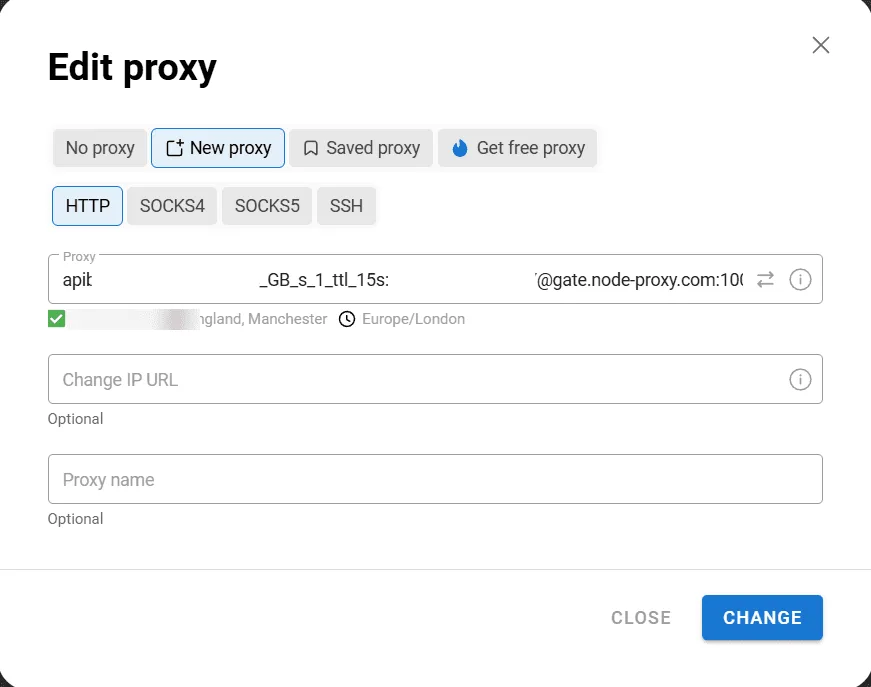
When several handles live on one computer, an antidetect browser walls off their cookies, fingerprints and exits:
- Make one profile per handle and give it the handle's name.
- On the profile's proxy tab pick the protocol, paste the
host:portpair and add the username and password. - Press the built-in check and make sure the reported country is the handle's home market.
- Sign in to that handle from this profile and nowhere else.
Walkthroughs for the most widely used tools are gathered in our antidetect browser proxy guides.
Confirming the Setup
- Still signed out, load an IP lookup page inside the same profile and note the address and country it reports.
- Sign in to X and clear any confirmation step it shows.
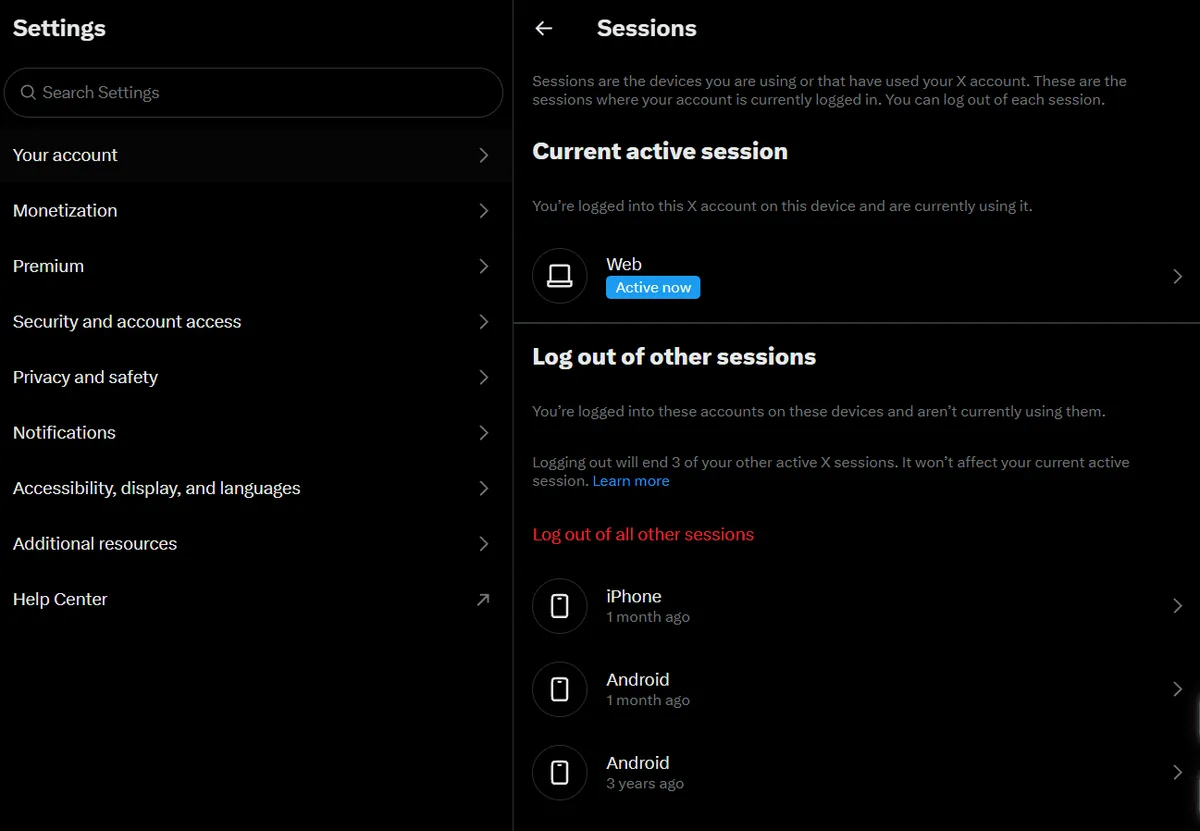
- Go to Settings and privacy, then Security and account access, then Apps and sessions, and open the session list: the newest entry should carry the location you planned.
Slip-Ups That End in Locked Handles
- A fresh IP every time you sign in. Rotation belongs to data collection; handle management needs a fixed exit.
- Several handles behind one address. X ties together accounts seen on the same IP and may restrict them as a group.
- An exit country that contradicts the handle's past. A handle with years of US activity that suddenly surfaces in Asia will be challenged.
- Free lists and open proxies. Slow, unsafe and flagged long ago.
- DNS or WebRTC leaks. If the browser exposes your real address, the rest of the setup is wasted; run a leak test inside the profile.
Twitter (X) Proxies FAQ
Do I need a proxy to use X?
For one personal handle, no. It starts to pay off once you manage several handles from a single office, run handles registered in another country or study public posts in volume.
What type of proxy is best for X?
Handle management works best with a static residential or mobile exit reserved for a single account. Studies and one-time checks call for rotating home addresses in the target country, combined with the official API.
Can X detect that I use a proxy?
It sees the IP, the network that owns it and its history. A clean home or carrier address in the handle's usual country blends in with ordinary members, while hosting ranges and free proxies are easy to spot.
How many accounts can I run on one proxy?
One is the safe answer. A shared IP links the handles in X's eyes, so trouble on one tends to reach the rest.
Is it allowed to have several X accounts?
Yes, ten at most per person or organisation, each with its own purpose. Copying the same posts across handles or running handles that duplicate one another breaks X's rules, whatever network you connect from.