Proxy for Amazon: How to Set It Up and View Regional Stores

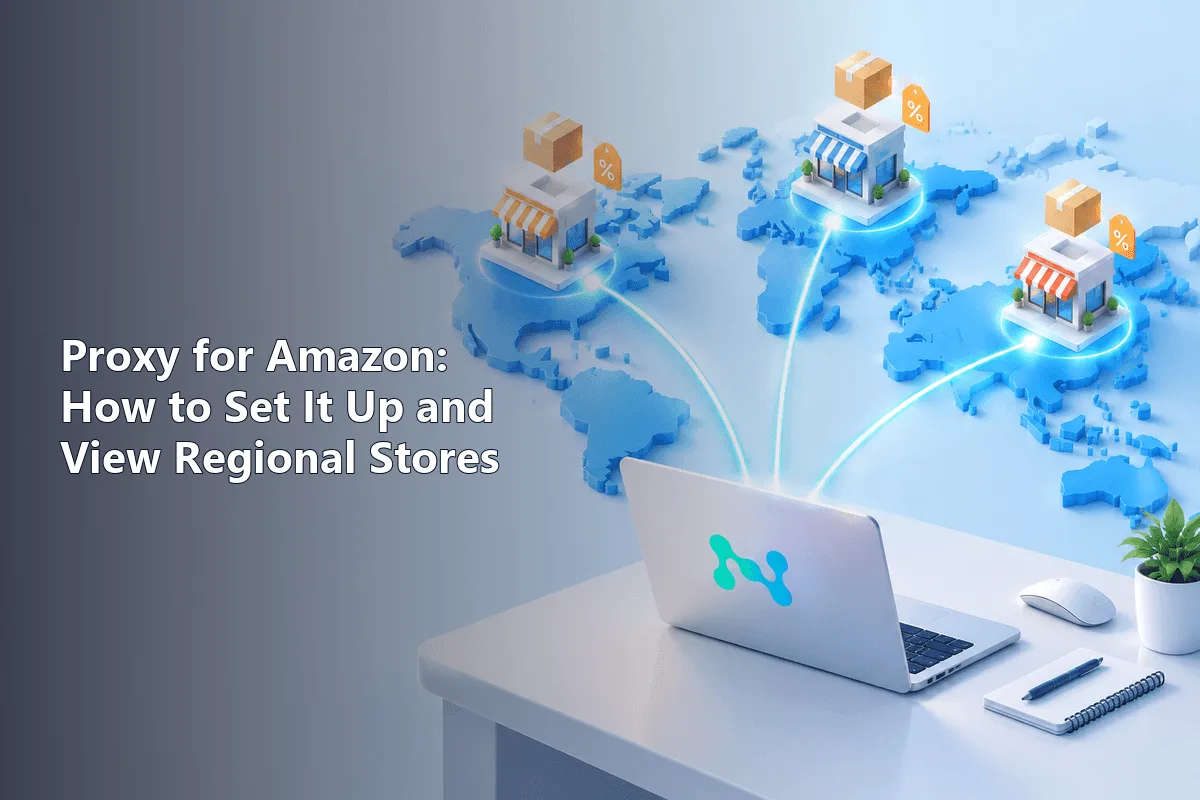
A proxy for Amazon routes your browser or device through an IP address in the country you need, so the store shows the prices, stock, delivery options and sponsored placements that local shoppers see. You set it up in three places at most: a browser extension, the system network settings or the Wi-Fi settings of a phone.
Below you will find a comparison of proxy types for typical Amazon jobs, a short checklist of credentials, walkthroughs for a Chrome extension, Windows 11, macOS and both mobile platforms, a test that shows which storefront Amazon actually serves you, and the platform rules that stay in force whatever your IP.
Proxies for Amazon
Residential and static IPs in the countries of Amazon marketplaces
Why People Use Proxies with Amazon
Amazon runs separate storefronts for the US, UK, Germany, Japan and many other countries. The IP address is one of the signals the store uses to suggest a storefront and to estimate your region before you enter a delivery address. Professionals use proxies to look at Amazon through a local visitor's eyes:
- Sellers check how their listings, prices and Buy Box look in each marketplace they sell in.
- Advertisers and agencies verify that sponsored products and display ads appear in the right country.
- Analysts compare prices and assortment between storefronts for market research.
- Shoppers abroad open their home store with the usual language and currency while travelling.
If all you need is to see prices for a particular US ZIP code, you may not need a proxy at all: the Deliver to selector at the top of the page lets you enter any ZIP code, and Amazon recalculates availability and shipping for it.
Which Proxy Type to Choose
| Type | Strong points | Weak points | Fits best |
|---|---|---|---|
| Residential | IPs of home internet providers, rarely trigger checks | Billed by traffic, speed varies | Viewing storefronts, ad checks, price research |
| Static (ISP) | Fixed address for weeks, fast | Smaller choice of cities | Long sessions in Seller Central, one stable workplace |
| Mobile | Carrier IPs, highest trust | Expensive, fewer locations | Checking the mobile app and mobile ads |
| Datacenter | Cheap and fast | Easy to identify, often meet bot checks | Technical tests, non-Amazon tasks |
For most Amazon work, residential proxies are the default choice. When the same address must stay with one account for a long time, take static proxies in the country of your marketplace. Ready-made packages by location are collected on the page with proxies for Amazon.
What to Prepare Before Connecting
Your provider's dashboard holds everything the setup needs. Copy these values somewhere handy:
- the gateway address, numeric or a hostname, plus its port number;
- whether that port speaks HTTP or SOCKS5;
- a username such as
user-7f3ktogether with its password; - alternatively, whitelisting: register your own public IP in the dashboard and the gateway lets you in with no username at all.
Next, settle on the scope. An extension touches one browser only, which keeps the rest of the computer untouched and is the gentlest choice. A system-wide proxy, by contrast, catches every application that reads the OS network configuration.
Configuring the Connection Device by Device
Step 1. A Proxy Extension in Chrome or Edge
Chromium browsers borrow the operating system's proxy and offer no field of their own. An add-on solves that and isolates Amazon sessions from your everyday browsing.
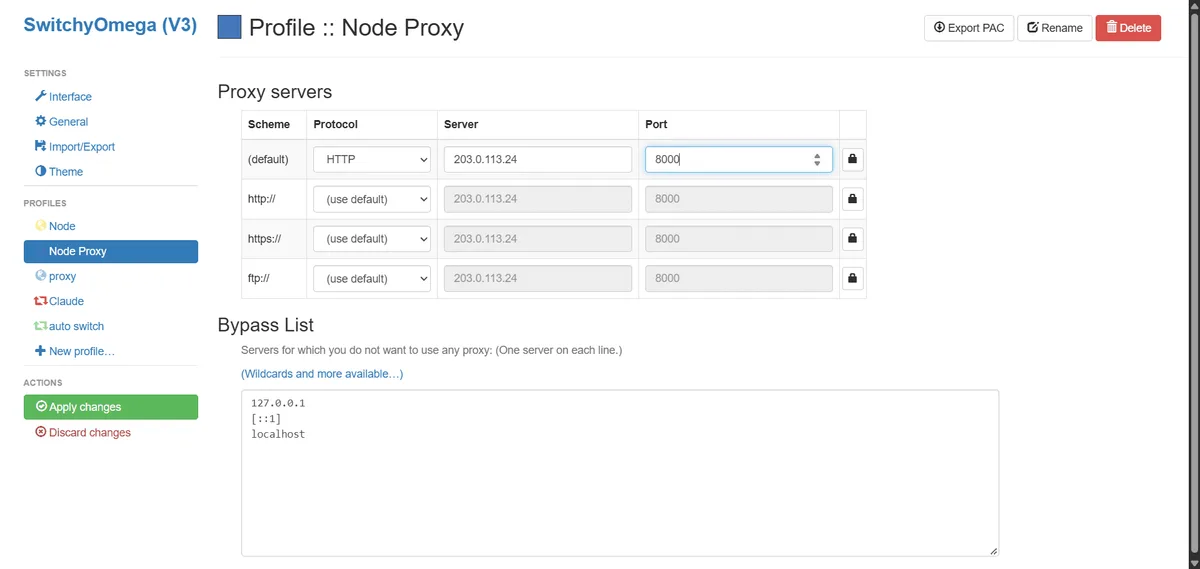
- From the Chrome Web Store, add a manager such as Proxy SwitchyOmega.
- Make a fresh profile, naming it after the marketplace, for example "amazon-uk".
- Pick the scheme that matches your port and type the gateway, for instance
203.0.113.24:8000. - If your plan uses credentials, paste the username and password into the authentication area.
- Apply the changes, then switch to this profile from the toolbar icon.
Step 2. Windows 11
- Head to Settings, choose Network & internet and select the Proxy page.
- Find the manual section and press the Set up button beside Use a proxy server.
- Flip the toggle on, then put the gateway IP and port into their boxes.
- Confirm with Save.
This dialog has nowhere to store a username. The first time Chrome or Edge reaches the gateway over HTTP, a small window pops up and asks for it. Authorised SOCKS5 isn't supported by this panel, so stick with the extension for that protocol.
Step 3. macOS
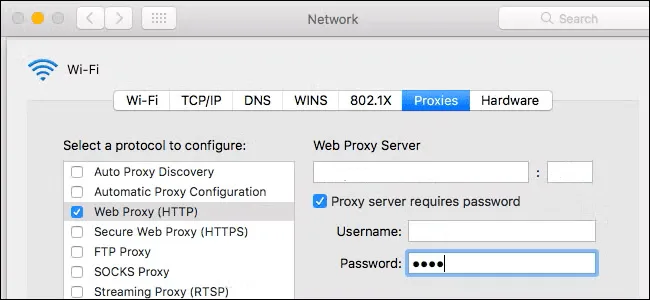
- In System Settings, click Network, highlight the interface you are online with and press Details.
- Switch to the Proxies tab.
- Tick the entries that fit your port: Web proxy (HTTP) together with Secure web proxy (HTTPS), or SOCKS proxy alone.
- Fill in the gateway and port for each ticked entry, then tick Proxy server requires password and supply the username and password.
- Close the sheet with OK so the change takes effect.
Step 4. Android and iPhone
Phones attach a proxy to one particular wireless network. On Android, press and hold the network name, choose Modify network, expand Advanced options and set Proxy to Manual; then type the gateway and port. That screen offers no username box, which means IP whitelisting or a separate client app; both routes are compared in our article on proxies on Android.
Apple devices keep the option inside the Wi-Fi details: tap the small "i" beside the network, scroll down to Configure Proxy, choose Manual and fill in the gateway and port. The Authentication switch reveals the username and password fields. On either platform, cellular data keeps going direct, so this trick works only while you stay on that Wi-Fi.
How to Check That Amazon Sees the Right Region
- Open any IP lookup service and confirm that it shows the proxy address and the expected country. If two lookup services disagree, ask the provider which country the address is registered to.
- Open Amazon in a private window so old cookies do not pull you back to your previous storefront.
- Look at the Deliver to line and the currency. On a fresh visit Amazon usually guesses the location from the IP.
- Open a product you know and compare its price and delivery promise with what local colleagues see.
If the store still shows your home country, clear Amazon cookies or switch the storefront with the flag icon next to the search box. A banner offering to "shop on" another country's Amazon is normal and only suggests a storefront.
Common Problems and Fixes
Connection refused or timeouts. Check the host, port and protocol. An HTTP port will not work as SOCKS5 and vice versa.
Credentials rejected. Look for spaces copied with the password. With IP whitelisting, make sure your current public IP is on the list; home addresses change.
Amazon shows "Sorry, something went wrong" or a robot check. The IP may be shared or flagged, or the address changed in the middle of a signed-in session. Use a sticky or static IP for account work; the full checklist is in our guide to the Amazon "Something went wrong" error.
Pages load slowly. Choose an exit closer to the marketplace, for example a UK IP for Amazon UK, and reduce the number of parallel tabs.
Amazon Rules a Proxy Does Not Change
A proxy changes your network location, not your account or your obligations:
- Amazon expects one Seller Central account per seller; a second account needs a legitimate business reason, and accounts linked by shared logins or devices can be suspended together.
- Reviews, ratings and purchases must come from genuine customers. Proxies must never be used to inflate them.
- Amazon's Conditions of Use limit automated data collection. For catalog and order data, start with Seller Central reports and the Selling Partner API.
- Purchases are still governed by your account's country, payment method and shipping rules.
For regular price tracking at scale, see how our price monitoring scenario keeps request rates moderate.
Amazon proxy FAQ
What is the best proxy type for Amazon?
Residential proxies suit most tasks: viewing local storefronts, checking ads and researching prices. Static ISP proxies are better when one account needs the same IP for weeks, and datacenter proxies mainly fit technical tests.
Can I change my Amazon country without a proxy?
Yes. The flag icon next to the search box switches the storefront, and the Deliver to selector changes the delivery location. A proxy is useful when you need to see what a visitor from that country actually gets, including ads and IP-based suggestions.
Is it allowed to use a proxy on Amazon?
Browsing through a proxy is not prohibited in itself. What Amazon forbids is the activity some people hide behind proxies: duplicate seller accounts, fake reviews and aggressive scraping. Use proxies for viewing and testing, not for getting around the rules.
Why does Amazon still show my home country through a proxy?
Old cookies and the saved delivery address override the IP. Open a private window, clear Amazon cookies or pick the storefront manually, then check again.
Should I use rotating or sticky IPs for Amazon?
Use sticky or static IPs whenever you are signed in, because an address that changes mid-session looks suspicious. Rotation is suitable only for anonymous viewing of many public pages at a moderate pace.