How to Use a Proxy with DuckDuckGo on Windows, Android and Other Devices

DuckDuckGo offers no box for a proxy server anywhere: neither the duck-logo search page nor the standalone DuckDuckGo browser will ask you for a host and port. The trick is to put the proxy underneath, into Windows networking, into a phone's Wi-Fi profile or into whichever browser you search from. DuckDuckGo then rides along on that route without knowing anything changed.
What follows is a walk through real Windows 11 and Samsung Android screens, a compact note for Apple devices, a one-word query that reveals your outgoing IP right in the results, a few words on picking the proxy type and a short list of snags people usually hit on day one.
Proxies for private browsing
Fast datacenter and residential proxies that work with DuckDuckGo on any device
Search Page or DuckDuckGo Browser: Where the Settings Live
The name covers two products, and each one takes its route from a different place:
| How you reach DuckDuckGo | Place for the proxy |
|---|---|
| duckduckgo.com opened in Chrome, Edge or Firefox | Windows settings, the browser's own options or an extension |
| Desktop DuckDuckGo browser (Windows, Mac) | Proxy configuration of the operating system |
| DuckDuckGo app on Android | Wi-Fi network profile or a separate proxy client |
| DuckDuckGo app on iPhone or iPad | HTTP Proxy block in the Wi-Fi network details |
It also helps to be honest about the benefit. DuckDuckGo says it does not assemble a personal history out of your queries, so the proxy is not there to hide searches from the duck. Its job is to mask your home address from the network and from every site you click through to, and to give you an exit point in a country of your choosing. If all you want is local results, skip the proxy entirely: the region dropdown just above the results swaps them in a second.
Three Things to Have at Hand
- Host and port, copied from the provider's dashboard.
- A login with its password, or your present IP whitelisted on the provider side.
- The protocol of that port. Built-in Windows and Android forms speak HTTP only; a SOCKS5 port belongs in a browser option or a dedicated app.
Windows 11: Routing Every Browser Through the Proxy
This route makes sense when you search from Edge, Chrome or the DuckDuckGo desktop browser, since all three obey the Windows configuration. Bear in mind that plenty of other software on the PC will start using the proxy as well.
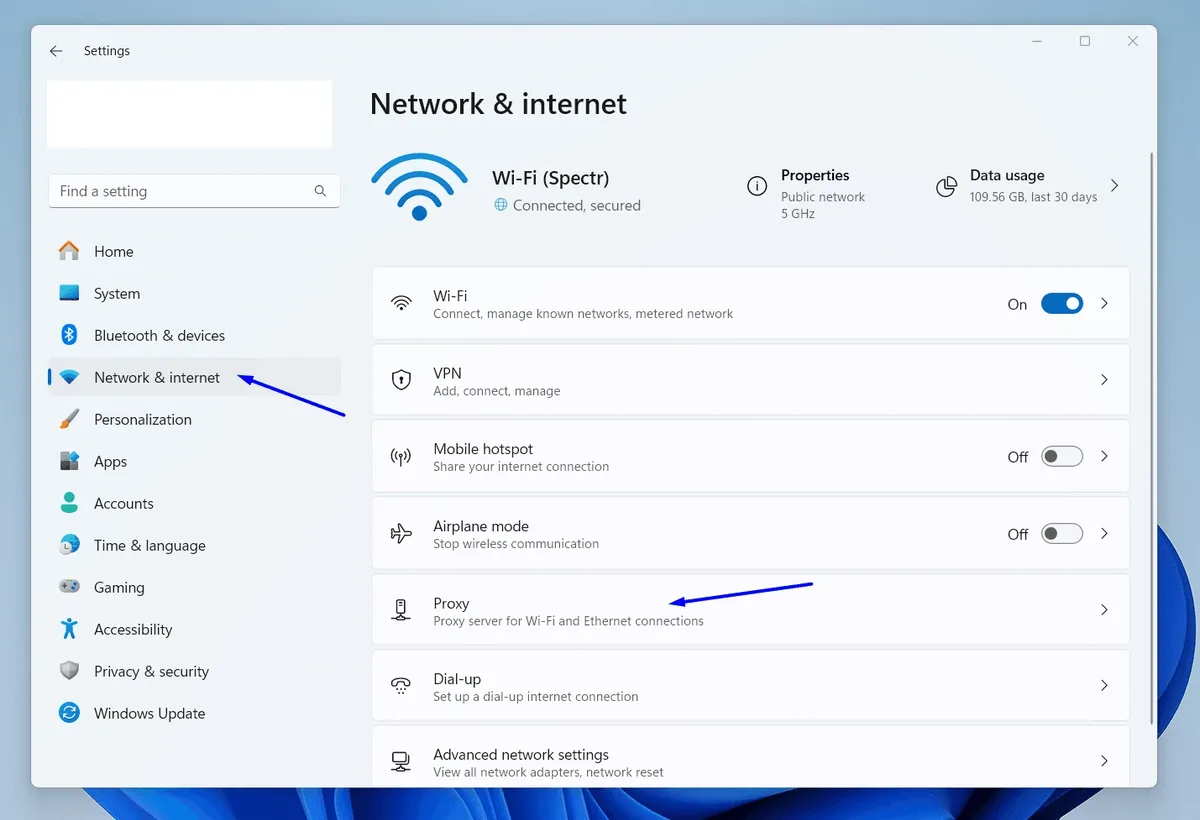
Step 1. Reach the Proxy Page
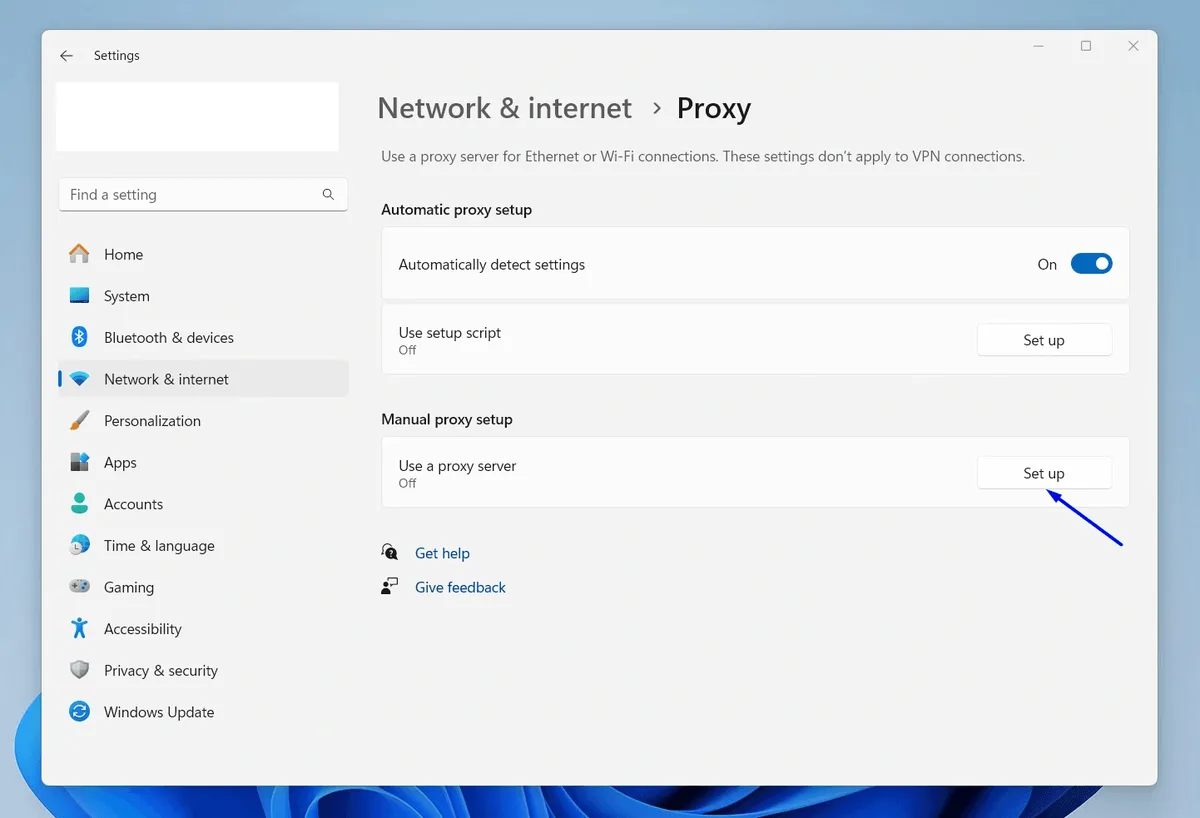
Hit Win+I. In the window that pops up, pick Network & internet from the left-hand column; Proxy sits near the bottom of the right-hand list.
Step 2. Open the Manual Form
Look for the block titled Manual proxy setup. The row Use a proxy server has a Set up button on its right; click it.
Step 3. Type the Server Details
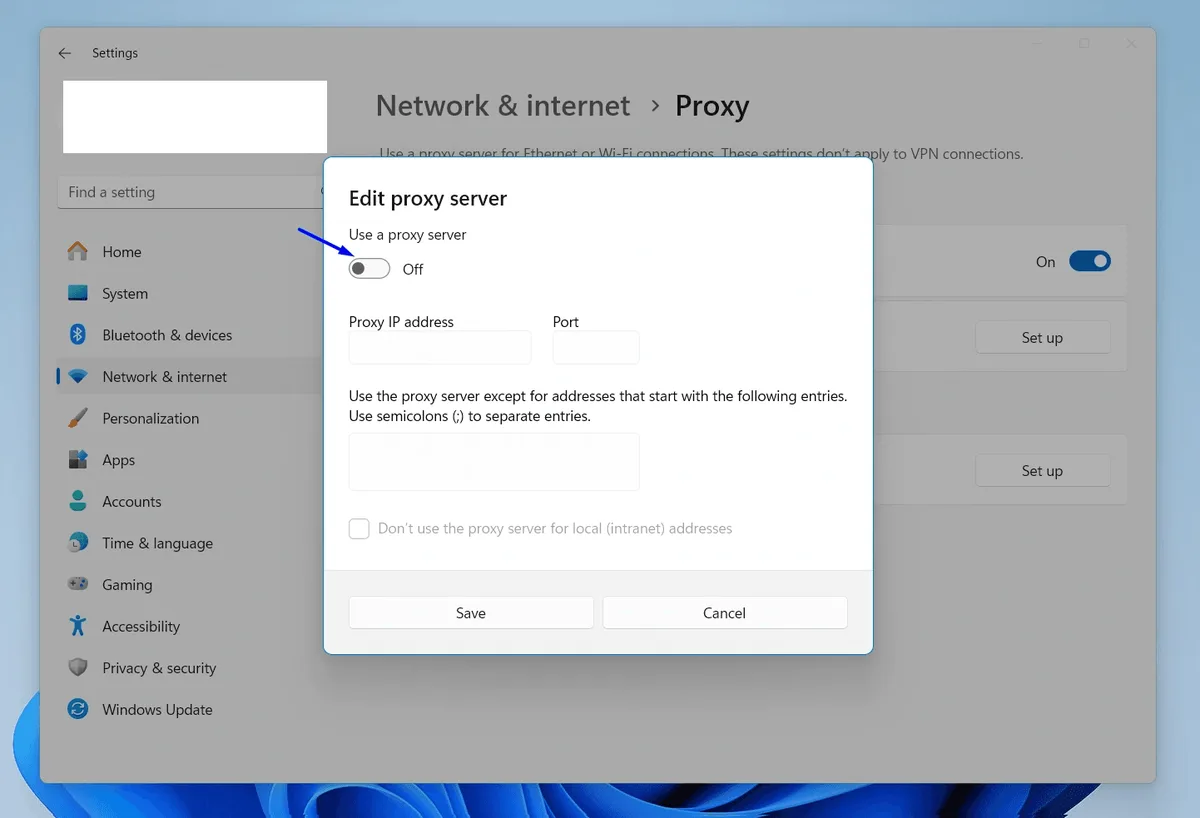
A dialog named Edit proxy server appears:
- Flip Use a proxy server so it reads On.
- Paste the host into Proxy IP address; the number goes into Port.
- Ticking Don't use the proxy server for local (intranet) addresses is optional, but it keeps the home router and network printer reachable directly.
Step 4. Save, Relaunch, Search
Click Save, close the browser completely, start it again and load duckduckgo.com. With a password-protected proxy, Chromium-based browsers pop up a credentials box on the very first page; it wants the proxy pair, not a Microsoft or DuckDuckGo sign-in.
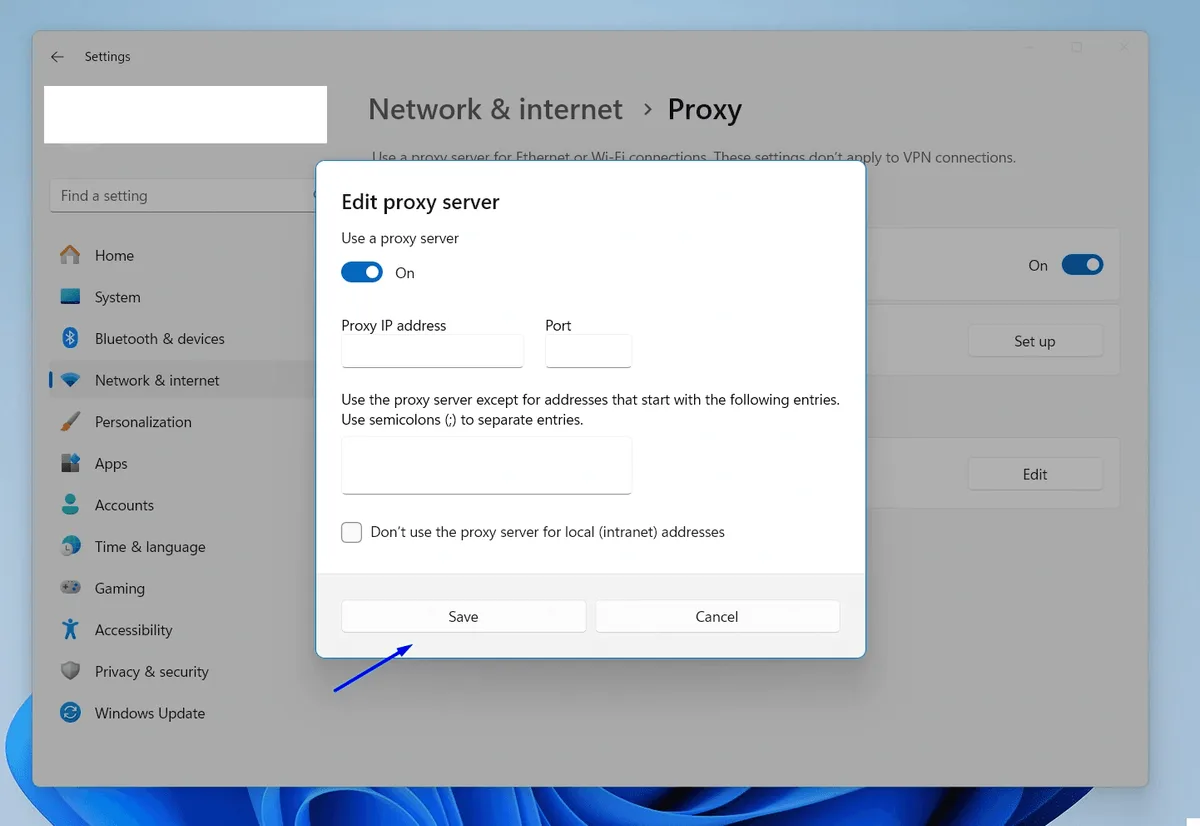
Turning the whole thing off later is the same dialog with the switch moved back.
Android: Proxy Inside a Wi-Fi Profile
On Android an HTTP proxy is bound to one particular wireless network. Our screenshots were taken on a Samsung handset; Pixels and other brands use near-identical labels, occasionally shuffled around.
Step 1. Reach the Network's Own Settings
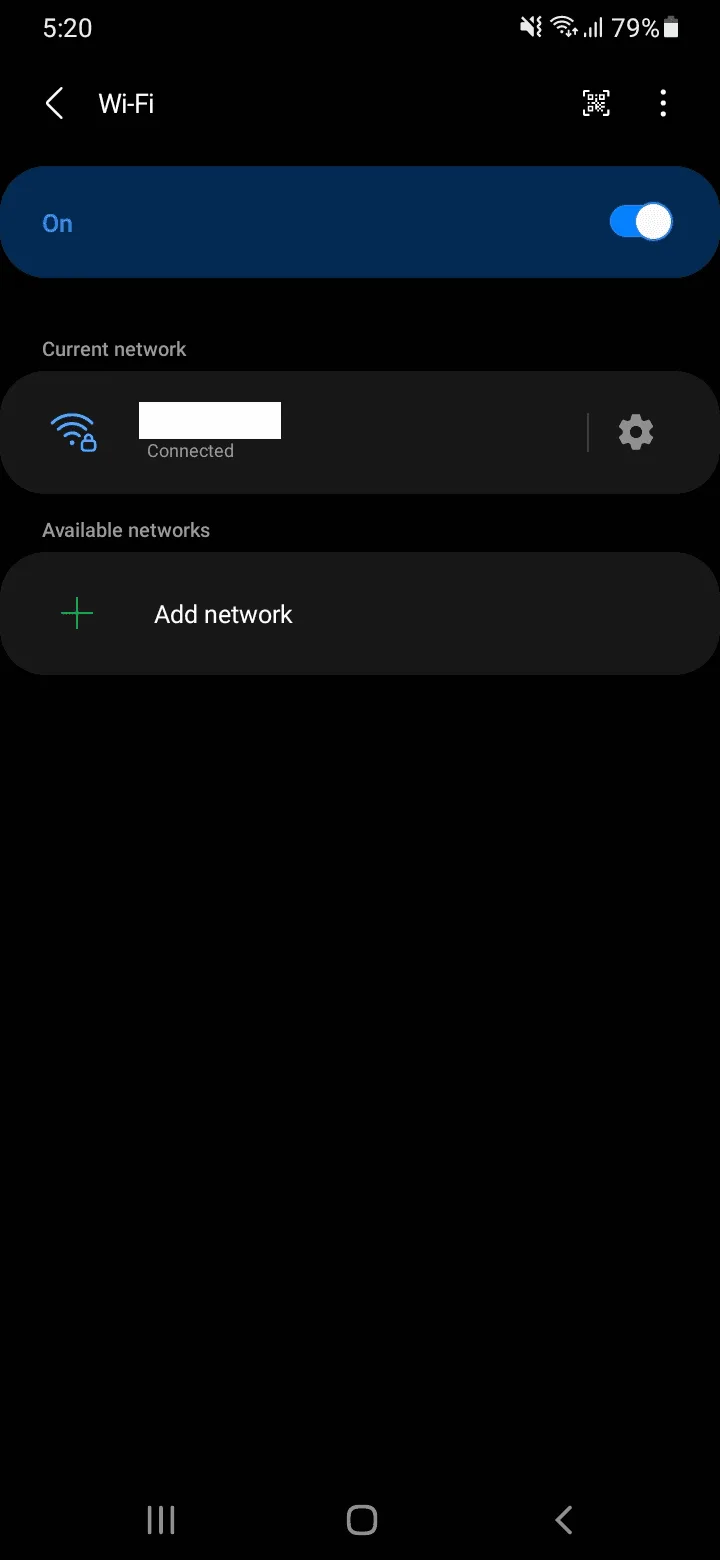
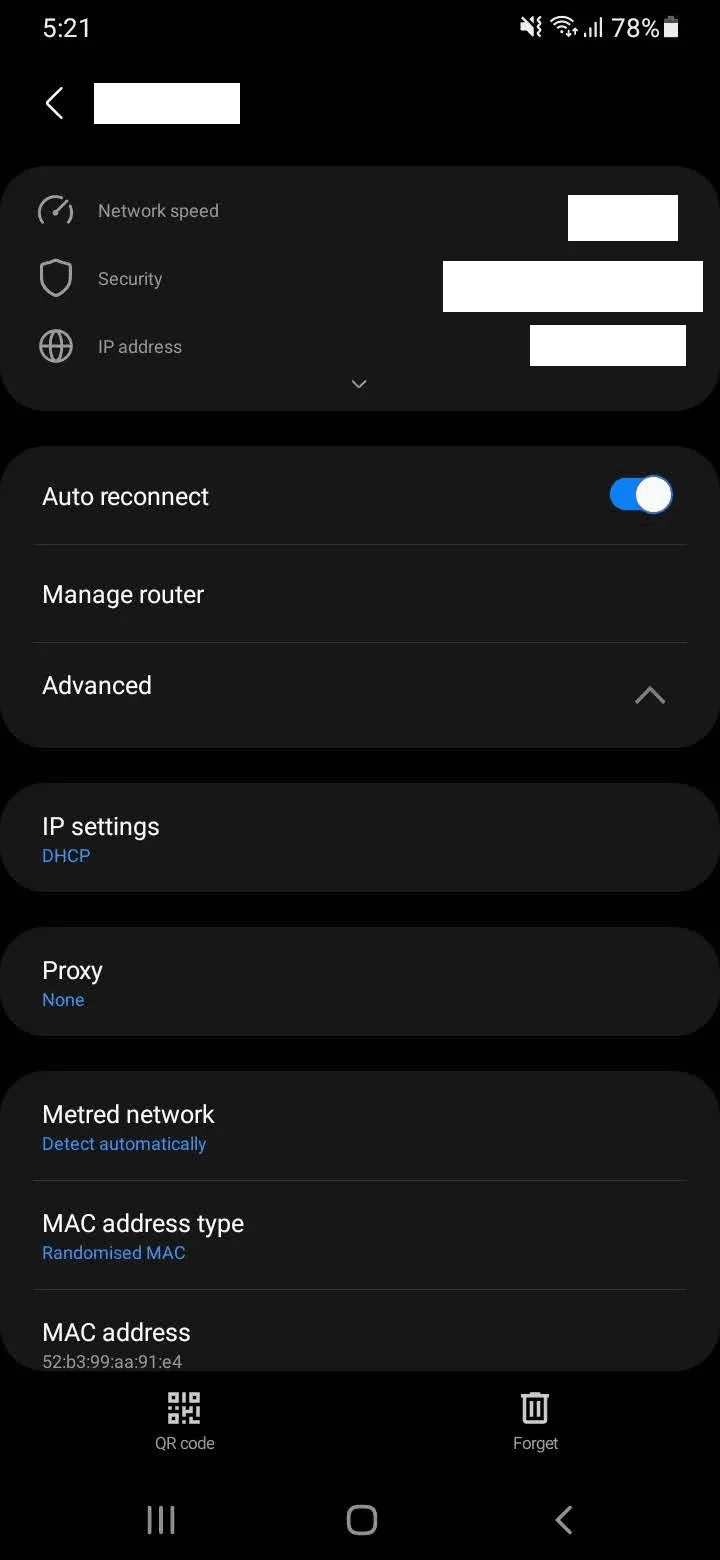
On Samsung it is Settings, then Connections, then Wi-Fi; stock Android calls the same place Network & internet, then Internet. Beside the network marked Connected there is a cogwheel. Tap it.
Step 2. Switch the Proxy From None
Unfold Advanced. The Proxy line reads None out of the box; touch it and select Manual.
Step 3. Host, Port, Save
Two fields appear, Proxy host name and Proxy port. The third one, Bypass proxy for, can stay blank unless certain domains should skip the server. Confirm with Save at the bottom.
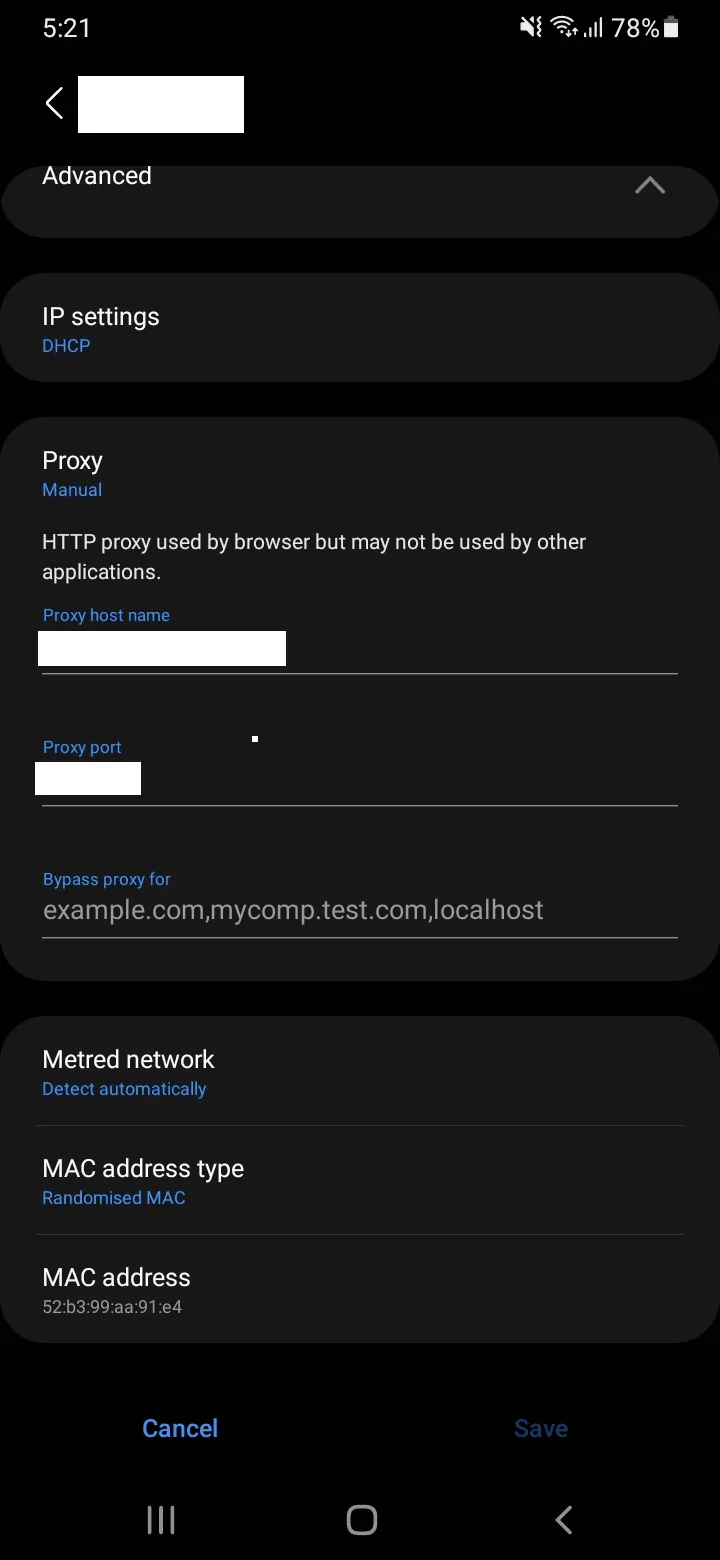
Notice the grey hint printed over those fields: Android admits that the browser honours this HTTP proxy while other apps are free to ignore it. You will not find a password field either, and the moment the phone drops to cellular data the proxy is gone. Whenever authentication, SOCKS5 or full-device coverage is required, an app that captures traffic via the Android VPN slot does the job better; our walkthrough of Super Proxy for Android demonstrates one.
Apple Devices at a Glance
iPhone and iPad keep the proxy per network as well. In Settings, open Wi-Fi, press the small "i" beside your network and scroll right down to HTTP Proxy. Pick Manual, then supply server, port and, when your plan uses one, the authentication pair. Every screen of that process appears in our separate iPhone proxy guide. Mac owners find the equivalent under System Settings, Network, the active connection, Details, then the Proxies tab; the two switches to turn on are labelled for HTTP and HTTPS.
Keeping the Proxy Inside One Browser
Rerouting the entire computer is not always welcome. Firefox carries a private set of connection options that understands SOCKS5, while Chromium browsers rely on an add-on such as Proxy SwitchyOmega, which can also limit the proxy to a handful of domains you specify.
The One-Word IP Test
Search DuckDuckGo for my ip. An answer box at the top of the page prints the address the search engine sees and a rough location. That number has to belong to the proxy. Toggle the proxy off, repeat the query and the difference becomes obvious.
No change? Walk through it calmly: is the Windows switch or the Android Manual mode actually active; did a stray space sneak into the host or port; is some VPN or other proxy client overriding the system; was the browser fully restarted? To exclude the server from suspicion, run it through our free proxy checker.
Choosing a Proxy Type
Everyday searching and reading needs nothing exotic. Datacenter proxies are quick, cheap and hold the same address, and DuckDuckGo rarely shows its bot puzzle unless a single IP fires off a burst of queries in a few minutes.
Automated work is another story: comparing what results look like across countries, say, or following rankings day by day. That means volume, and residential or rotating addresses distribute it in a way that looks far more organic. Our SERP data collection page walks through such setups. Whatever you pick, keep the pace reasonable and respect the search engine's terms.
Snags and How to Clear Them
Nothing loads once the proxy is on. Either the server is down or the port speaks a different protocol. Windows and Android forms need an HTTP port; a SOCKS5 one will silently fail there.
The credentials prompt never goes away. The proxy login or password has a typo. Retype them slowly, or whitelist your IP with the provider and forget about the password.
A picture puzzle replaces the results. That address is overused or has a bad history. Move to a fresh IP, throttle any scripts, or upgrade to residential addresses.
The Android app still reports your home IP. A few apps simply skip the Wi-Fi proxy. Rely on a VPN-slot client, or confirm the result in the phone's default browser instead.
It worked on the home network but not at the café. The Android proxy belongs to one Wi-Fi profile only; any other network, cellular included, goes direct.
DuckDuckGo proxy FAQ
Does DuckDuckGo have a built-in proxy?
No. You will not find a proxy field in the search engine or in the DuckDuckGo browser. It is configured in the operating system, the Wi-Fi network profile or another browser.
Is the DuckDuckGo VPN the same as a proxy?
No. The VPN bundled with DuckDuckGo's paid subscription encrypts everything leaving the device and runs on DuckDuckGo's own servers. A proxy sends traffic through a server you choose, in the country and with the IP type your task requires.
Why does DuckDuckGo still show my real IP?
The program you are using does not pick up the proxy. Confirm it is switched on, relaunch the browser and close any other VPN or proxy tool that could take priority.
Can I use a SOCKS5 proxy with DuckDuckGo?
Yes, though not through the Windows dialog or the Android Wi-Fi form, both of which expect HTTP. Put SOCKS5 into Firefox, a proxy extension or a client app on the phone.
Do I need a proxy to get results for another country?
Not always. The region selector above DuckDuckGo results already changes them. A proxy matters when the sites you visit afterwards should also treat you as a local visitor.