Postman Proxy Settings: System and Custom Proxy, Authentication and Fixes for Common Errors

Postman's desktop client can route outgoing API calls in two ways: borrow whatever proxy the operating system already uses, or follow a custom server typed straight into the app under Settings, Proxy. The custom option lets you pick HTTP or one of four SOCKS flavours, attach a username and password and list hosts that should skip the tunnel; when both modes are switched on at once, the custom one wins.
Below you will find what each toggle actually changes, a recipe for checking which exit IP your requests really leave from, how the proxy fields relate to environment variables and Newman, and a lookup table that decodes the cryptic messages Postman prints when a proxy misbehaves.
Datacenter proxies
Fast datacenter proxies with a fixed IP for API testing in Postman
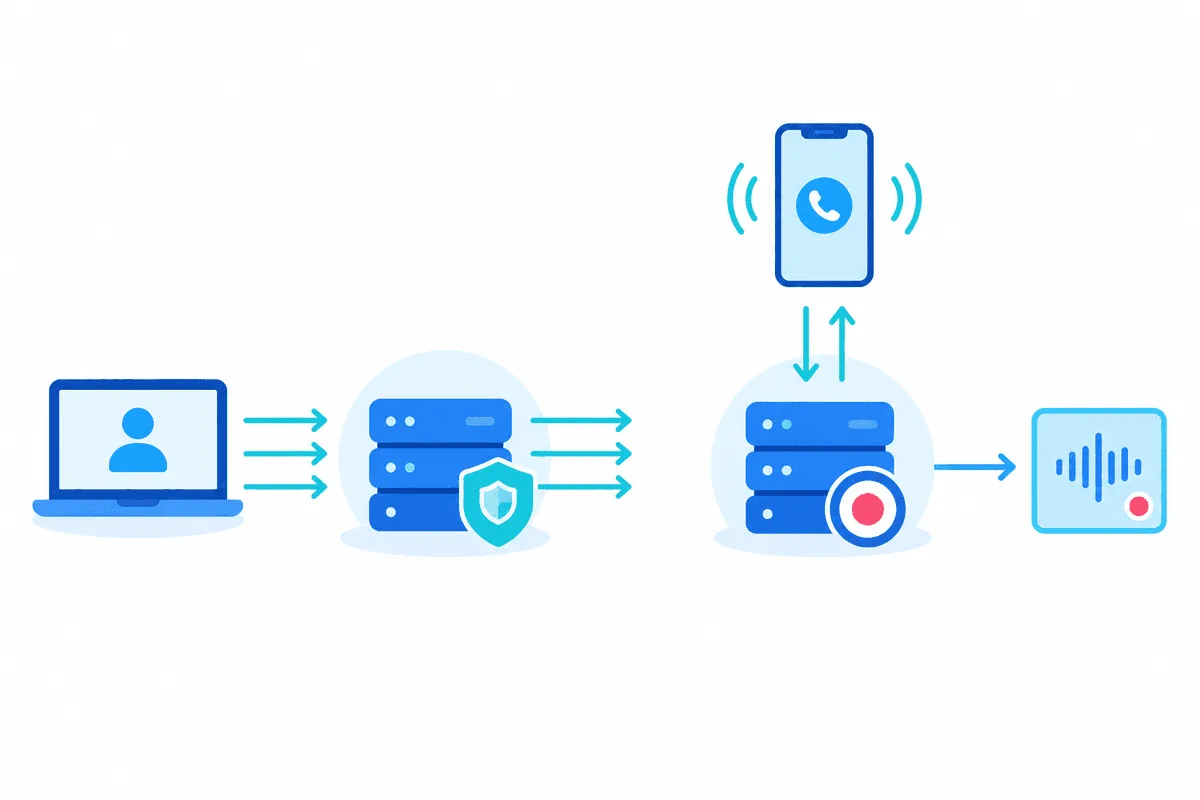
Sending Proxy Versus Capture Proxy
Postman's menus mention a proxy in two unrelated places, which regularly sends newcomers down the wrong path.
| Mode | Traffic flow | Menu location | Typical reason |
|---|---|---|---|
| Outbound proxy | Postman calls leave via a remote relay | Settings, Proxy tab | Office gateways, regional API checks, a stable exit IP |
| Capture proxy | Phones or browsers relay through Postman | Capture requests panel | Turning observed traffic into collection items |
Everything below concerns the outbound relay. Recording what a mobile app sends is a job for the capture panel, a separate topic.
Checklist Before You Start
- Postman installed as a desktop program on a PC, Mac or Linux box; the web edition lacks the block where OS gateway credentials are saved.
- Relay details issued by your provider, say
198.51.100.7:3128speaking HTTP. - A username and password, or your machine's IP already whitelisted on the provider side.
Teams hammering an API from one predictable origin tend to choose datacenter proxies: latency stays low, each call costs little, and the outgoing IP survives for weeks, handy whenever the vendor guards its endpoints with an allowlist.
Opening the Proxy Tab
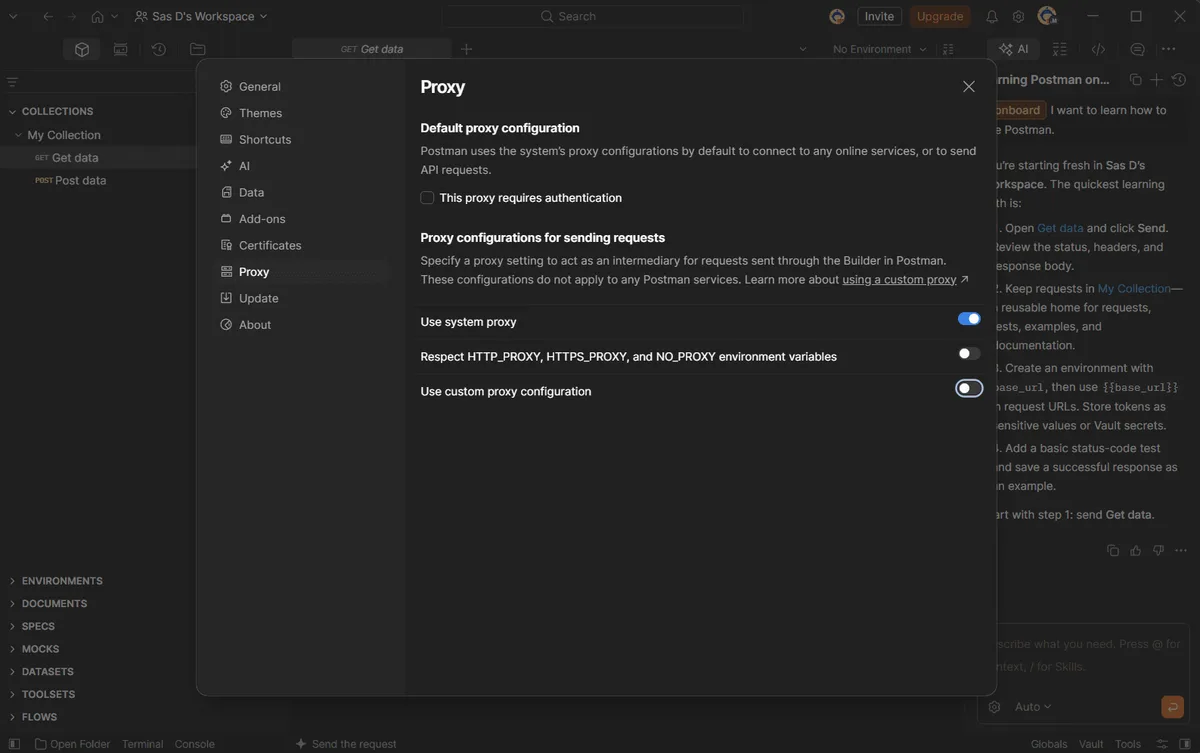
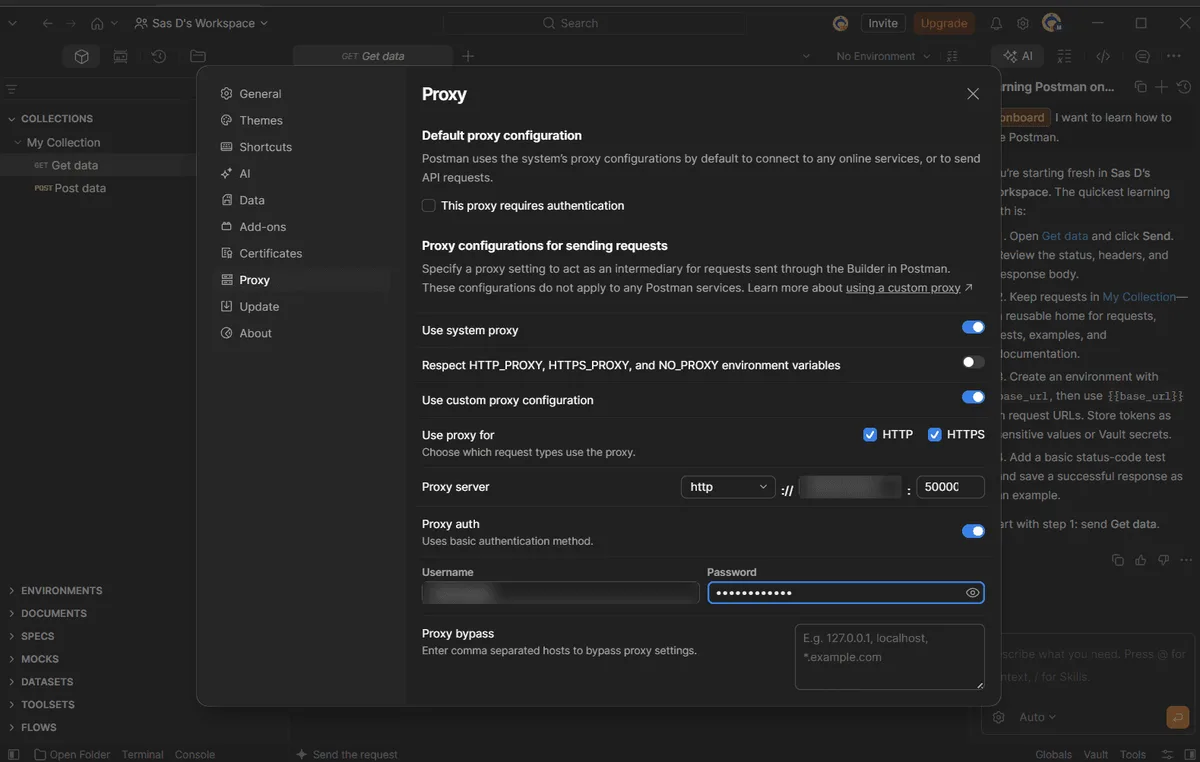
Hit the cogwheel near the top right, pick Settings from its menu and move to Proxy. That page holds three areas: credentials for the operating system gateway, a switch labelled Use system proxy and a second one called Use custom proxy configuration.
Mode A. Follow Whatever Windows or macOS Uses
Sensible inside corporate networks where an outbound gateway is mandatory anyway and Postman merely has to play along.
- Activate Use system proxy; from then on the client mirrors the HTTP or SOCKS relay your OS already knows about.
- A nested checkbox makes the app honour the
HTTP_PROXY,HTTPS_PROXYandNO_PROXYvariables as well. Tick it if your terminal tools rely on those variables and you want identical behaviour. - Leave the custom switch disabled; should both be active, the custom one quietly takes over.
- Gateways demanding a login are handled in the top block: mark This proxy requires authentication, supply both values and confirm with Save and Restart Postman, which relaunches the app.
Mode B. A Relay Reserved for Postman
Browsers, messengers and the rest of the machine keep their usual route, which is why testers reach for this mode most often.
Step 1. Decide Which Schemes Are Relayed
Flip the custom switch. Right underneath, a row named Use proxy for comes with both HTTP and HTTPS preselected; untick plain HTTP only if unencrypted calls must deliberately bypass the relay.
Step 2. Describe the Server
A dropdown lets you choose between HTTP and the SOCKS family (5, 5H, 4, 4A); after that choice, the hostname and the port go into two neighbouring boxes. Skip any http:// prefix in the hostname box, since the dropdown already encodes the scheme. With SOCKS5H, name resolution happens on the proxy side, so internal DNS of your office never sees the target domain. The SOCKS options only carry HTTP and HTTPS requests, so WebSocket or gRPC tabs are not covered. More on that choice in our comparison of SOCKS5 vs HTTP proxies.
Step 3. Add Credentials
Enable Proxy auth and drop in the pair of credentials. These reach the relay as basic auth and never touch the target service; the request-level Authorization tab is a different layer aimed at the API itself. Confusing these layers explains a large share of 407 responses.
Step 4. Exclude Hosts
The Proxy bypass field takes a comma-separated list such as localhost,127.0.0.1,staging.internal. Requests to those hosts go straight out. Add your local mock servers here, otherwise the remote proxy tries to reach localhost on its own machine and fails.
Confirming the Exit IP
Create a GET request to any service that echoes the caller's address, for example https://ip-echo.example/json (substitute a real IP lookup API you trust), and send it. The response should show the proxy address and its country rather than your own. Next open the Postman Console with Ctrl+Alt+C on Windows and Linux or Cmd+Option+C on macOS: expanding a logged call reveals its network details, including the remote address the connection went to. For a check outside Postman, our proxy checker confirms that the server answers at all, and our notes on checking proxy geolocation explain why databases sometimes disagree about the country.
Environment Variables and Newman
Variables inherited from your shell can sabotage the setup. Once http_proxy, https_proxy or their capitalised twins are defined, Postman sides with the system proxy and ignores what you typed in the app. Remove them from the profile, or start Postman from a small wrapper script that clears them first:
@echo off
set HTTP_PROXY=
set HTTPS_PROXY=
start "" "%LOCALAPPDATA%\Postman\Postman.exe"
Remember that the tab applies application-wide. Current releases cannot bind one relay to a single collection, folder or environment, and placeholders from an environment typed into those boxes stay unresolved. For per-run proxies, use Newman, the command-line runner, which reads the same three variables:
HTTPS_PROXY=http://qa-user:s3cret@198.51.100.7:3128 NO_PROXY=localhost newman run orders-api.jsonThis keeps CI pipelines independent from anyone's desktop settings.
Error Messages and What They Mean
| Message in Postman | Likely cause | What to do |
|---|---|---|
tunneling socket could not be established, statusCode=407 | Proxy rejected the credentials | Re-enter login and password under Proxy auth; check that the plan has not expired |
connect ECONNREFUSED with the proxy address | Wrong port or the server is down | Verify the port and protocol; test the server with a checker |
getaddrinfo ENOTFOUND | Typo in the proxy hostname, or a target host the proxy cannot resolve | Check the spelling; try SOCKS5H or an IP address |
ETIMEDOUT or socket hang up | Slow or overloaded proxy, firewall in between | Raise the request timeout under Settings, General; try another exit |
self signed certificate in certificate chain | Corporate gateway inspects HTTPS | Add the company CA under Settings, Certificates, or switch off SSL certificate verification for testing only |
| Request still uses your real IP | Environment variables or the system toggle win | Clear the variables, disable the system toggle, restart |
When a call fails only through the proxy, the target API may be blocking that address range. An HTTP proxy that cannot open an HTTPS tunnel produces similar symptoms; our explainer on HTTP vs HTTPS proxies covers how the CONNECT method works.
Postman Proxy FAQ
Does Postman support SOCKS5 proxies?
It does. Besides plain HTTP the custom mode understands both SOCKS generations, version 5 (also in its H variant) and version 4 (also as 4A), optionally with a login. Such relays move HTTP and HTTPS calls only.
Postman keeps ignoring the proxy I entered. Why?
The usual culprit is a proxy variable living in your OS environment, which Postman treats as more authoritative. Delete it or start the client via a wrapper that wipes it, and confirm the custom switch is the one turned on.
Can each Postman environment get its own proxy?
The GUI client does not allow that, because one global relay serves everything and its fields ignore environment placeholders. Newman solves it: pass different proxy variables to each command-line run.
Proxy auth or the Authorization tab: which one do I need?
Proxy auth proves to the relay that you are a paying client and travels with each call. The Authorization tab carries whatever the destination API expects, for example a bearer header.
How can I stop Postman from using a proxy?
Visit the Proxy tab and switch off both modes. Traffic that still leaves via a relay afterwards points to leftover proxy variables in your operating system.