uTorrent Proxy Settings: Routing the Client Through SOCKS5


To route uTorrent through a proxy, open Options → Preferences → Connection, choose SOCKS5 in the Proxy Server block, enter the host, port and login, then tick the options that force peer connections and DNS lookups through the proxy. Only the torrent client changes its route; the browser and other programs keep using your regular connection.
The reason people do this is mostly privacy. In a BitTorrent swarm every peer sees the IP address of everyone else, so even a perfectly legal download, such as a Linux image or an open-licence film, exposes your home address to strangers. A proxy replaces it with the server's IP. Below: which proxy type fits, the setup with screenshots, the privacy switches that most guides forget, a way to verify the result and fixes for typical errors.
SOCKS5 proxies
SOCKS5 proxies with a login and password for uTorrent and other clients
Which Proxy Type to Use
uTorrent offers SOCKS4, SOCKS5, HTTP and HTTPS in its type list. For a torrent client the right answer is almost always SOCKS5:
- it relays arbitrary TCP connections, not only web requests, so peer-to-peer traffic passes without conversion;
- it supports authorization by username and password;
- it can resolve hostnames on the server side, which keeps tracker lookups away from your provider's DNS.
HTTP proxies are designed for websites, and many of them refuse the long-lived peer connections a swarm needs. SOCKS4 lacks authentication and remote DNS. If you want a deeper comparison, read SOCKS4 vs SOCKS5.
Beyond the protocol, look at bandwidth and traffic limits, because torrents move many gigabytes, and at the provider's terms: some services restrict P2P traffic. Dedicated SOCKS5 proxies with a fixed IP are a predictable choice for long sessions.
What You Need
- the server: a dotted IP or a hostname from your dashboard;
- its port number;
- a login pair, unless your plan authorizes by IP;
- uTorrent Classic for Windows. The steps below refer to version 3.6; uTorrent Web runs in the browser and has a different settings layout.
Configuring SOCKS5 in uTorrent
Step 1. Open Preferences
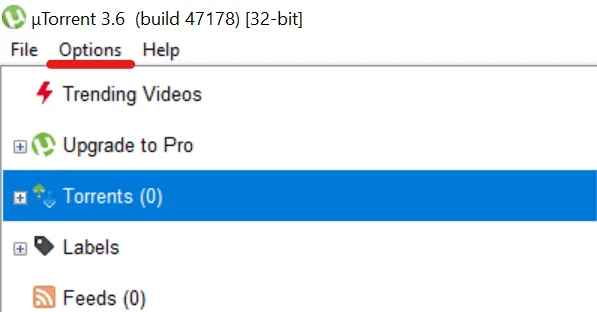
Start uTorrent and click Options in the menu bar.
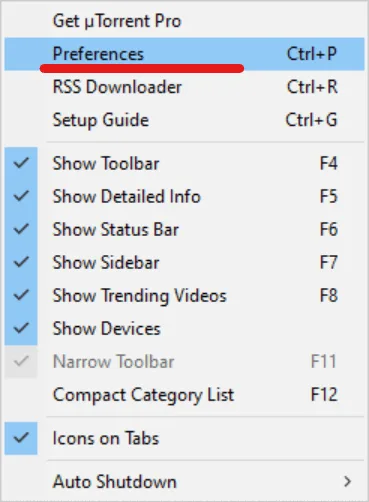
In the drop-down list choose Preferences. The shortcut Ctrl + P opens the same window directly.
Step 2. Go to the Connection Section
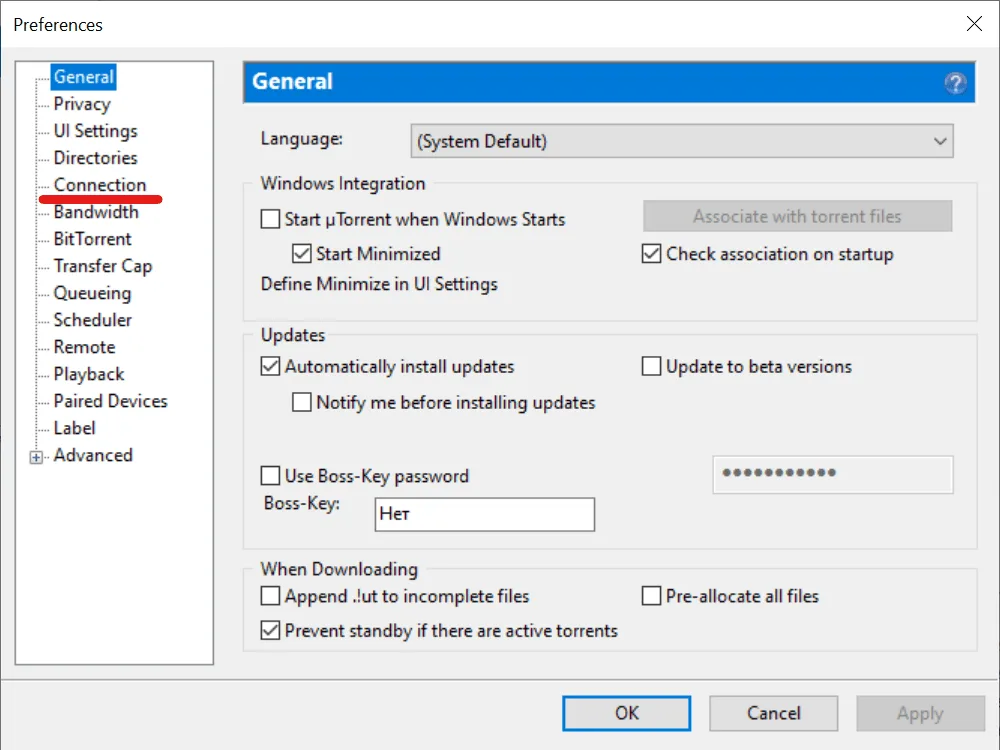
The left column of the Preferences window lists the settings sections. Click Connection; this is where both the listening port and the proxy block live.
Step 3. Fill In the Proxy Server Block
- Open the Type drop-down and pick the Socks5 entry.
- The field labelled Proxy receives the host from your dashboard; the small Port box beside it receives the number.
- Plans protected by a login need the Authentication box ticked, after which Username and Password become editable. Plans relying on an IP allowlist leave that box clear.
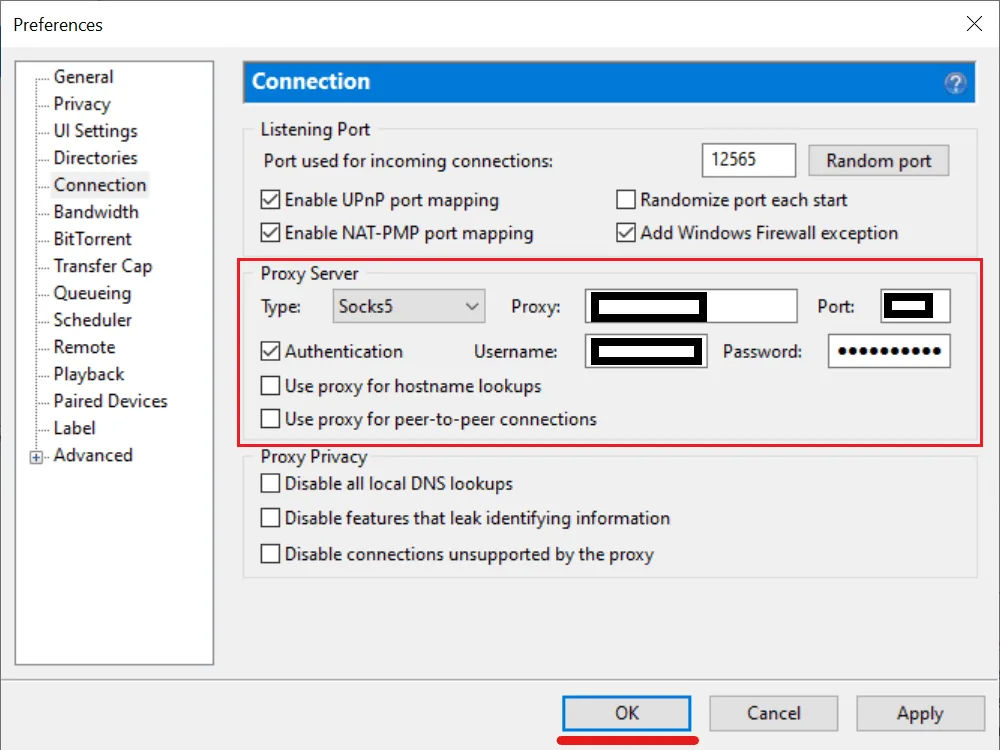
Step 4. Turn On the Routing and Privacy Options
In the screenshot every one of these checkboxes is still empty, which is how uTorrent ships. Leaving them that way means the proxy handles only part of the job, so tick all five:
- Use proxy for hostname lookups. Tracker domains are now translated into IPs at the proxy end, keeping that list away from your broadband company.
- Use proxy for peer-to-peer connections. This one matters most. Left off, only tracker announces travel via SOCKS5, while every peer still sees your real address.
- Disable all local DNS lookups. No name queries leave your PC through the system DNS at all.
- Disable features that leak identifying information. The client keeps quiet about details it would otherwise broadcast to trackers and peers.
- Disable connections unsupported by the proxy. Several swarm functions (the distributed hash table, the uTP transport, discovery of peers on your LAN) rely on UDP, and uTorrent cannot tunnel UDP via SOCKS5. Ticking this box shuts them down so none of them slips past the relay.
The last option has a price: with DHT and uTP off, magnet links resolve only through trackers, and the number of peers may drop. For privacy that trade-off is usually acceptable.
Step 5. Apply and Restart
Click Apply, then OK. Restart uTorrent so that every existing connection is rebuilt through the new route, then check that trackers report working on the Trackers tab of an active torrent.
Checking Which IP the Swarm Sees
Opening a what-is-my-IP site proves nothing, since your browser ignores the client's proxy entirely. What you want is a torrent-aware checker; ipleak.net, for one, generates a magnet link for exactly this purpose. Paste that magnet into uTorrent and wait a minute: the checker's page then prints every address its tracker saw announcing that torrent. Seeing just the relay's IP means success, while spotting your own address is a cue to go back over Step 4.
When nothing connects at all, verify the proxy itself with our free proxy checker before changing anything in the client.
Free or Paid Proxy
Free proxies cost nothing, but they are shared by crowds of users, change speed unpredictably and disappear without warning. Worse, an unknown operator sees your traffic. Our overview of public proxy servers explains the risks in detail. For torrents, where sessions last hours and volumes are large, a paid proxy with stable bandwidth is the practical option. When comparing services, check:
- supported protocols (SOCKS5 must be among them);
- traffic limits and channel speed;
- server locations close to you;
- whether P2P traffic is allowed by the terms;
- how a non-working IP gets replaced.
Common Problems
Authentication Errors
Most often the cause is a typo or an invisible space at the end of the pasted login. Also check that the type is SOCKS5, the port matches the one in the dashboard and the plan has not expired. If the password contains unusual characters, see whether the provider recommends a specific format.
Torrents Stay at Connecting to Peers
Check the type, address and port first. Then look at the Trackers tab: errors or a long updating state point to the proxy being unreachable. Magnet links that carry no tracker list depend on DHT to locate peers, and the option that blocks unsupported connections turns DHT off, so such downloads stall. Add a .torrent file with trackers or temporarily test without that option.
Download Speed Dropped
All traffic now goes through one more server, so the result depends on its load, its bandwidth and the distance to it. Try a proxy located closer to you, or a different IP from the same provider, and compare.
The Connection Keeps Dropping
Resist the urge to reinstall the client. First find out where the fault lives: does the relay still pass the online checker, are your credentials still valid, and does a second proxy show the same symptom? If uTorrent works steadily without a proxy and fails only through one particular server, the cause is that server or its route.
How to Disable the Proxy
- Bring up Preferences again, via the Options menu or with Ctrl + P.
- Switch to the Connection page.
- Set the proxy Type drop-down back to its first entry, (none).
- Confirm with Apply, then close the window with OK.
Keep It Legal
Masking your address from fellow peers says nothing about whether a file may be downloaded. BitTorrent shines for material its owners hand out freely: ISO images of open-source operating systems, out-of-copyright classics from digital libraries, music and video released under open licences, official game patches and big datasets published by researchers. Fetching protected works without the rights holder's consent remains illegal whichever route your packets take.
uTorrent Proxy FAQ
Which proxy type is best for uTorrent?
Go with SOCKS5: it relays peer TCP sessions untouched, handles username-and-password access and resolves tracker names remotely.
Does uTorrent send all traffic through the proxy?
Not by default. Peer traffic joins the proxy only once its dedicated checkbox is on, and the UDP-based extras stay outside unless you also block connections the proxy cannot handle.
How do I check that uTorrent is using the proxy?
Load the diagnostic magnet from a torrent IP checker (ipleak.net offers one) and compare the reported address with your relay's IP.
My torrents got slower with the proxy on. Why?
Every byte now detours via one more machine, whose bandwidth, current load and distance from you cap throughput. Switch to a nearer location or a less busy IP.
Is it legal to use a proxy with uTorrent?
Using a proxy is legal in most countries, and BitTorrent itself is a legitimate protocol. What matters is the content: download only files that their owners allow to be shared.