Camoufox Proxy Setup: Python Examples, GeoIP and Rotation


Proxy settings in Camoufox follow the Playwright convention. At launch you supply a dict holding server, username and password; from then on, all tabs of that instance reach the internet via the address you gave. Turning on geoip=True adds a second layer: the launcher resolves the location of the outgoing IP and makes the browser's clock, language, coordinates and WebRTC report agree with it.
For context, Camoufox is a patched, openly licensed Firefox aimed at scripted browsing, and you control it with a Python library that runs on all three desktop systems. This walkthrough covers installation, a short script that works as is, an asyncio version, session pinning versus rotation, a SOCKS5 catch that confuses many users, verification and the failures we see most.
Proxies for Camoufox
Residential proxies with country targeting and sticky sessions for Camoufox scripts
What to Prepare
- Python 3 and pip on the machine that will run the scripts.
- The five connection values: protocol, host, port, username, password. Paste them from your provider panel; manual typing invites typos.
- The right IP class for the site. The official documentation leans toward residential addresses. Strict sites usually call for residential proxies, while test benches and lenient targets run fine on cheaper server IPs.
Step 1. Install the Package and the Browser
Strictly speaking you can skip the [geoip] part, but proxy users should keep it: it pulls in the lookup data that turns an address into a country, city and timezone.
pip install -U "camoufox[geoip]"
python -m camoufox fetch
Line two pulls the modified browser binary itself. Out of the box you track the stable release line. Need reproducible runs? Pin one build via camoufox set, and print installed builds via camoufox list.
Step 2. Choose the Proxy Type
| Proxy | IP behaviour | Fits Camoufox when you need |
|---|---|---|
| Datacenter | Fixed server IP, very fast | Load tests, staging, sites without bot filtering |
| Static ISP | Fixed IP registered to a consumer ISP | Long logged-in sessions on one address |
| Rotating residential | New home IP per request or per session | Wide geography, many independent visits |
| Mobile | Carrier IP shared by many subscribers | Platforms that trust mobile networks most |
Camoufox works identically with all four. What decides the pick is how picky the destination is about address ranges and how many minutes or days a single identity must survive. For that reason, knowing when to hold an IP and when to let it change, explained in our piece on sticky vs rotating proxies, counts for more than bandwidth.
Step 3. Pass the Proxy in Python
Here is a compact script that launches the browser, visits an IP echo page via the proxy and prints the result. All credentials shown are placeholders.
from camoufox.sync_api import Camoufox

gateway = {
    "server": "http://203.0.113.25:8000",
    "username": "user-7f3k",
    "password": "s3cret-pass",
}

with Camoufox(proxy=gateway, geoip=True, humanize=True) as fox:
    tab = fox.new_page()
    tab.goto("https://httpbin.org/ip")
    print(tab.inner_text("body"))
The server string packs scheme, host and port together. Drop the two credential keys only when the provider lets you in by an allow-listed IP. As for humanize=True, it has nothing to do with networking and only smooths out mouse paths.
The Async Variant
Projects written around asyncio swap in AsyncCamoufox; the keyword arguments stay identical:
import asyncio
from camoufox.async_api import AsyncCamoufox

async def run():
    async with AsyncCamoufox(proxy=gateway, geoip=True, headless=True) as fox:
        tab = await fox.new_page()
        await tab.goto("https://httpbin.org/ip")
        print(await tab.inner_text("body"))

asyncio.run(run())
Running on a Linux box with no monitor attached? headless="virtual" starts a throwaway X display in the background, so the browser runs in normal windowed mode without a screen.
Step 4. Let GeoIP Match the Browser to the Exit IP
Once the flag is on, the launcher makes a single probe through your proxy to discover which public address websites will see. It then reads that address's position from the bundled database and derives coordinates, time zone, country and preferred language from it, while the WebRTC report is rewritten to show the same IP. A session whose clock says Berlin but whose address resolves to Texas stands out at once; GeoIP closes that gap automatically.
Renting a static proxy whose outgoing address you already know? Hand that address over as a string, and the probe is skipped:
with Camoufox(proxy=gateway, geoip="203.0.113.25") as fox:
    ...
Keep in mind that the location profile is fixed when the instance starts. A second context opened later with another proxy would still carry the first proxy's clock and language, so the safe pattern is one launched instance per proxy.
Sticky Sessions and Rotation
A common pattern is one gateway hostname for everyone, with country and session options encoded in the login. Every vendor invents its own format, so read the lines below as a sketch and take the exact grammar from your control panel.
sticky = dict(gateway, username="user-7f3k-country-de-session-a91")
rotating = dict(gateway, username="user-7f3k-country-de")- Pinned session. As long as the session ID stays the same (and the provider's time limit has not run out), you keep one address. Sign-ins, shopping carts and other chained steps need this, and it pairs well with
geoip=Truesince the startup location remains true. - Rotation. Each fresh connection may land on another address. Fine for unrelated page fetches, yet the clock picked at startup can stop matching the later IPs. If you want both rotation and GeoIP, give every identity its own launch:
for slot in ["a91", "b47", "c03"]:
    cfg = dict(gateway, username=f"user-7f3k-country-de-session-{slot}")
    with Camoufox(proxy=cfg, geoip=True, headless=True) as fox:
        tab = fox.new_page()
        tab.goto("https://httpbin.org/ip")
        print(slot, tab.inner_text("body"))
SOCKS5 and Authentication
Writing socks5:// in front of the host is allowed, and unauthenticated SOCKS5 connects fine. The catch: the Playwright layer underneath never sends SOCKS5 credentials, so a password-protected SOCKS5 port stays closed. Workarounds:
- Point Camoufox at the HTTP port that most providers open next to SOCKS5; login and password pass there without trouble.
- Allow-list the public IP of the machine running the script, then drop the credentials.
- Start a small forwarder on localhost that takes password-free SOCKS5 and relays to the protected upstream.
Option one needs no extra moving parts. Whether the protocol makes any real difference for your job is discussed in our SOCKS5 vs HTTP breakdown.
Checking the Result
Do a dry run first and load two pages in the freshly configured instance:
- A plain address echo, for example httpbin.org/ip. What it prints should be the proxy's IP rather than your office or home line.
- A fingerprint report such as BrowserScan. Put the country of the IP side by side with the time zone, language and WebRTC fields.
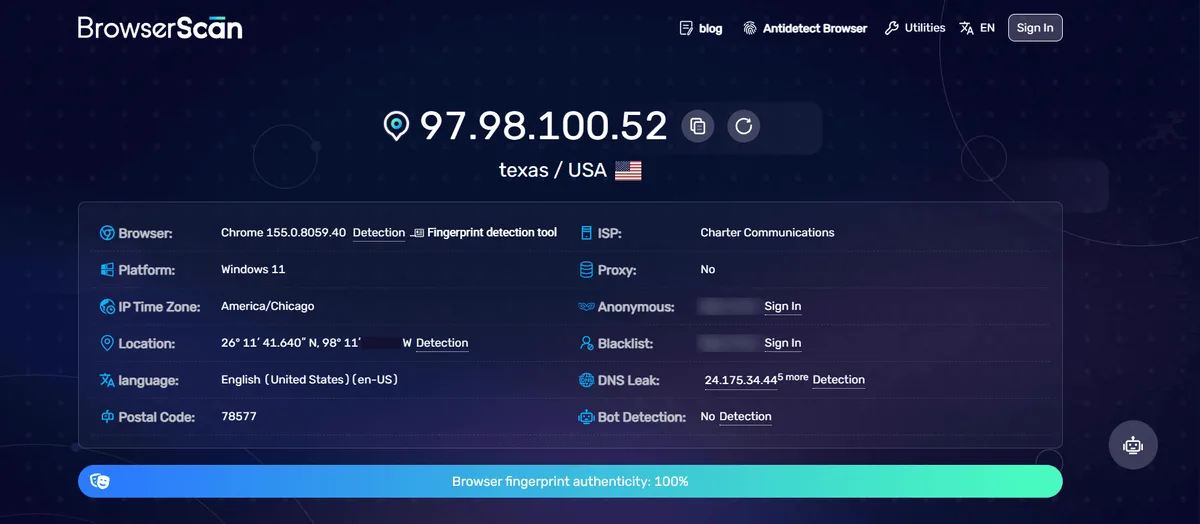
When nothing loads at all, take the browser out of the equation and run the credentials through our free proxy checker. You will know within seconds whether the fault lies with the proxy or with your code.
Common Errors
NS_ERROR_PROXY_CONNECTION_REFUSED, or the page just hangs. Either the host and port contain a typo, or you wrote http:// for a port that actually expects SOCKS5 (or the reverse).
407 Proxy Authentication Required or NS_ERROR_PROXY_AUTHENTICATION_FAILED. The gateway rejected your credentials. Look for a trailing space picked up while pasting, or a username that lost its country or session suffix.
A password-protected SOCKS5 endpoint will not come up. Expected behaviour, see the section above. Move to the HTTP port or to IP-based access.
The fingerprint checker shows a foreign time zone. Make sure geoip was actually passed, and that a rotating gateway did not swap addresses between the startup probe and your first navigation.
Your address jumps halfway through a checkout or login. The username points at a rotating pool. Add a session ID or rent a static IP instead.
Everything in Camoufox happens in code. Teams that would rather manage profiles with a mouse can browse our collection of antidetect browser proxy guides for GUI-based tools.
Camoufox proxy FAQ
Can Camoufox use a proxy with a username and password?
It does when the proxy speaks HTTP or HTTPS; the two credentials go into their own keys of the proxy dict. A SOCKS5 server that demands a password will not work, so pick the HTTP port or whitelist your IP.
What does geoip=True do in Camoufox?
The flag looks up the public address behind your proxy and tunes the clock, language, coordinates and WebRTC data of the browser to that place. You need the package installed with its [geoip] extra for it to work.
Can I use a different proxy for each page?
Technically Playwright lets each context have its own proxy. Because Camoufox settles GeoIP values at startup, though, a matching fingerprint requires one launched instance per proxy.
Is Camoufox free?
Yes. Both the browser build and its Python library are published as open source at no cost; your only spend is on proxies.
What kind of proxy should I pair with Camoufox?
Its maintainers point to residential IPs for well-protected sites. Server addresses do the job on test benches and tolerant targets, while session-pinned IPs fit anything that has to stay logged in.