How to Set Up an ISP Proxy on Windows, macOS, Phones and Browsers

Whatever the device, an ISP proxy needs the same small kit: a host, a port and either a login with a password or an allowlisted IP that replaces them. Only the place where those values go and the quirks of each platform differ. Windows, for one, offers nowhere to type a password, while the Wi-Fi proxy on Android is silently skipped by plenty of apps.
So what is an ISP proxy? It is a fixed address that belongs to a consumer internet provider yet lives on fast data center hardware. Sites trust it the way they trust a home line, and it stays up like a server, which suits long sessions, logged-in accounts and regional checks. Below are setups for each operating system, the main browsers and Python, followed by a way to confirm the new IP and remedies for the usual faults.
Static proxies
Static proxies that keep one IP for the whole rental, ready for long sessions
What to Copy from the Dashboard
Gather four details before opening any settings screen:
- host — a numeric IP or a domain;
- port — HTTP and SOCKS5 frequently sit on different ports of one IP;
- login and password, when you authorise with credentials;
- protocol — HTTP(S), SOCKS5, or both.
Providers usually let you in by one of two methods. Credentials travel with you, so they fit laptops and phones that hop between hotspots. An allowlist admits only addresses you registered in advance and asks for nothing at connection time, which rescues you on systems with no password field. A server with a permanent address is the natural candidate for allowlisting.
ISP-style work fits plans that keep one address for the entire rental, such as our static proxies. If the job instead calls for a stream of fresh addresses, rotation is the right tool; the comparison of sticky and rotating proxies lays out the trade-offs.
Protocol Support by Platform
| Where you configure it | Protocol | Can it store a password? |
|---|---|---|
| Windows network settings | HTTP | No; the browser prompts, or rely on an allowlist |
| macOS network settings | HTTP, HTTPS or SOCKS5 | Yes |
| iPhone and iPad, per Wi-Fi network | HTTP | Yes |
| Android, per Wi-Fi network | HTTP | No; allowlist or a separate app |
| Firefox | HTTP or SOCKS5 | Prompts for HTTP; none for SOCKS5 |
| Chrome, Edge, Opera, Brave | System settings or an extension | Prompt for HTTP |
| Python, curl, automation software | HTTP or SOCKS5 | Yes, embedded in the URL |
When a program accepts both, HTTP is the dependable default for web pages and SOCKS5 is the pick for everything else.
System-Wide Configuration
Windows 10 and 11
- Launch Settings and head to the Proxy page inside Network & internet.
- Find the line labelled Use a proxy server and press its Set up button.
- Flip the switch to On, then type the host into the address box and the number into the port box.
- Optionally list local addresses that should bypass the proxy, and confirm with Save.
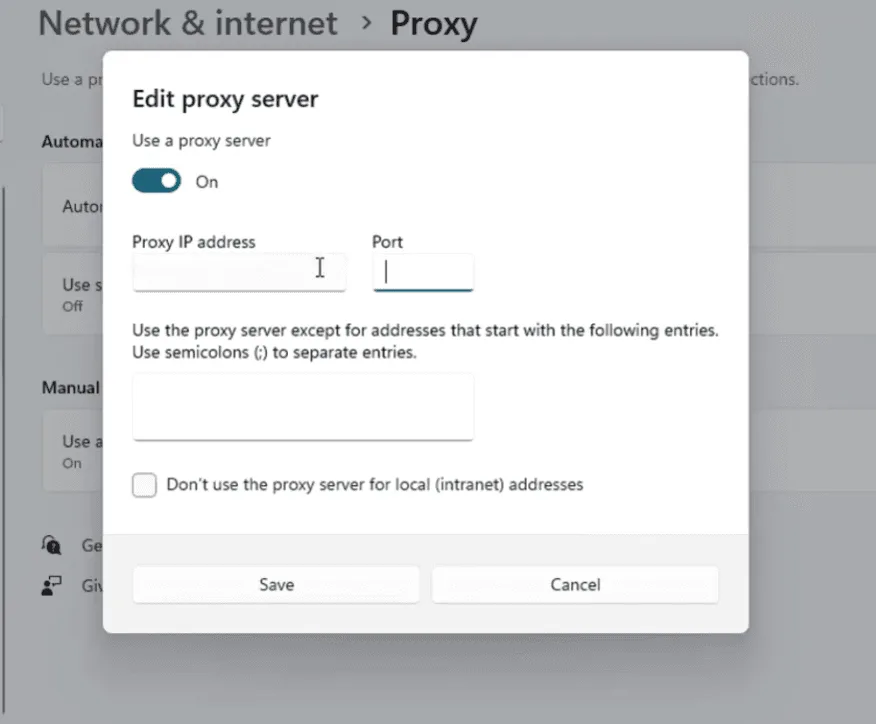
There is no spot for credentials on this page. Chrome and Edge raise a sign-in pop-up the first time a site loads, while most other software just times out. Registering your IP on the provider's allowlist solves that.
macOS
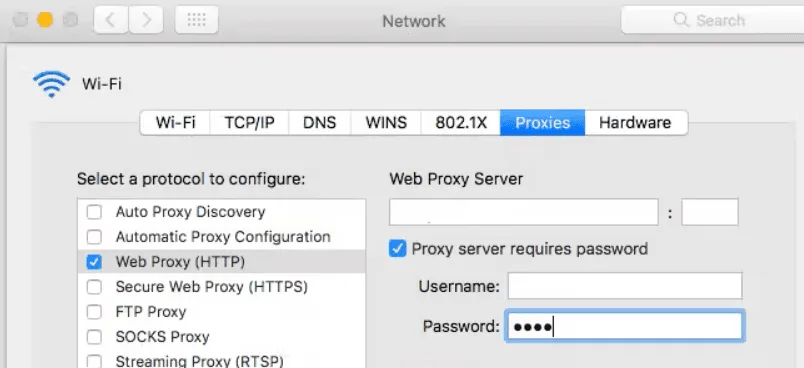
- In System Settings, open Network, highlight the connection you use and click Details.
- Switch to the Proxies section.
- Enable the web proxy entries for HTTP and HTTPS, or the SOCKS entry when your port is SOCKS5.
- Enter the host and port, turn on the password requirement and supply the login details.
- Press OK; Safari follows the change straight away.
Linux
GNOME keeps the switch under Settings → Network → Network Proxy: pick Manual and complete the HTTP, HTTPS or SOCKS lines. Terminal programs ignore that panel and look at environment variables, mostly spelled in lower case:
export http_proxy="http://user-7f3k:Pa55word@198.51.100.31:8080"
export https_proxy="$http_proxy"
export no_proxy="localhost,127.0.0.1"
Appending the lines to ~/.bashrc makes them survive a reboot. Daemons started by systemd never read that file, so give them their own configuration.
iPhone and iPad
- Inside Settings, choose Wi-Fi and press the round ⓘ beside the network you are on.
- At the bottom of that page, open the proxy section and switch it from Off to Manual.
- Enter the host as the server, add the port, then enable the authentication toggle for your credentials.
- Confirm with Save in the corner.
Because the entry belongs to one Wi-Fi network, cellular traffic bypasses it. Covering mobile data takes a proxy app, which our guide to proxies on iPhone and iPad explains.
Android
- Go to the Wi-Fi list (some brands file it under Network & internet), open your current network and press the pencil or cog.
- Unfold the advanced section and set the proxy option to Manual.
- Fill in hostname and port, then save.
Since the form lacks a password line and many apps disregard it anyway, an allowlisted IP or a dedicated client works better here. Our article on setting up a proxy on Android compares the app choices.
Browser-Level Configuration
Firefox carries independent settings, which is ideal when only the browser should leave through the proxy. In Settings → General, scroll down to network options and press the settings button beside them. Choose manual configuration, then either fill the HTTP line and tick the option that reuses it for HTTPS, or fill the SOCKS line with version 5 selected. In the SOCKS case also tick the box that sends DNS through the proxy, otherwise name lookups leak past it.
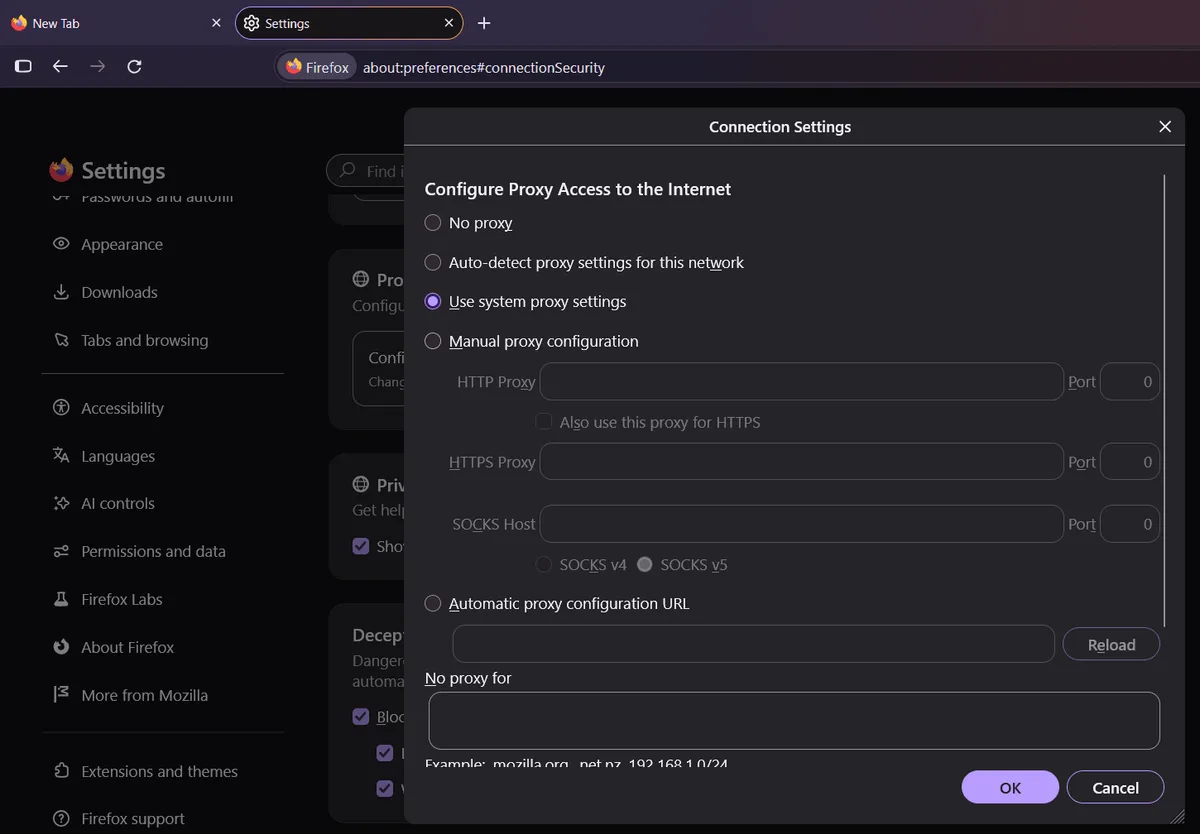
Chrome, Edge, Opera and Brave borrow the operating system's proxy and request the password in a small dialog. Giving the browser a proxy of its own, or flipping between several ISP addresses, is easiest with an extension such as the one in our Proxy SwitchyOmega guide. Safari always mirrors macOS.
Where each account must keep its own address, an antidetect browser pins one proxy to one profile; instructions for well-known tools sit in our antidetect browser proxy guides.
Code and Desktop Programs
Lots of desktop software disregards system settings and offers a private Network or Proxy tab, so look there first when traffic still escapes directly. For Python scripts built on requests, hand the proxy to both schemes:
import requests

gateway = "http://user-7f3k:Pa55word@198.51.100.31:8080"
answer = requests.get(
    "https://api.ipify.org?format=json",
    proxies={"https": gateway, "http": gateway},
    timeout=15,
)
print("exit IP:", answer.json()["ip"])
SOCKS5 needs the optional requests[socks] package and the socks5h:// scheme; the trailing h makes the proxy, not your machine, resolve domain names.
Confirming the New Address
- Jot down your genuine IP while the proxy is still off.
- Turn it on and load an IP lookup page inside the very program you configured.
- Match the shown address and country against your dashboard.
- Fire a handful of requests and note how quickly they return.
A server can also be tested apart from your device in our proxy checker. An unchanged IP usually means the program bypasses the system configuration.
Typical Faults and Remedies
Connection refused. Re-read host and port, make sure the protocol suits that port and that the plan is still active.
Repeated sign-in failures. Paste the password again, watching for hidden spaces. With allowlisting, verify that today's public IP is on the list, since home addresses drift more often than most people think.
Unexpected location. Geo databases disagree, so a site may name a neighbouring region. Consult two or three lookup services before writing to support.
Sluggish pages. Every extra thousand kilometres adds delay, so choose an IP near the target site or audience and race two addresses on identical requests.
A program ignores the proxy. Configure it inside that program, or use a utility that forces its traffic through the relay.
Habits That Keep ISP Proxies Stable
- Let the task dictate the country, for example a British address when auditing UK search results.
- Give each account or project one address and leave it alone mid-session.
- Before a long job, test connectivity, location and speed.
- Keep a note of which program uses which IP, so faults are quick to trace.
ISP Proxy Setup FAQ
How does an ISP proxy differ from a residential one?
Both use IPs owned by consumer providers. Residential traffic passes through real household devices and often rotates, whereas an ISP proxy runs on server hardware with a fixed address, so it is quicker and steadier.
Why does Windows never ask for my proxy password?
Its network settings simply have no credential fields. Browsers show their own sign-in pop-up, and for other software the fix is adding your IP to the provider's allowlist.
Will an ISP proxy work over mobile data?
Not through built-in iOS or Android settings, which cover Wi-Fi only. A proxy app that builds a local VPN tunnel is required.
HTTP or SOCKS5 for an ISP proxy?
HTTP works wherever a browser is involved and is the sole choice in Windows and in phone Wi-Fi menus. SOCKS5 serves programs beyond the browser, such as messengers and scripts.
How can I tell the proxy is really in use?
Load an IP lookup page inside the configured program. If it reports the address and country from your dashboard, traffic is flowing through the proxy.