How to Add Your Own Proxy to Rebrowser Cloud Browser


Rebrowser accepts a third-party proxy as a single connection string. Open Dashboard → Proxies → Add new proxy, set Type to External, paste the address into External URL in the format proto://user:password@host:port, keep Status on Active and press Create. The proxy then appears in your list and can be used by cloud browser sessions and runs.
Below you will find each screen of that flow, how to assemble the URL correctly for HTTP and SOCKS5, why special characters in a password break it, how to check that sessions really leave through your IP, and what to look at when they do not.
Proxies for Rebrowser
Rotating and static proxies in HTTP and SOCKS5 for cloud browser sessions and scraping
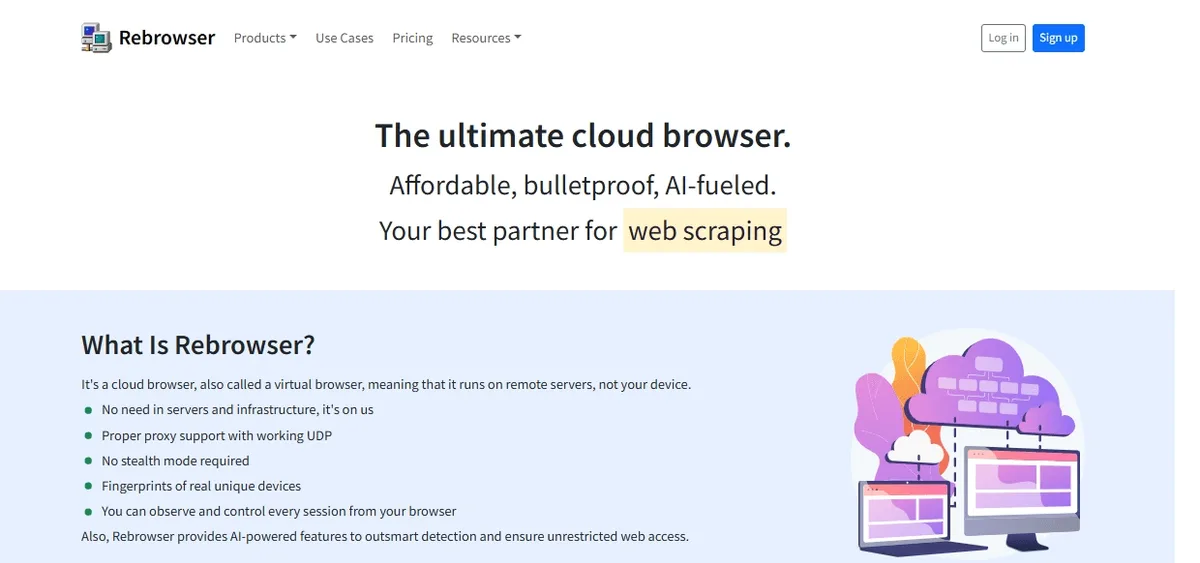
What Rebrowser Is
Rebrowser is a cloud browser service: browser sessions run on its remote servers and real devices rather than on your computer, and you watch or control them from a regular browser tab or through automation libraries such as Puppeteer and Playwright. The platform targets web scraping, test automation and AI agents, and also offers a Web Scraper API and ready datasets.
Inside the dashboard the top menu has six sections: Runs, Scrapes, Groups, Profiles, Proxies and API. Profiles keep separate browser fingerprints and storage, while the Proxies section holds the network side. Rebrowser can sell its own proxy traffic, but external proxies and datacenter proxies are free to use there, according to the hint on the proxy form.
Because the work happens in the cloud, Rebrowser is closer to a remote antidetect browser than to a desktop app. For comparison with classic desktop tools, see our hub of antidetect browser proxy guides.
Which Proxy to Bring
- For scraping at volume, rotating proxies spread requests over many addresses and reduce blocks on catalogue pages.
- For long sessions in one profile (logged-in dashboards, repeated checks of one site), a sticky or static address keeps the session intact.
- Protocol: Rebrowser accepts HTTP and SOCKS5. The home page also advertises proper UDP support, which matters for WebRTC and QUIC; UDP passes only over SOCKS5, as our article on UDP proxies explains.
Building the External URL
Rebrowser does not have separate host and port fields. Everything goes into one line:
proto://user:password@host:port| Part | Example | Note |
|---|---|---|
| proto | http or socks5 | Must match the port type |
| user | user-7f3k | Proxy login |
| password | Rq8vT2mx | Proxy password |
| host | 203.0.113.10 | IP address or domain name |
| port | 10800 | Port from your dashboard |
A finished line looks like socks5://user-7f3k:Rq8vT2mx@203.0.113.10:10800. Many providers show credentials as host:port:user:pass; rearrange the parts rather than pasting that string as is.
Watch out for special characters. If a password contains @, :, / or #, the URL becomes ambiguous and the connection fails. Either regenerate a password without these symbols or replace them with percent codes, for example @ → %40.
Adding the Proxy Step by Step
Step 1. Sign In to Rebrowser
Open the Rebrowser website and press Log in, or Sign up if you are new.
Step 2. Go to the Proxies Section
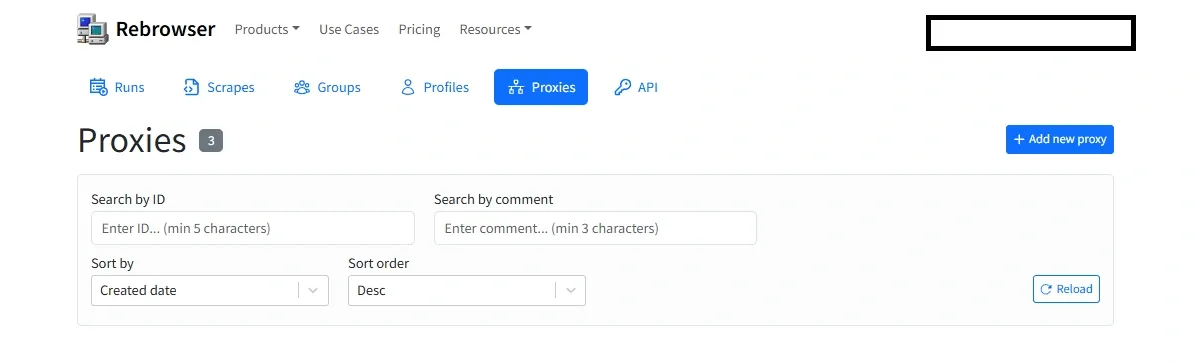
Click your account name in the top right corner and choose Dashboard. In the top menu of the dashboard switch to Proxies. The counter next to the heading shows how many proxies are already saved; the filters below let you search by ID or comment and sort by creation date.
Step 3. Open the Add New Proxy Form
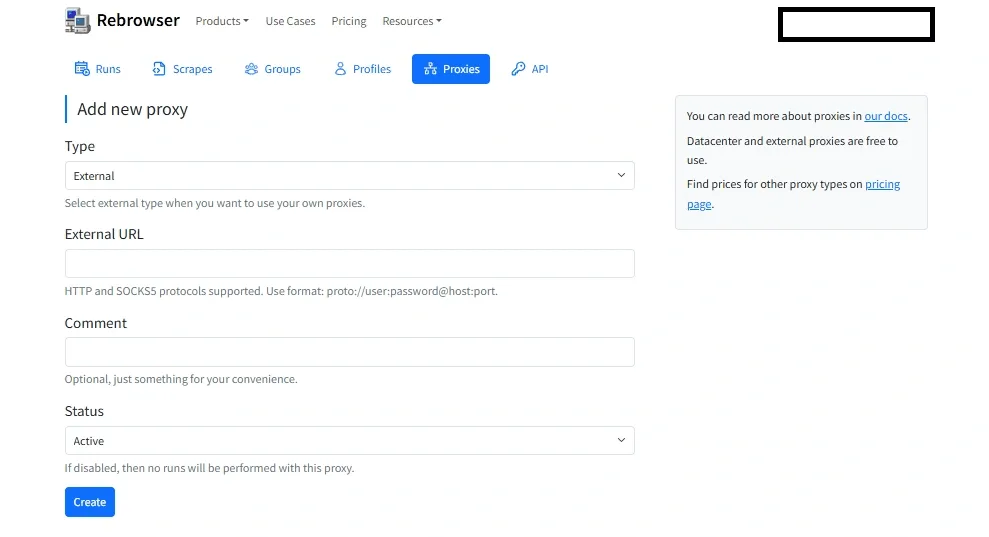
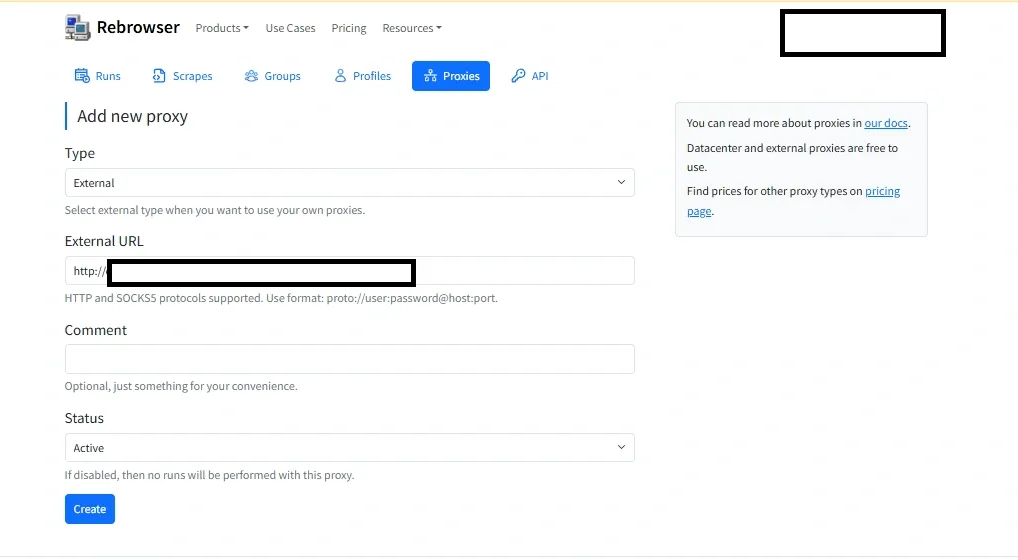
Press + Add new proxy on the right. The form has four fields: Type, External URL, Comment and Status.
Step 4. Choose External and Paste the URL
- In Type select External. The hint under the list confirms that this option is meant for your own proxies.
- In External URL paste the string you prepared. The hint below repeats the expected format.
- In Comment add a short label such as the country and purpose, for example
de-sticky-shop-monitor. It is optional, but it makes the list searchable later.
Step 5. Keep It Active and Create
Leave Status on Active. A disabled proxy stays in the list, but no runs are performed through it. Press Create at the bottom of the form.
Checking That Sessions Use the Proxy
Start a session or run that uses the new proxy and open any IP-checking page inside the cloud browser. The reported address and country must belong to your proxy. For automated runs, log the response of an IP-echo endpoint at the start of the script; this catches a misconfigured proxy before the job collects wrong data.
If you scrape several regions, create one external proxy per country and name them clearly in Comment. Switching the network then means picking another proxy rather than editing the profile.
Common Problems
- Connection refused or timeout. Check host and port, then the protocol prefix: an HTTP port described as
socks5://will not answer. - Authentication error. The login or password is wrong, or a special character breaks the URL. Percent-encode it or set a simpler password.
- Proxy saved, but runs do not start. Make sure Status is Active; disabled proxies are skipped.
- Pages load slowly or fail randomly. Speed depends on both sides. Test the same proxy locally; if it is slow there too, the issue is on the proxy side. Our tips on avoiding blocks while scraping help when target sites start refusing requests.
Rebrowser is a tool for engineers: setting up runs, profiles and API calls takes some technical background, and cloud browser hours cost more than a local browser. For collecting public data, the combination of cloud sessions and your own proxy pool is still one of the most convenient setups; more scenarios are on our web scraping page.
Rebrowser Proxy FAQ
Which proxy formats does Rebrowser accept?
One URL in the form proto://user:password@host:port, where proto is http or socks5. Separate host and port fields are not available.
Do I pay Rebrowser for traffic through my own proxy?
According to the hint on the proxy form, external and datacenter proxies are free to use. Other proxy types bought from Rebrowser are priced on its pricing page.
How do I add a proxy without a password?
Use the short form proto://host:port. Your provider must then authorize access by IP, so add the Rebrowser server address to its whitelist if required.
Can I keep several proxies in Rebrowser?
Yes. Each one is a separate entry in the Proxies list, and the Comment field helps tell them apart when you assign them to different tasks.
What does the Status field do?
Active proxies can be used in runs. Switching a proxy to disabled keeps it saved but stops any runs from using it.