How to Scrape Telegram Channels and Groups: Telethon, Web Previews and Proxies


To scrape a Telegram channel you either log in through the official MTProto API with a library such as Telethon and read the message history, or you fetch the public web preview at t.me/s/<channel> and parse its HTML. The first route gives complete, structured data for anything your account can see; the second needs no account at all but only works for public channels and returns a thinner set of fields.
Most tutorials paste a forty-line script and stop. Below you will find a comparison of both routes, a Telethon collector with proxy settings and flood-wait handling, a parser for the web preview, notes on the status of Pyrogram, the limits Telegram enforces, and which proxy type makes sense for each case. Everything here is aimed at public channels and groups you have joined legitimately, not at harvesting people.
SOCKS5 proxies
Stable SOCKS5 proxies with a login and password that Telethon supports out of the box
Two Ways to Get Telegram Data
| MTProto API (Telethon) | Public web preview t.me/s/ | |
|---|---|---|
| Account needed | Yes, a phone number plus api_id and api_hash | No |
| What you can read | Public channels, groups you are a member of, your own chats | Public channels only (and only if the owner left the preview on) |
| Fields | Full message objects: id, date, text, views, forwards, replies, reactions, media metadata, edit date | Text, date, view counter, post link, some media links |
| History depth | Whole history, paged by message id | Roughly 20 posts per page, older ones via ?before= |
| Main limit | Flood-wait errors per account | HTTP throttling per IP |
| Where proxies help | Reaching Telegram from restricted networks, keeping a stable exit | Spreading page requests, choosing a region |
For analytics on a handful of channels the API is almost always the better choice: data is cleaner, nothing breaks when Telegram redesigns a page, and you see exact counters. The web preview is handy for quick monitoring without a phone number, or when you need to check what an anonymous visitor sees.
Rules Before You Start
Telegram publishes API Terms of Service for third-party clients. They forbid using the API for spam, flooding, and inflating subscriber or view counts, and they expect developers to respect user privacy. Keep to that and to the law where you work:
- Collect from public channels or from groups you have joined as yourself; do not create accounts to get in.
- Treat member lists and user profiles as personal data. Under GDPR and similar laws you need a legal basis to store them, so most research projects should aggregate or skip them entirely.
- Store message ids and channel names, not copies of every image and video, unless you have rights to the media.
- Stop when Telegram tells you to slow down. A flood wait is a request, not an obstacle to defeat.
For the wider picture of collecting public posts, see our overview of collecting data from social networks.
Route 1: Telethon and the Official API
Telethon is an asynchronous Python library that speaks MTProto, the same protocol the official apps use. Your script logs in as a normal user account, so it sees exactly what that account sees.
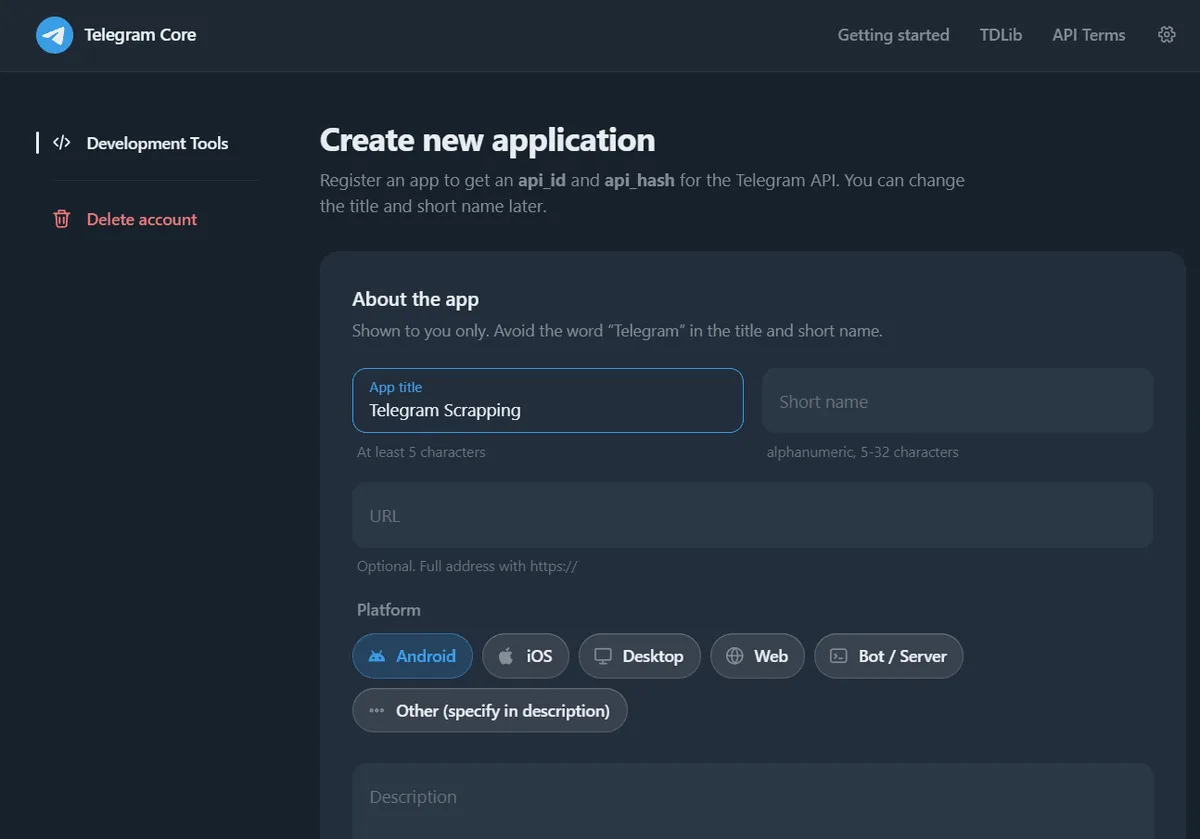
Step 1. Register an application
Open my.telegram.org, sign in with your phone number, go to API development tools and create an app. You get two values, api_id and api_hash. Keep them out of your code repository: read them from environment variables.
Step 2. Install the libraries
pip install telethon "python-socks[asyncio]"The second package is what Telethon uses for SOCKS and HTTP proxies; without it the proxy argument is ignored with a warning.
Step 3. Connect through a proxy
Telethon accepts a proxy as a dictionary. The keys below follow the library documentation; the address and login are placeholders.
import os
from telethon import TelegramClient

relay = {
    "proxy_type": "socks5",
    "addr": "203.0.113.40",
    "port": 1080,
    "username": "tg-reader-01",
    "password": "replace-me",
    "rdns": True,
}

client = TelegramClient(
    "channel_reader",                 # name of the local session file
    int(os.environ["TG_API_ID"]),
    os.environ["TG_API_HASH"],
    proxy=relay,
)
On the first run Telethon asks for the phone number and the login code in the console and then saves a .session file. Guard that file like a password: anyone holding it is logged into your account.
If you only have an MTProto proxy (host, port and secret), Telethon supports it through a special connection class, connection.ConnectionTcpMTProxyRandomizedIntermediate, with proxy=(host, port, secret). The difference between the two proxy kinds is covered in our piece on MTProto proxies.
Step 4. Read the channel history
import asyncio, csv
from telethon import errors

CHANNELS = ["example_news", "example_tech"]

async def harvest():
    await client.start()
    with open("posts.csv", "w", newline="", encoding="utf-8") as out:
        sheet = csv.writer(out)
        sheet.writerow(["channel", "msg_id", "posted", "views", "forwards", "text"])
        for handle in CHANNELS:
            try:
                async for post in client.iter_messages(handle, limit=500):
                    sheet.writerow([handle, post.id, post.date.isoformat(),
                                    post.views, post.forwards,
                                    (post.message or "").replace("\n", " ")])
            except errors.FloodWaitError as pause:
                print(f"{handle}: Telegram asks to wait {pause.seconds} s, stopping here")
                break
            await asyncio.sleep(5)       # breathing room between channels

with client:
    client.loop.run_until_complete(harvest())
A few details worth knowing. iter_messages pages through history in batches for you, newest first; pass reverse=True with offset_date to walk forward from a date. post.views is only filled for channel posts. For incremental runs, save the highest msg_id per channel and pass it as min_id next time, so you only fetch new posts.
Rate Limits and Flood Waits
Telegram does not publish exact quotas. Instead, when an account calls a method too often the server answers with FLOOD_WAIT_X, where X is the number of seconds to wait. Telethon turns this into FloodWaitError and, by default, quietly sleeps on its own when the wait is short (the flood_sleep_threshold setting, 60 seconds out of the box). Longer waits are raised to your code.
Practical habits that keep an account healthy:
- resolve each channel name once and cache the entity instead of resolving it on every run;
- read history in a few big batches rather than thousands of tiny calls;
- run on a schedule (hourly or daily) instead of a tight loop;
- keep one account per project and do not hop between IP addresses mid-session.
Notice that the last point is about stability, not anonymity. A session that jumps between countries looks like a stolen login, and Telegram may end it and ask you to sign in again.

What About Pyrogram?
Pyrogram was the other popular MTProto library, but its GitHub repository was archived in December 2024 and the README states that the project is no longer maintained. Old scripts still run until Telegram changes something they depend on. Community forks continue the codebase under new names; if you choose one, check its release history and issue tracker first. For a new project in 2026, Telethon is the safer default. Pyrogram took proxies as a dictionary with scheme, hostname, port, username and password keys, and most forks kept that format.
Route 2: Parsing the Public Web Preview
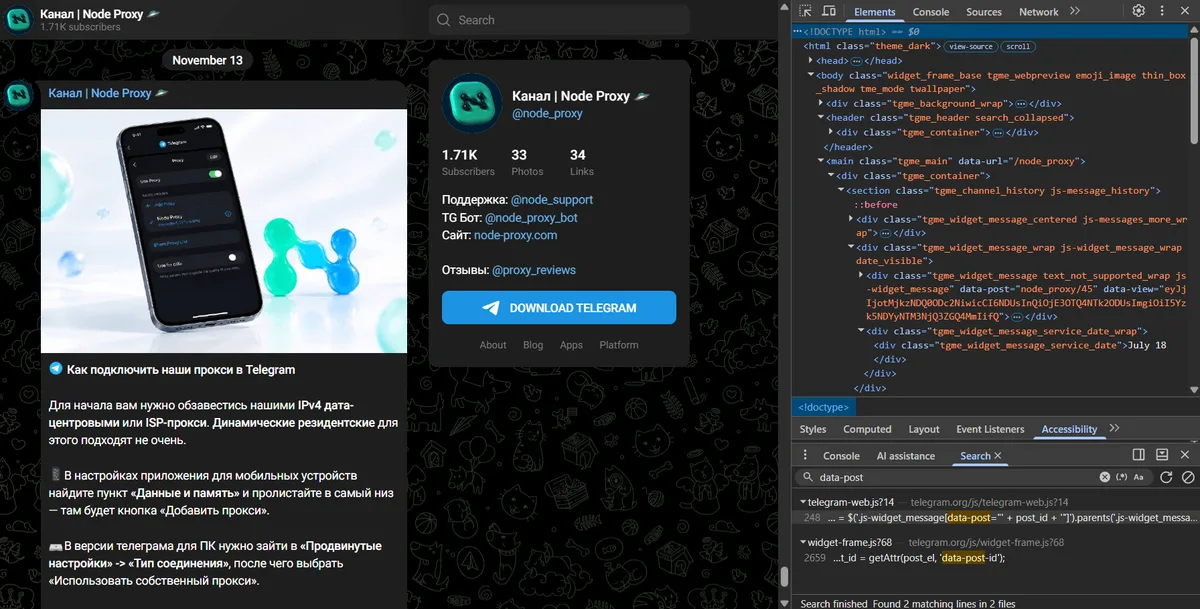
Every public channel with the preview enabled has a page at https://t.me/s/<name> that renders recent posts as plain HTML. You can read it with any HTTP client and a parser like BeautifulSoup. Class names below are what the page used when this guide was written; confirm them in DevTools.
import time, requests
from bs4 import BeautifulSoup

exit_node = "http://tg-reader-01:replace-me@203.0.113.40:8000"
http = requests.Session()
http.proxies = {"http": exit_node, "https": exit_node}
http.headers["User-Agent"] = "Mozilla/5.0 (Windows NT 10.0; Win64; x64)"

def preview_page(name, before=None):
    url = f"https://t.me/s/{name}" + (f"?before={before}" if before else "")
    soup = BeautifulSoup(http.get(url, timeout=20).text, "html.parser")
    found = []
    for card in soup.select("div.tgme_widget_message[data-post]"):
        body = card.select_one(".tgme_widget_message_text")
        seen = card.select_one(".tgme_widget_message_views")
        stamp = card.select_one("time[datetime]")
        found.append({
            "post": card["data-post"],
            "text": body.get_text(" ", strip=True) if body else "",
            "views": seen.get_text(strip=True) if seen else None,
            "date": stamp["datetime"] if stamp else None,
        })
    return found

batch = preview_page("example_news")
time.sleep(3)
The data-post attribute looks like channel/1234; take the number after the slash and request ?before=1234 to load the previous page. View counters come abbreviated (for example 12.4K), so convert them yourself. If a channel returns an empty page, its owner has probably disabled the preview, and the only legitimate route left is the API.
Choosing a Proxy for Telegram Scraping
Proxies solve different problems on each route.
For the API. Your connection count is tiny, so you need one dependable exit, not a pool. The main reasons are network restrictions (offices, countries where Telegram is filtered) and keeping a fixed, clean address for a long-lived session. SOCKS5 proxies fit best: Telethon supports them natively, and a static address keeps the session consistent. Use the same exit every time the session runs.
For the web preview. Here you send plain HTTP requests, and Telegram throttles by IP when a single address pulls hundreds of pages. Spread the load across a few exits and keep a pause of a few seconds between pages. Whether you need sticky or rotating proxies depends on volume: for a dozen channels a single sticky IP is enough.
If you only want to open Telegram itself through a proxy rather than collect data, our guide to setting up a proxy in Telegram walks through the app settings on desktop and mobile. General principles for proxy pools in data collection are in proxies in web scraping.
Common Errors
| Message | What it means | What to do |
|---|---|---|
FloodWaitError | Too many calls of one method | Wait the given seconds, then reduce frequency |
UsernameInvalidError / UsernameNotOccupiedError | Wrong or deleted channel handle | Check the name, use the numeric id if you have it |
ChannelPrivateError | Private channel or you were removed | You need a legitimate invite; skip it otherwise |
AuthKeyDuplicatedError | The same session file used from two places at once | Run one process per session file |
| Connection timeouts | Proxy unreachable, or python-socks missing | Test the proxy separately, install the package |
Empty t.me/s/ page | Preview disabled by the owner | Use the API with an account that can see the channel |
Telegram scraping FAQ
Is it legal to scrape Telegram channels?
Reading public channels for analysis is generally accepted, but Telegram's API terms ban spam and fake engagement, and data protection laws apply to any personal data you store. Collect public posts, aggregate where possible, and avoid building profiles of individual users.
Can I scrape Telegram without an account?
Yes, for public channels that keep the web preview enabled: the t.me/s/ page shows recent posts as HTML. Private channels, groups and full message metadata require logging in through the API.
Is Pyrogram still maintained?
No. The original repository was archived in December 2024 and marked as unmaintained. Community forks exist, but for new code Telethon is the more conservative choice.
How many requests can I send before Telegram blocks me?
Telegram does not publish fixed limits. It answers with a flood-wait error that tells you how many seconds to pause, and the threshold depends on the method and on your account history. Batch requests, cache channel lookups and run on a schedule.
Do I need a proxy to scrape Telegram?
Not always. Through the API you mainly need one if Telegram is restricted on your network or if you want a stable dedicated address for the session. For the web preview, proxies help when you pull many pages and want to avoid per-IP throttling.