What Is an MTProto Proxy in Telegram and How Does It Work


An MTProto proxy is a relay server built for exactly one client: Telegram. The app connects to it instead of going straight to Telegram's data centers, the relay forwards the encrypted stream onward, and every other program on the device keeps using the normal connection. Support is native, so there is nothing to install: a single link or three values (server, port and secret) are enough.
Below we look under the hood rather than at the settings menu. You will see what the relay can and cannot observe, why the secret matters more than it seems, what the dd and ee prefixes change, how a proxy link is assembled, where the sponsored channel in your chat list comes from and why a server that worked yesterday may be dead today.
Proxies for Telegram
Private SOCKS5 proxies with a login and password that plug straight into Telegram
How the Connection Is Routed
Without a proxy, the client opens connections to Telegram's data centers directly. Once an MTProto proxy is switched on, the route gains one hop:
Telegram app → MTProto proxy → Telegram data centerThe relay accepts the client's TCP connection, checks that the client knows the secret, and opens its own connection to the data center. Bytes then flow both ways through it. Chats, media and bots behave as usual, because the app still speaks its normal protocol; it is merely wrapped for transport.
Two consequences follow. First, the reach of the proxy ends at Telegram: browsers, games and mail clients are untouched. Second, the relay never holds the keys to your messages. MTProto encrypts traffic between the app and Telegram's servers, so the operator sees ciphertext only.
The Secret: Plain, dd and ee
The secret is a shared key known to the client and the relay. It is used to obfuscate the stream, so that an observer cannot tell from the first bytes that this is Telegram. Over the years three formats appeared, and the first characters of a secret reveal which one a server uses.
| Secret format | What it looks like | What it adds | Current status |
|---|---|---|---|
| Plain | 32 hex characters | Basic obfuscation of the stream | Easy for network filters to fingerprint; rarely used now |
dd + 32 hex | Starts with dd | Random padding that hides typical packet sizes | Still supported, weaker than Fake-TLS |
ee + 32 hex + domain | Starts with ee, followed by a long hex tail | Fake-TLS: the handshake imitates a visit to a regular HTTPS site | The usual choice for new servers |
In the ee variant, the hex tail is simply a domain name encoded in hexadecimal. During the handshake the client sends what looks like a TLS 1.3 greeting for that domain, with an authentication value hidden inside. If the value is wrong, a well-built server forwards the probe to the real website, so a scanner sees an ordinary HTTPS host. None of this guarantees access in every network: filtering systems also study traffic volume, timing and the reputation of the server's IP.
Anatomy of a Proxy Link
Operators rarely hand out three separate values. They share a link, which Telegram turns into a ready-made entry with one tap. Two forms carry the same data:
tg://proxy?server=198.51.100.24&port=443&secret=ee1b9f...
https://t.me/proxy?server=198.51.100.24&port=443&secret=ee1b9f...
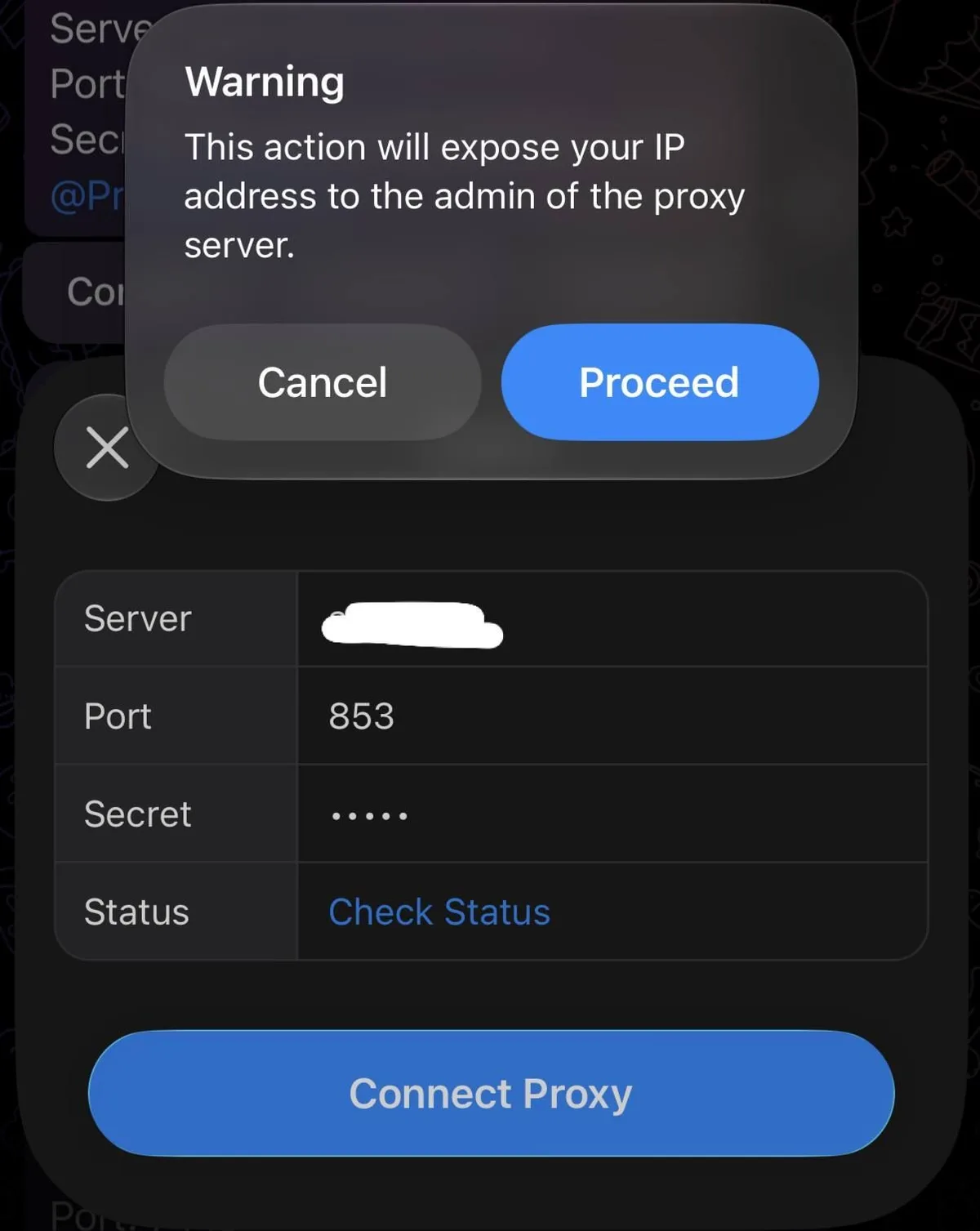
The server parameter is an IP or domain, port is often 443 because that port is rarely blocked, and secret is the key described above. Tapping such a link opens a confirmation dialog with a Connect proxy button. The full walkthrough for desktop and phone menus, including manual entry, lives in our guide on setting up a proxy in Telegram.
Why a Sponsored Channel Appears
Many users notice a pinned channel marked "Proxy sponsor" right after connecting. This is a legitimate feature: the operator registers the server with Telegram's official proxy bot and receives a tag that lets Telegram promote one channel to everyone using that relay. The channel disappears as soon as the proxy is turned off. A private server without a tag never shows anything.
MTProto Proxy, SOCKS5 and VPN Compared
All three move traffic through a third-party server, but at different scopes.
| MTProto proxy | SOCKS5 proxy | VPN | |
|---|---|---|---|
| What goes through it | Telegram only | Any app that supports SOCKS5 | Usually the whole device |
| Credentials | Server, port, secret | Server, port, optional login and password | App profile or config file |
| Hides that traffic is Telegram | Yes, via obfuscation | No, the handshake is plain | Depends on the protocol |
| Voice and video calls | Not carried | Possible if the server relays UDP | Carried |
| Extra software | None | None for Telegram | A VPN client |
If the choice is between the first two columns, our comparison of SOCKS5 and MTProto for Telegram breaks down speed, calls and setup in more detail.
What the Operator Can and Cannot See
The relay cannot read messages, media or contacts. It does, however, see connection metadata:
- your public IP address and approximate location;
- when you connect and how long the session lasts;
- how much data passes through;
- the fact that you use Telegram.
So trust in the operator still counts. A stranger's server can keep logs, vanish overnight or start promoting a channel you would rather not see.
Public Lists, Private Servers and Self-Hosting
Free lists in channels and on websites are the quickest way to get online, and the least predictable. Hundreds of users share one machine, so latency jumps in the evening, and links stop working when the IP gets blocked or the owner rotates the secret. The trade-offs mirror those of any free proxy.
A private relay solves load and trust at the cost of upkeep. The original server from Telegram is written in C and has seen little development for years; most people now run community builds such as mtg (Go), which focuses on Fake-TLS secrets, or mtprotoproxy (Python), which understands all three formats. A small VPS with a clean IP and port 443 open is enough for a family or a team.
When you do not want to administer a server at all, Telegram's own SOCKS5 support is the simpler route: a private SOCKS5 proxy with a login and password goes straight into the app's proxy list and can also serve your browser. Ready-made options for the messenger are collected on our Telegram proxies page.
Why an MTProto Proxy Stops Working
The status line in the proxy list is the first clue. "Connecting" that never ends, or a missing ping, usually points to one of these causes:
- The secret changed. Operators rotate secrets after a server is detected. Fetch a fresh link.
- The IP got blocked. Public relays are hunted down quickly; private ones last longer.
- The format is outdated. A plain secret may be filtered while an
eesecret on the same network works fine. - The server is overloaded. High ping with timeouts in peak hours means too many users.
- The local network is at fault. If a second, known-good proxy fails too, test another Wi-Fi or mobile data before blaming the relay.
Keeping two or three relays in the list helps: Telegram shows each one's ping, and switching takes a tap.
MTProto Proxy FAQ
Is an MTProto proxy the same as a VPN?
No. A VPN usually tunnels the entire device, while an MTProto proxy carries Telegram alone. Your browser and other apps keep their normal route.
Can the proxy owner read my messages?
No. Messages stay encrypted by Telegram's protocol, so the relay only sees ciphertext and metadata such as your IP, session time and data volume.
What does a secret starting with ee mean?
It is a Fake-TLS secret. The connection imitates a visit to an ordinary HTTPS site whose domain is encoded in the hex tail of the secret.
Do voice calls go through an MTProto proxy?
They do not. Calls use their own route, so they can fail even while chats work through the relay. A SOCKS5 server that relays UDP is the option for routing calls.
Why did a channel appear at the top of my chat list?
The proxy owner registered the server for a sponsored channel. It is shown only while that proxy is active and disappears when you turn it off.