Craigslist IP Blocked: Why It Happens and How to Fix It

When Craigslist says your IP has been automatically blocked, its anti-abuse filter has stopped traffic from your network address, not necessarily from you personally. The usual triggers are too many page requests, posting patterns that look like spam, or an address shared through a VPN, Tor, a hosting provider or a busy public network. The fix starts with working out which of these applies, pausing the activity and, if the block persists, writing to the email address Craigslist shows on the block page.
This article explains how an IP block differs from an account restriction or a hidden post, what usually causes each one, what to do step by step, how VPNs and proxies fit into the picture, and how to post so the filters leave you alone.
Dedicated residential IPs
Clean residential proxies with a fixed address in your region
What the Block Looks Like
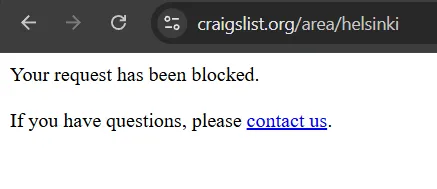
An IP block appears as a plain page instead of the listings. It says the IP has been automatically blocked and gives a special email address for questions. The block covers the whole connection, so every browser and device behind the same address sees it, whether you are signed in or not.
Other Craigslist restrictions look different, and mixing them up leads to wrong fixes:
| What you see | What is restricted | Where to look |
|---|---|---|
| A block page on any Craigslist URL | Your IP address | Network, VPN, request volume |
| You can browse but cannot log in or post | Your account | Account history, rules, support |
| The post shows as active but nobody finds it | A single listing (often called "ghosted") | Duplicates, category, wording |
| The post status says it was flagged or removed | A single listing | Content and category rules |
Why Craigslist Blocks IP Addresses
Too Many Requests
Craigslist pages are meant to be read by people. Opening hundreds of listings quickly, refreshing searches every few seconds or running a script looks like automated collection. Craigslist's terms of use forbid robots, scrapers and crawlers and treat viewing more than 1,000 pages in 24 hours as a violation, so heavy browsing alone can trip the filter.
Posting That Looks Like Spam
Copies of the same ad in several cities, the same item in several categories or frequent deleting and reposting are classic spam signals. New accounts that publish many ads right after registration draw extra attention too.
Shared and Server Addresses
Commercial VPNs, Tor exit nodes and datacenter IP ranges carry traffic of thousands of users. If one of them abuses the site, the whole address is blocked, and Craigslist has historically restricted Tor and many hosting ranges entirely. The same happens on dorm, hotel, office and café networks, where one public IP serves everyone.
Location Mismatch
Craigslist is built around local sites. Posting in a city far from where your connection appears to be is a factor the filters weigh, especially combined with many posts. How services estimate location from an address is covered in our article on IP geolocation.
Content Problems
Prohibited goods and services, misleading text, many links or odd contact formatting get posts removed and, if repeated, can escalate to account or IP restrictions. A new connection does not fix this.
How to Fix a Craigslist IP Block
Step 1. Stop and Wait
Close Craigslist tabs, stop any tools that touch the site and give it time. Many automatic blocks are temporary and lift after some hours or a day once requests stop.
Step 2. Find Out Whether It's the Network
Open Craigslist on your phone using mobile data, with Wi-Fi turned off. If it works there but not at home, the restriction is tied to the home or office address rather than your account. Ask others on the same network whether they see the block.
Step 3. Turn Off VPN, Tor and Proxy Extensions
If you browse through a VPN or a free proxy, disconnect it and reload. Shared exit addresses are the most common reason ordinary users meet this page. Remember that browser add-ons marketed as privacy or "unblock" tools often route traffic through such servers.
Step 4. Email Craigslist
If the block stays on your normal home connection, write to the address shown on the block page. Keep it short: the blocked IP, date and time, what you were doing and a note that you are an individual user. One clear message works better than a series of repeats.
Step 5. Review Your Posts and Account
Even if access returns, open your account and look at listing statuses. Remove duplicates, fix categories and check contact details, otherwise the same pattern can trigger the filter again.
Don't try to dodge a block by cycling through new addresses or creating fresh accounts. Craigslist's terms forbid bypassing its moderation, and the original cause keeps working against you on any IP.
If Your Account or Post Is Restricted Instead
Account: read the notice or email from Craigslist, correct the problem listings and contact support through the help pages. Describe what happened in plain words and ask for a review. A restored old account is better than a new one opened from the same place.
Ghosted or flagged post: check that the ad is in the right city and category, has original text and photos and contains no long lists of links or keywords. Use the renew option for an existing ad instead of deleting it and posting a copy.
VPNs and Proxies with Craigslist
A proxy is not a way around a Craigslist block, and Craigslist doesn't allow automated data collection, so proxies can't help there. They still have a normal place in legitimate work. For example, a business may route its office traffic through a fixed gateway, or a property manager travelling abroad may need to manage ads in their home city from a familiar IP.
In these cases the address type matters:
- datacenter and shared VPN addresses are the most likely to be already blocked, as our comparison of residential and datacenter proxies shows;
- free proxy lists combine every risk: shared, flagged and unsafe, as described in our guide to public proxy servers;
- a dedicated proxy gives one user one address, so nobody else's behaviour affects it.
For the scenarios above, a residential proxy with a fixed IP in the same region as your listings keeps location and activity consistent. Use it for normal volumes and the same rules as on a home connection.
How to Avoid Future Blocks
- Post each item once, in one city and one category.
- Post where you are actually offering the item or service.
- Renew ads instead of deleting and reposting them.
- Write each ad yourself, don't clone texts with small edits.
- Keep links and contact details simple and limited.
- Browse at a human pace and don't run scrapers or auto-refresh tools.
- Avoid shared VPNs when you post or manage your account.
Craigslist IP block FAQ
How long does a Craigslist IP block last?
There is no official duration. Many automatic blocks lift within hours to a few days after the triggering activity stops; if the block persists on a normal home connection, email the address on the block page.
Why is my IP blocked on Craigslist if I did nothing wrong?
Your address may be shared with other people through a VPN, a public Wi-Fi network or a provider that assigns one public IP to many customers. Turn off the VPN or try mobile data, and if the block stays on your own connection, write to Craigslist.
Will restarting my router unblock Craigslist?
Sometimes a restart assigns a new address and the page opens, but this does not fix the cause and Craigslist forbids bypassing its moderation. Use it only as a test to see whether the block is tied to the IP, then deal with the reason.
Does Craigslist block VPNs?
Craigslist often blocks addresses of commercial VPNs, Tor and hosting providers because they carry a lot of abusive traffic. If you see the block page while connected, disconnect the VPN first.
Can I use a proxy for Craigslist?
You can for normal browsing and posting, provided the address is clean, dedicated to you and in the same region as your listings. A proxy does not legalize scraping or mass posting, and it will not lift an existing block.