TikTok Shadowban: How to Check It, Why It Happens and How to Recover Reach

A TikTok shadowban is the popular name for a quiet drop in distribution: your account works, videos stay online, yet new posts barely reach the For You feed and get far fewer views. TikTok itself doesn't use the word. In its terms, a video or a whole account can become "ineligible for the For You feed", and the app now shows this status, so you can check it instead of guessing.
This guide shows how to tell a real restriction from an ordinary dip, where to find the status in the app, what usually triggers it, a recovery plan with realistic timing, and what agencies and SMM teams should know about network setup, including what proxies can and cannot do.
Proxies for TikTok
Stable mobile and residential IPs for managing TikTok accounts in their market
Shadowban or Just a Weak Video?
Reach on TikTok fluctuates naturally. One weak hook, a trend that faded or a change in what your audience watches can halve views without any penalty. Signs that point to a restriction usually come together:
- several new videos in a row get a fraction of your usual views;
- the For You share in the video's traffic sources falls close to zero;
- followers still react, but there are almost no views from new viewers;
- your videos stop showing up in search for their own hashtags or keywords;
- the app shows a notice about ineligibility or a Community Guidelines violation.
If only one or two videos underperform while the rest are normal, look at content first: the first seconds, length, sound, posting time.
How to Check Your Status in the App
TikTok gives creators two places to look.
- Video analytics. Open the post, tap the three dots or More insights and check for a notice that the video is not eligible for recommendation in the For You feed. Tapping it shows the reason and, in most cases, an option to appeal.
- Account status. In recent versions of the app, an account overview lists strikes, removed posts and restrictions on features such as comments, live or messages. Depending on the app version and region, it sits in Settings and privacy or in creator tools; the account check covers your most recent posts.
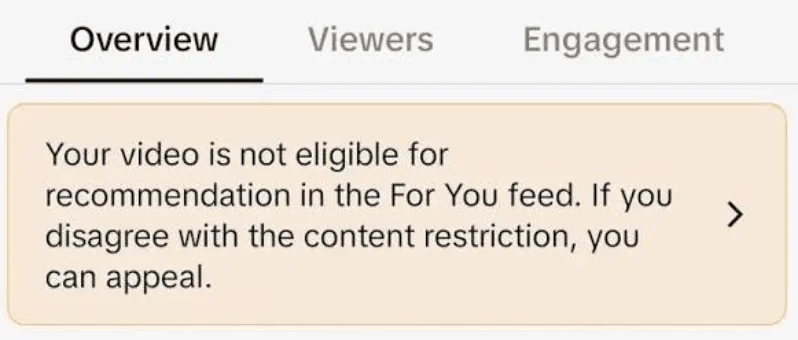
Since 2024, TikTok can make an entire account temporarily ineligible for recommendations if it keeps posting content that falls short of the For You standards. Such accounts are also harder to find in search. TikTok notifies the creator in this case and allows an appeal.
What Usually Causes Restricted Reach
Content That Breaks or Brushes the Rules
Clear violations are removed. Borderline content often stays up but is not recommended: dangerous stunts, misleading health or money claims, graphic scenes, sexually suggestive material, and anything the For You eligibility standards list as unsuitable for broad distribution.
Unoriginal and Reposted Videos
Re-uploading clips from other platforms or other creators without meaningful editing is one of the most common reasons for ineligibility. Watermarks from other apps, static slideshows of someone else's photos and duplicate uploads of your own videos fall into the same group.
Spam-Like Activity
Mass following and unfollowing, identical comments under many videos, bursts of likes and third-party "growth" services that sell engagement all look inauthentic. Purchased views and followers break TikTok's rules and can bring a restriction or a ban.
Account Security Signals
Logins from many countries in a short time, frequent device changes and sharing one password across a team look like a compromised account. TikTok may ask for verification, log people out or limit features until the situation calms down.
How to Recover Reach
Step 1. Read the Notices and Appeal
If the app shows a violation or ineligibility, open it, read the reason and appeal when you believe it is a mistake. Appeals are reviewed individually, and a successful one restores the post's eligibility.
Step 2. Clean Up Recent Posts
Review the last 20–30 videos. Delete or edit those that could be borderline, and check captions, hashtags, on-screen text and sounds as well. Remove reposts of other people's content.
Step 3. Pause Mass Actions for a Few Days
Stop bulk following, copy-paste comments and any automation tools. Keep posting rhythm normal or take a short break of 2–3 days, but don't delete and re-upload the same video, which creates duplicates.
Step 4. Secure the Account
Change the password, turn on two-step verification and review the list of logged-in devices. Disconnect any third-party app that promised followers or views.
Step 5. Return with Original Content
Publish videos made for TikTok, use hashtags that describe the video and watch the traffic source chart. When the For You share starts growing again, the restriction is over.
There is no fixed duration. Practitioners usually report recovery within one to two weeks after the cause is removed; posts that were marked ineligible may stay that way unless an appeal succeeds.
Notes for Agencies and SMM Teams
Teams that manage TikTok for several clients face a specific risk: many people log into the same accounts from different places and devices. To keep that predictable:
- give staff access through TikTok Business Center instead of sharing passwords;
- keep each client's account on one stable device or browser profile;
- avoid logging in from a new country every day; if the team is distributed, give each account a fixed location in its market.
That last point is where a proxy fits legitimately. An agency in Europe running a brand account for the US market can use a stable address in that country so the account isn't constantly flagged for unusual logins; how this works is explained in our guide to TikTok US from another country. Mobile proxies match how most people use TikTok, and options by country are collected on the page with TikTok proxies. For choosing between types, see our article on proxies for TikTok.
What a proxy won't do is fix reach. It doesn't make reposts original, doesn't erase strikes and doesn't hide spam behaviour, and using it to run fake accounts or dodge a ban breaks TikTok's rules. Broader advice on team access and account hygiene is in our article on proxies for SMM.
How to Avoid a Repeat
- Publish original content and edit anything borrowed substantially.
- Read the For You eligibility standards once and revisit them when TikTok updates its guidelines.
- Engage naturally, without bulk actions or paid engagement.
- Keep logins stable: same devices, same location, two-step verification on.
- Check video analytics weekly so a drop in For You traffic is noticed early.
TikTok shadowban FAQ
Is a TikTok shadowban real?
TikTok doesn't call it a shadowban, but limited distribution exists. Videos and accounts can be ineligible for the For You feed, and the app shows this status in post insights and the account overview.
How do I know if I'm shadowbanned on TikTok?
Check the video's insights for an ineligibility notice and the account status for strikes. A sharp fall of For You traffic across several posts in a row, with no notice, more likely points to content or audience changes.
How long does a TikTok shadowban last?
There is no fixed term. Reach usually returns within a week or two after the cause is removed, while individual posts marked ineligible stay restricted unless an appeal is accepted.
Will deleting videos remove a shadowban?
Deleting posts that broke the rules helps, but it doesn't erase strikes already recorded. Mass deletion of normal videos doesn't help and can look like unusual activity.
Can a VPN or proxy cause a TikTok shadowban?
A network address alone doesn't lower reach. Frequent jumps between countries or shared addresses can trigger security checks, though, so keep each account on one stable connection in its market.