Free Proxies for Telegram: Risks, Checks and Safer Alternatives

A free Telegram proxy can get the messenger connecting again in a minute, but you pay for it with someone else's control over your connection: the owner sees your IP address, decides how long the server lives and may push a promoted channel into your chat list. Your chats stay encrypted either way, so the real costs are reliability, privacy of metadata and exposure to scam links rather than stolen messages.
Below we break down what a stranger's server can and cannot learn about you, how free MTProto links differ from free SOCKS5 lists, a short routine for vetting any proxy before you trust it, and what paid or self-hosted options look like when the free ones keep dying.
Private SOCKS5 proxies
SOCKS5 proxies with a login and password for Telegram, no sponsored channels
Where Free Telegram Proxies Come From
Most free links circulate in three places: public channels that post fresh proxies every few hours, websites with long tables of addresses, and bots that hand out a link on request. Behind them stand very different people. Some are enthusiasts running a spare server, some earn from the sponsored channel attached to their proxy, and a few use the traffic of strangers for their own purposes.
Two kinds of links dominate:
- MTProto links of the form
tg://proxy?server=...&port=...&secret=.... They are built for Telegram alone and open straight into the app with a Connect proxy button. How they work inside is covered in our explainer on the MTProto proxy in Telegram. - SOCKS5 addresses from generic lists. These are open servers meant for any software, and many of them were never intended to be public at all: misconfigured routers, forgotten test machines or hijacked devices.
What the Proxy Owner Can and Cannot See
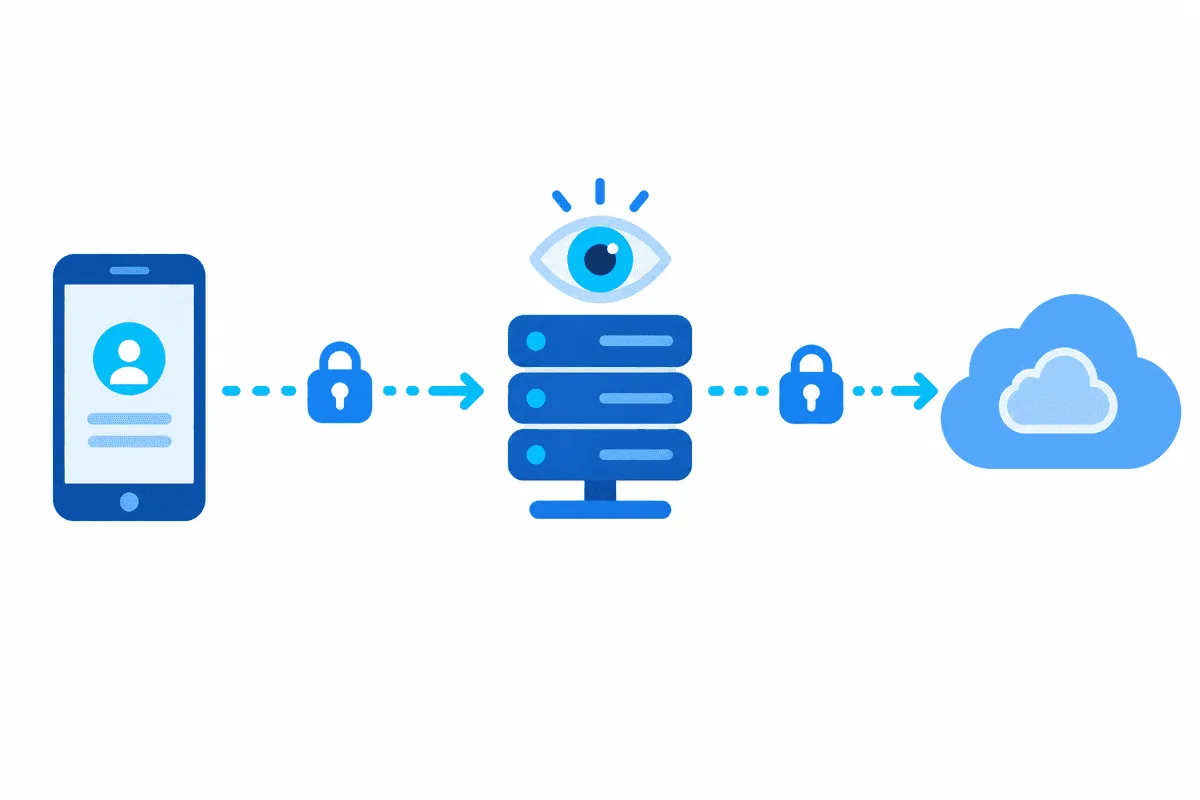
Telegram encrypts traffic between your app and its data centers with its own MTProto protocol, and that layer sits inside whatever tunnel you choose. An intermediate server only relays encrypted packets. It cannot read cloud chats, secret chats, files or contact lists, and it cannot sign in to your account.
What it does get:
- Your real IP address, and with it your approximate location and internet provider.
- Timing and volume: when you are online, how long sessions last, how much data moves.
- Control over availability: the owner can switch the server off, throttle it or let it overload with thousands of users.
For most readers this is acceptable on a one-off basis and unacceptable as a permanent setup. A journalist, an activist or anyone whose location is sensitive should treat an unknown proxy operator as a party that knows where they connect from.
Free MTProto vs Free SOCKS5
| Free MTProto link | Free SOCKS5 from a list | |
|---|---|---|
| Built for | Telegram only | Any program |
| Sponsored channel | Often, chosen by the owner | Never |
| Disguise from filters | Possible with dd or ee secrets | None, the protocol is easy to spot |
| Voice calls | Usually fail, calls need UDP | Work only if the server relays UDP |
| Typical lifetime | Days to weeks | Hours to days |
| Who is behind it | A person who registered the server | Often unknown, sometimes a compromised device |
Neither type is safe by default. MTProto links at least have an owner with a motive to keep the server running, while random SOCKS5 entries are a lottery. If you are still deciding between the two protocols on their merits, our SOCKS5 vs MTProto comparison goes deeper into speed and call support.
Risks That Matter in Practice
Sponsored Channels and Scam Promotion
An MTProto server registered with Telegram's official proxy bot can attach a channel that appears pinned at the top of your chat list while the proxy is active. Most sponsors are harmless news or meme channels, but some promote betting, crypto "signals", fake giveaways or phishing pages. The pinned spot lends them credibility they have not earned.
Fake Apps and Lookalike Clients
Search for "free Telegram proxy" in an app store and you will meet utilities promising one-tap access. Some are honest wrappers around public lists. Others ask for VPN permission over the whole phone, show aggressive ads or ship modified Telegram clients. Only the official app and well-known open-source forks published by their authors deserve your session.
Phishing Links Disguised as Proxies
A real proxy link never asks for your phone number, login code or cloud password. If tapping a "proxy" opens a web page or a bot that wants those details, it is an account takeover attempt, not a connection helper.
Instability
Hundreds of strangers share one free server, so speed collapses in the evening, media stops loading and the link dies when the server is blocked or the owner rotates the secret. You end up hunting for a new address every few days, which is exactly when people grab the first link they see. The general trade-offs of free proxies apply here in full.
How to Check a Telegram Proxy Before You Rely on It
Run through this list with any free link, and repeat the last two points from time to time.
- Check where the link came from. A channel with a long history and real discussion is better than a fresh account in your private messages. Never use proxies sent by strangers who also ask for anything else.
- Read the link before tapping. It should start with
tg://proxyorhttps://t.me/proxyand contain only server, port and secret. Anything else is not a proxy. - Look at the status in Telegram. In the proxy list the app shows whether the server is available and the ping in milliseconds. A server that flips between online and offline will not improve.
- Watch for a sponsor. If a channel appears at the top of your chats, open it and decide whether you are fine seeing it daily. Disconnecting the proxy removes it.
- Keep a backup. Store two or three links in the app's proxy list, so one dead server does not cut you off and you are not tempted by the first random link you find.
- Turn the proxy off when it is not needed. On a network where Telegram works directly, every relay is just an extra observer.
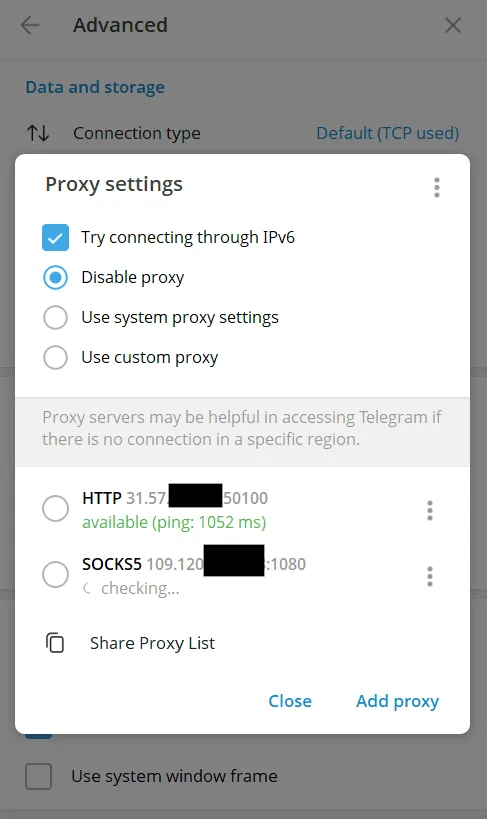
For manual entry of a server on desktop, Android and iPhone, follow our step-by-step guide to setting up a proxy in Telegram.

Safer Alternatives to Free Proxies
A Private SOCKS5 Proxy
A paid SOCKS5 server is issued to you alone or to a small pool of customers, protected by a login and password, and supported by someone who answers when it breaks. Telegram accepts SOCKS5 with authentication natively on every platform, and the same SOCKS5 proxy can also serve your browser or other apps. There is no sponsored channel, and the provider has a contract and reputation at stake instead of an anonymous channel.
Your Own MTProto Server
If you are comfortable with a Linux server, you can rent a small virtual machine and run an MTProto proxy on it yourself. You control the secret, decide who receives the link and can register it without a sponsor. The costs are admin time and the need to replace the server's IP if it ever gets blocked.
A Ready Option for the Messenger
When you just want a working connection without comparing protocols, our Telegram proxies page lists the formats that suit the app and how to connect them.
When a Proxy Is the Wrong Tool
If your goal is to encrypt every app on the device, not only the messenger, a reputable VPN is the more fitting choice. A proxy in Telegram affects Telegram and nothing else. Also keep local law in mind: in some countries the use of circumvention tools is regulated, and that is worth knowing before you set anything up.
Comparing the Options
| Option | Cost | Who controls it | Sponsor channel | Stability |
|---|---|---|---|---|
| Free MTProto link | Free | Anonymous owner | Often | Low |
| Free SOCKS5 from a list | Free | Often unknown | No | Very low |
| Private SOCKS5 from a provider | Paid | Provider under contract | No | High |
| Own MTProto server | Server rent plus your time | You | Optional | Depends on you |

Free Telegram Proxy FAQ
Are free proxies for Telegram safe?
They are safe for message content because Telegram encrypts it on top of any proxy, but the owner learns your IP address and connection times and can show you a sponsored channel. Use them briefly and only from sources you have reason to trust.
Can a proxy owner read my Telegram messages?
No. The server relays packets already encrypted by Telegram and cannot decrypt chats, files or login codes. It can only see that you connected, from which IP address and how much data moved.
Why did a strange channel appear at the top of my chat list?
That is the sponsored channel of the MTProto proxy you are using. It disappears as soon as you switch to another proxy or disconnect from this one.
How do I know a Telegram proxy is still working?
Open the proxy list in Telegram settings: the app marks each server as available or unavailable and shows its ping. A link that keeps failing should be replaced rather than retried.
Is a paid proxy better than a free MTProto link?
For daily use, usually yes: a private SOCKS5 server has a known operator, no promoted channel and support when something breaks. A free link is fine as a temporary backup.
Do voice calls work through a free proxy?
Often they do not, because Telegram calls rely on UDP, which MTProto proxies and many SOCKS5 servers do not relay. Text and media usually work even when calls fail.